Spark Plugin Review: Is It Worth Paying For?
Spark Plugin is worth evaluating for repeated design tasks on a compatible Squarespace site.
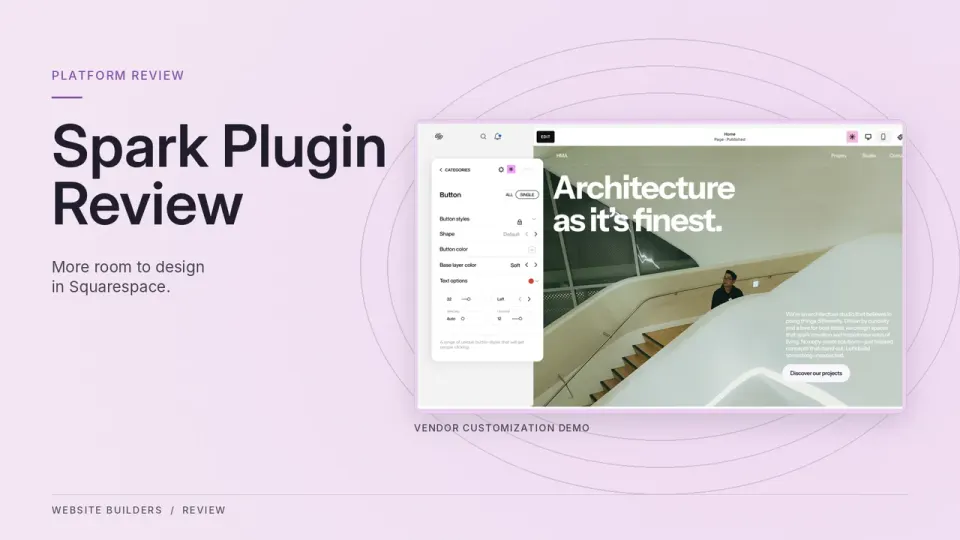
Editorial composite · Vendor reference: Source
Spark Plugin is worth evaluating for repeated design tasks on a compatible Squarespace site. I would not subscribe until a specific feature solves a real problem and the recurring cost and cancellation behavior are acceptable.
Spark Plugin is worth evaluating for repeated design tasks on a compatible Squarespace site. I would not subscribe until a specific feature solves a real problem and the recurring cost and cancellation behavior are acceptable.
Name the missing visual capability.
Check 7.1, code injection and feature tier.
Compare renewal, recovery and support.
Trial one noncritical page; keep a native fallback.
A design toolkit, not a new website builder
When I work on a website, I like to know which layer owns a visual change. A theme setting is usually easier to maintain than five unrelated CSS overrides. Spark Plugin takes a different approach to Squarespace design: it supplies a library of configurable enhancements on top of the existing website.
That makes it interesting for owners who do not want to maintain their own snippets. It does not replace Squarespace hosting, the content editor or the underlying commerce system. I would assess it against the specific parts of a site that are awkward to customize natively.
A worked evaluation: a three-offer service page
Consider a hypothetical studio that sells a basic audit, a design package and a larger implementation project. The first version should use regular page content: three headings, clear scope, a price basis and an inquiry link. If those cards are already readable, there may be no reason to add a dependency.
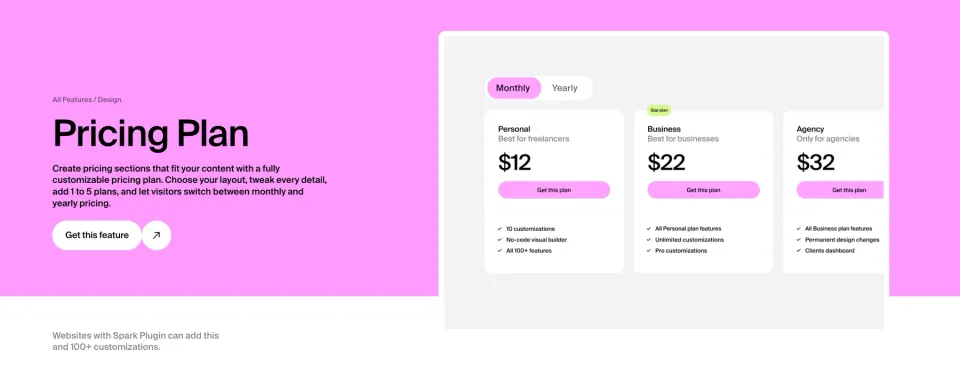
Vendor demonstration · 2026-11-26 · Source / documentation
The studio might still want a better pricing layout. Spark’s catalog includes a dedicated pricing-section feature, marked Pro. I would check the Business or relevant agency entitlement before planning around it. Compare the original and revised pages with identical copy. Test the most complicated option on a narrow screen, make sure the price period is unambiguous, and check what happens if the add-on is disabled.
| Question | Evidence to collect |
|---|---|
| Does it solve the problem? | A visitor can compare the three offers and find the relevant action. |
| Can the owner edit it? | The owner can change a price and an offer description. |
| Does it remain usable? | The content can be reached with touch, keyboard and appropriate motion settings. |
| Can we remove it? | The original offer information survives or can be restored without guessing. |
I would not interpret a nicer visual presentation as proof of higher sales. That would require a real experiment with adequate traffic and a defined success metric.
What I would buy it to solve
I would evaluate Spark against a page that already works, then look for one missing design capability. For example, a portfolio might need an interactive comparison of two photographs. Spark documents a before-and-after slider; the obvious alternative is two labeled images side by side. If the static version communicates the difference just as well, it has the advantage of being easy to maintain. If comparison is genuinely important, a slider may be worth testing. I would preserve descriptive labels and provide a readable alternative to dragging the control.
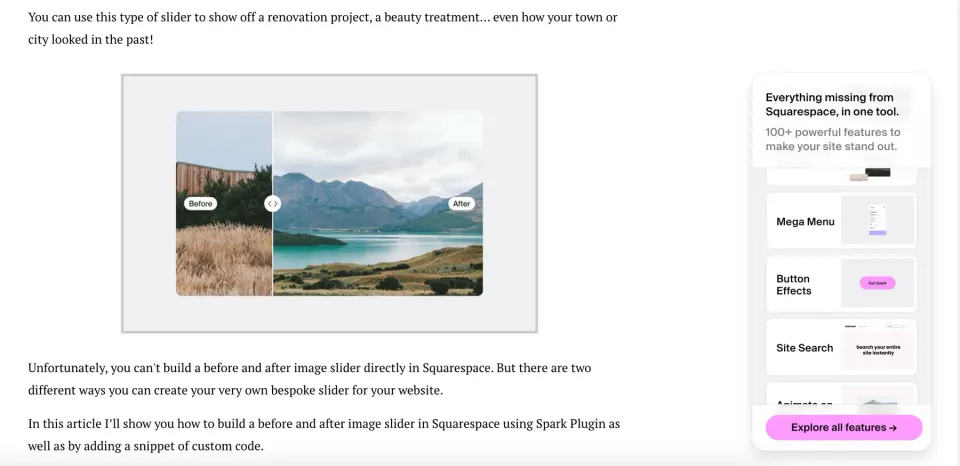
Vendor demonstration · 2026-11-26 · Source / documentation
For a multi-service business, the issue might be a growing navigation rather than imagery. Spark lists a mega menu among its advanced options. I would first group pages into a simple information architecture, then see whether the extra menu treatment actually helps a visitor find a service. A feature cannot rescue labels that make no sense.
| Design job | Native starting point | Spark candidate | Acceptance criterion |
|---|---|---|---|
| Clarify the main action | Consistent button styles and placement | Button or header customization | The contact action remains easy to reach on mobile |
| Compare visual work | Two labeled images | Before-and-after slider | A visitor can understand both images without precise dragging |
| Compare service tiers | Three plain content blocks | Pricing section | Scope, billing period and contact actions are readable |
| Organize many pages | Short navigation and clear groups | Mega menu | Visitors can open, navigate and close it using keyboard and touch |
The vendor feature catalog is useful for confirming which options exist. I would treat every row as a candidate experiment, not a verified outcome.
A trial checklist I would use before subscribing
The vendor advertises a trial. Before signing up, I would confirm the current duration, account requirements and cancellation conditions on its website. I would also check that the Squarespace site is eligible for code injection and document any existing custom code. A blank trial site without real content is a poor proxy for a busy client website.
- Pick one non-critical page and save its baseline appearance at desktop and phone widths.
- Identify a single feature in the official catalog, check its tier and follow the current setup instructions.
- Keep the original content and change only the presentation. Check a logged-out browser rather than relying on the editing view.
- Test keyboard focus, reduced-motion preferences, touch and the site’s primary inquiry or purchase path.
- Disable the enhancement and confirm the original page remains usable. Record exactly what must be restored if the subscription is stopped.
If the trial exposes a conflict with an existing customization, I would send the vendor a minimal reproduction rather than add another CSS workaround. For a client, I would also ask who receives support notices and who has permission to change settings.
The problem I would put in front of Spark Plugin
A tool that adds design options to a managed platform is attractive for the same reason I have used plugins in WordPress projects: sometimes a small extension is a reasonable alternative to maintaining custom work. The trouble begins when every request becomes another dependency. My own WordPress work has made me sensitive to the cost of a site that nobody can confidently modify. That experience is relevant to how I evaluate Spark, but it is not evidence that Spark has the same implementation or failure modes as a WordPress plugin.
Imagine an independent photographer who sells two packages and frequently updates a gallery. The owner wants to preserve a consistent image treatment, make the two packages easier to compare and occasionally change the main call to action. I would start with native typography, spacing and a pair of clear content blocks. If one visual requirement is still missing, Spark offers a catalog of candidates. The purchase decision hinges on that gap, not how many effects the catalog advertises.
There is a second kind of customer: a designer creating a series of client sites. Here repeatability and handoff are more important than a single page’s appearance. A customization that can be edited consistently may save time, but only if the client knows how the change is maintained and who pays for it. I would test both scenarios separately rather than claim that an agency always needs the most expensive plan.
Compatibility is a purchase gate, not a footnote
Before I even compare Spark’s tiers, I would inspect the actual Squarespace site. Confirm that it is version 7.1 and supports code injection on its current plan. The Squarespace custom code documentation identifies eligible current and legacy plans. Spark’s own requirements and the account’s actual permissions must both be satisfied. Buying a Spark subscription cannot change the underlying website’s plan limitations.
If an upgrade to a compatible site plan is needed, compare the incremental website cost as well as the Spark renewal. Suppose an otherwise suitable site needs an additional $8 per month of website-plan features merely to install an add-on. That hypothetical $96 per year belongs in the plugin decision. If the upgraded site plan already serves other business requirements, the accounting changes; the add-on is no longer the only reason for the upgrade.
Compatibility also includes the other scripts and styles already present on a site. The vendor describes general third-party compatibility but that is not a universal guarantee. I would inventory existing custom code, avoid duplicate installation snippets and test on a separate or noncritical site first. If a problem appears, reproduce it with one enhancement enabled, capture the browser and page details, and contact support. Piling more custom styles on top of a conflict makes diagnosis harder.
The time-saving claim needs a test
I would compare three approaches to the same design request. First, see how far native controls can go. Second, ask a developer to estimate a narrowly scoped custom CSS implementation, including documentation and a future check. Third, trial the corresponding Spark feature if it exists and is included in the tier. The test is successful only if the implementations solve the same problem.
A useful measurement is maintenance time rather than a stopwatch for initial installation. Can the owner change an image without breaking the treatment? Can a teammate remove the feature? Are instructions clear enough for someone who was not there when it was configured? On a client site those questions can be worth more than the first few minutes saved.
For example, suppose a designer charges $60 an hour, and a specific change would take ninety minutes to implement plus thirty minutes to review at the next redesign. The illustrative labor budget is $120. Compare that with the actual annual renewal, possible site-plan upgrade and the time still required to install, test and document Spark. If the website needs several similar treatments the comparison changes. If this is a one-off style adjustment, a subscription may cost more over two or three years. Neither outcome is guaranteed by the vendor’s pricing page.
What I would check when a subscription ends
A customization can be easy to add and still difficult to hand over. I would tell a client about the dependency before the client accepts the design. Who owns the Spark account? Is the underlying Squarespace subscription controlled by the business? Which enhancements stop being shown if the subscription ends? What remains under the applicable agency terms? Those are contractual and operational questions, not styling questions.
Keep a register of site-wide code, the features in use and where they are applied. Record the native content beneath each enhanced section, so that removing the integration does not remove the business information. For a client, write a one-page ownership note stating renewal dates, support contact and the approved method of reverting a change. Confirm any promised persistence against the current vendor terms, particularly the qualifying agency subscription period. Do not promise a permanent result based on a pricing headline.
When I would skip the product
I would not buy it for a site whose only issue is a poor heading, an oversized photograph or unclear copy. Those are problems the owner can often solve without another service. I would also avoid placing optional visual effects in a checkout or contact flow until the core path has been checked. A page that cannot be used after disabling a visual enhancement is too tightly dependent on the enhancement for my taste.
A developer who already maintains a handful of stable scoped CSS rules may be better served by improving documentation for those rules. Conversely, an owner who cannot maintain code and has several specific supported design needs has a reason to try a visual toolkit. My preference is to select the least complicated approach that the person responsible for the site can actually maintain.
What would make me comfortable recommending it to a client
The following is my proposed evaluation record. It is deliberately not a star rating: I have not completed these hands-on tests. Each row should have a written result and a link to a private test record before a client makes a long-term decision.
| Area | Pass condition |
|---|---|
| Eligibility | The intended site and account support the documented installation |
| Feature fit | A named customization improves a real page problem |
| Editing | The owner can update the underlying content without breaking the page |
| Accessibility | Essential information and controls work without precise dragging or motion |
| Recovery | Removing the enhancement restores a usable native version |
| Cost | The actual renewal and any plan upgrade fit the annual budget |
| Handoff | The owner knows who pays, who supports and what happens if billing ends |
For official demonstrations, use the how-it-works page and feature catalog. Those are vendor demonstrations, not my own screenshots. I would use them to select a test, then make my own record from an authorized trial before calling the evaluation hands-on.
My verdict
I’d shortlist Spark Plugin if several design requirements are difficult to meet using native tools and the owner needs to edit those enhancements without writing code. For one small styling fix, I would try native settings or a scoped CSS rule first. Use a non-critical page for the trial and document how to remove the installation. This is an unscored research review, not a claim of firsthand installation or performance testing.
For current compatibility, feature details and trial options, check the product website using the link below.
If you are working on a Squarespace site and have a specific design gap, I would put Spark Plugin on your shortlist. Start with its official demonstrations to see whether the customization you need is available before committing to a subscription.
Referral link — commission attribution is not confirmed. Explore Spark Plugin on its official website ↗
If you decide to try Spark Plugin, check whether the code SPARK20 still gives you 10% off at checkout.