Official references: For baseline WordPress concepts, cross-check tool decisions with the WordPress Plugin Handbook and Theme Handbook.
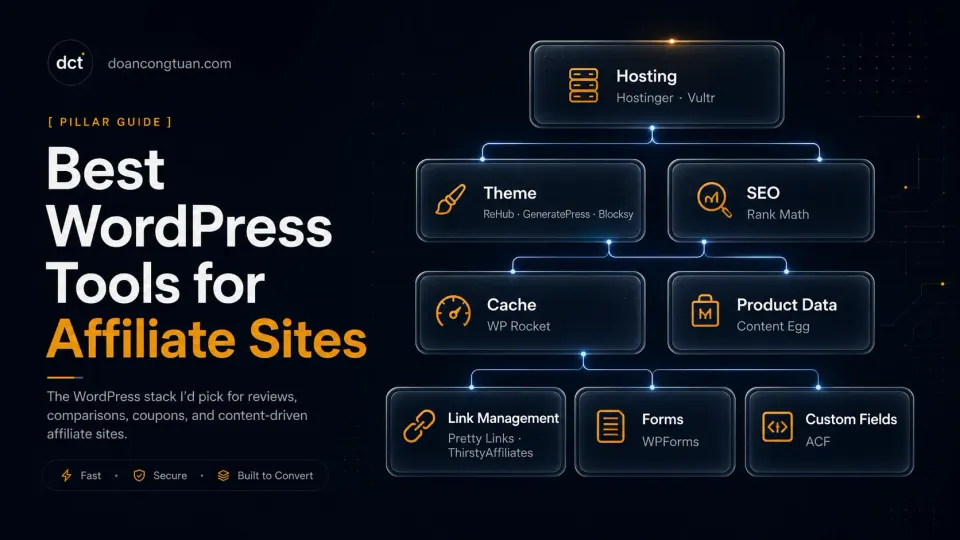
Most articles about WordPress affiliate tools are written by people who have not built a real affiliate site. They list twenty plugins, assign scores, and recommend everything equally. Then they mention WP Rocket and ReHub in the same sentence as Contact Form 7 as if they serve the same purpose.
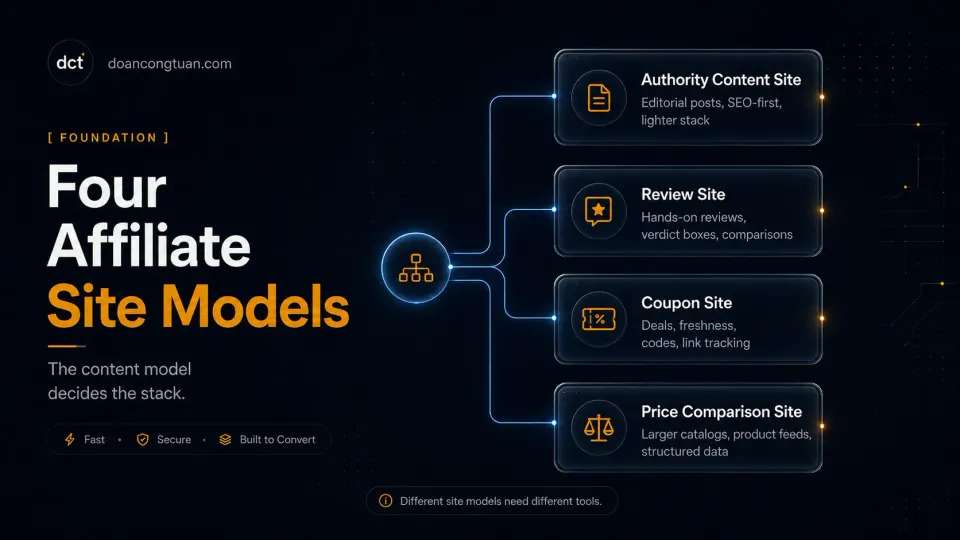
An affiliate site is not a general WordPress site that happens to have some affiliate links. It has a content model — review site, coupon site, comparison site, authority blog, or deal aggregator — and that content model determines which tools you actually need. Getting this wrong costs you time rebuilding later.
I have built enough of these to know what the stack looks like in practice.
What an Affiliate WordPress Site Actually Needs
Before picking tools, decide which kind of affiliate site you are building:
Product comparison and price tracking sites need comparison tables, live pricing, deal blocks, structured data for product reviews, and some form of automated product data. ReHub and Content Egg are designed for exactly this. Everything else is secondary.
If WooCommerce becomes the product layer for an affiliate catalog, keep the WooCommerce documentation nearby because product data, taxonomies, and catalog behavior start to matter more than normal blog-post publishing.
Authority and content sites need a fast, clean base, strong SEO foundations, good schema for articles and reviews, and a caching layer that does not fight with the theme. GeneratePress or Blocksy with Rank Math and WP Rocket covers this well without the overhead of a purpose-built affiliate theme.
For cache-related decisions, the WordPress cache handbook and LiteSpeed Cache for WordPress docs are better references than random plugin comparison posts.
Coupon sites sit between the two. A coupon-specific theme (ReHub covers this too) or a clean theme with ACF Pro fields for coupon data and expiry dates works. Content Egg can pull deals and coupons automatically from supported networks.
The tools below are organized by role, not by a ranking. Pick what the content model actually requires.
Best Theme for Affiliate Sites
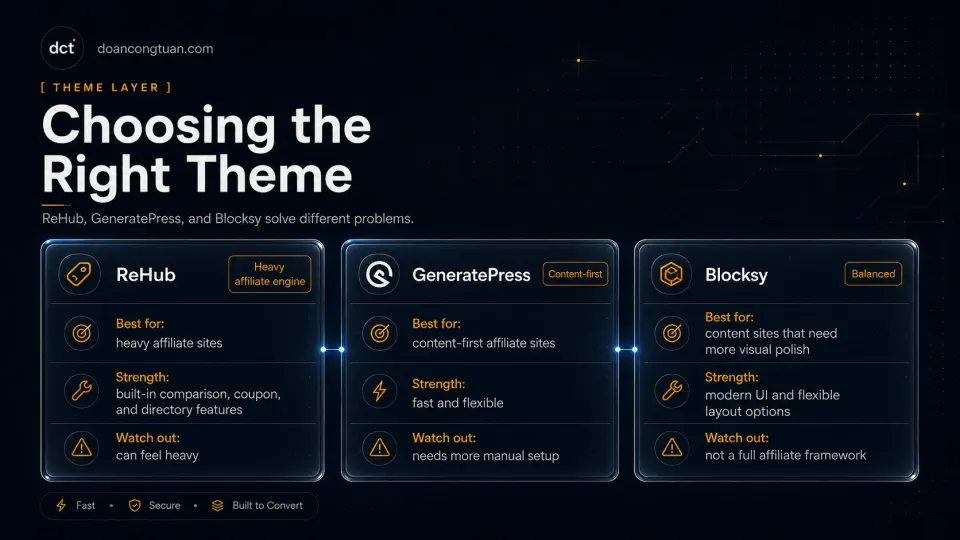
The theme is the most consequential decision because it shapes the content model for everything that follows. Switching themes later is painful.
ReHub — for serious comparison and product sites
ReHub is what I use on affiliate and comparison-focused sites. It is not a general WordPress theme that happens to have affiliate features. It is built specifically for: product review layouts, comparison tables, deal blocks, coupon sections, price history, rating formats, and Content Egg native integration.
The trade-off is complexity. ReHub has more configuration than any theme you have used before. The options panel is dense, the shortcode system is extensive, and the demo import is a starting point, not a finished site. Setup investment is real. For a coupon site, product comparison site, or review site with structured product data, that investment pays off because the features are built in rather than assembled from separate plugins.
GeneratePress — for lightweight content and authority sites
GeneratePress is the theme most recommended by developers who prioritize performance. It is a minimal base theme with a modular Premium add-on system — activate only what you need. No bloat by default. The code is clean, accessible, and well-documented.
For an affiliate content site — an authority blog, a product review site without complex comparison tables, or a niche content site — GeneratePress gives you a fast foundation and gets out of the way. The trade-off is that it requires meaningful customization to produce distinctive visual results. The blank canvas is an advantage for developers. It can feel limiting if you want template-driven design without extra work.
GeneratePress pricing has changed over time, so I would not treat old lifetime-plan references as current buying advice. Check the official GeneratePress pricing page before purchasing, especially if you are comparing it against Astra, Blocksy, Kadence, or a more affiliate-specific theme like ReHub.
Blocksy — for flexible modern WordPress sites
Blocksy is what I have used in Amazon affiliate niche site workflows as a lighter alternative to ReHub. It is built for Gutenberg and Full Site Editing in a way that most older affiliate themes are not. The free core theme is legitimately capable without the Pro Companion plugin. Dynamic data blocks connect directly to ACF and Meta Box fields, which matters if your content model uses custom field groups.
For an affiliate site built on the modern WordPress block editor, Blocksy is a natural fit. For someone who wants the deep affiliate-specific features of ReHub out of the box, Blocksy requires more plugin assembly to reach the same point.
The community is smaller than Astra or GeneratePress, which means fewer third-party tutorials when you hit edge cases.
Best SEO Plugin
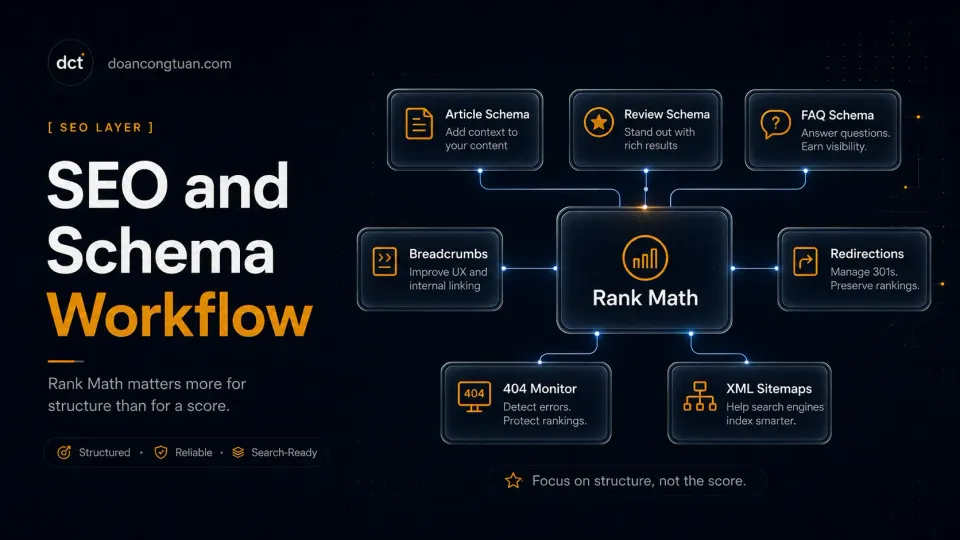
Rank Math. It is the SEO plugin I would choose for most affiliate sites in my workflow.
Rank Math’s free tier is generous for affiliate workflows, especially around schema, multiple focus keywords, and editor checklists. Google Search Console data can show inside the WordPress workflow, and the interface feels more practical to me than Yoast for affiliate content. Still, I would choose based on publishing workflow rather than treating any plugin score as Google’s opinion.
For affiliate sites specifically, schema markup matters. Review schema helps rich results appear for product reviews. FAQ schema surfaces FAQ answers in search. Product schema communicates product information to search engines. Getting all of this without a paid upgrade makes the free tier genuinely useful.
You can read the full breakdown on the Rank Math tool profile or the Rank Math review.
Best Caching and Performance Plugin
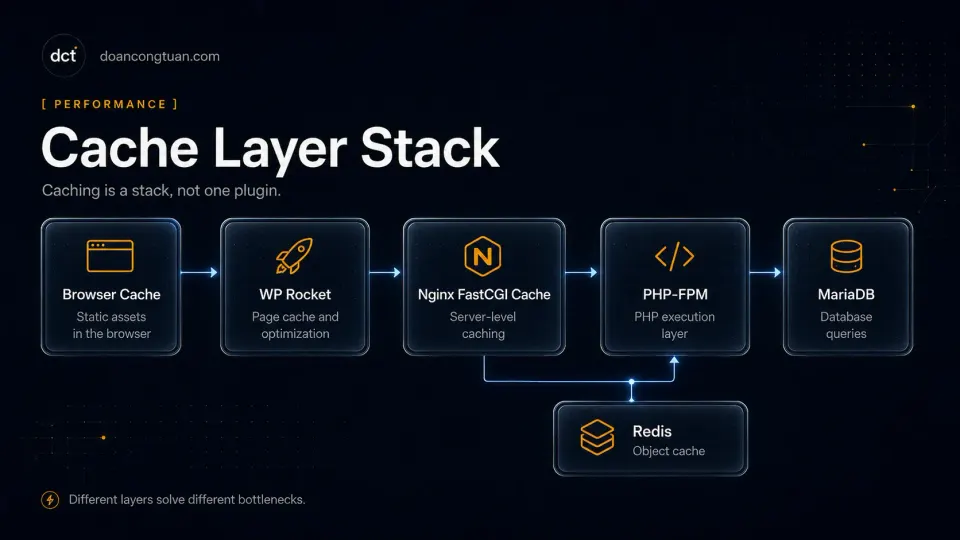
WP Rocket for most affiliate WordPress sites, particularly on self-managed VPS or standard shared hosting without managed caching.
Affiliate sites accumulate page weight: heavy themes, comparison table scripts, affiliate product blocks, review widgets, and multiple plugin assets. WP Rocket’s page caching reduces PHP execution on repeat visits. Lazy loading reduces initial page weight. Remove Unused CSS addresses render-blocking styles that drag Lighthouse scores down. These three features alone handle the main causes of slow affiliate sites.
On a self-managed VPS where no hosting-level caching is pre-configured, WP Rocket provides the caching layer. On hosting with LiteSpeed (Hostinger), the LiteSpeed Cache plugin is a free alternative worth evaluating first.
One practical note from running WP Rocket alongside Nginx FastCGI cache: WP Rocket generates static HTML in wp-content/cache/. On a small VPS, this fills disk space faster than expected. Check it periodically with du -sh /var/www/*/wp-content/cache/.
Best Product and Offer Content Tools
Content Egg — for automated price comparison
Content Egg is the plugin that pulls live product data from Amazon, eBay, and 30+ other affiliate networks into WordPress automatically. Prices update without editorial intervention. Content Egg feeds into ReHub’s comparison tables and product boxes natively.
The setup investment is real: API credentials from each network, module configuration, testing data pulls, understanding which modules are available in your market. Amazon’s PA API requires qualifying sales before full access is granted. This is not a plugin you install in twenty minutes.
For an affiliate site doing serious product comparison — comparing prices across Amazon, eBay, and other sources, keeping pricing current automatically — Content Egg is the right tool. For a standard review site that mentions products without live pricing, it adds complexity without proportional value.

ACF Pro — for structured content without custom development
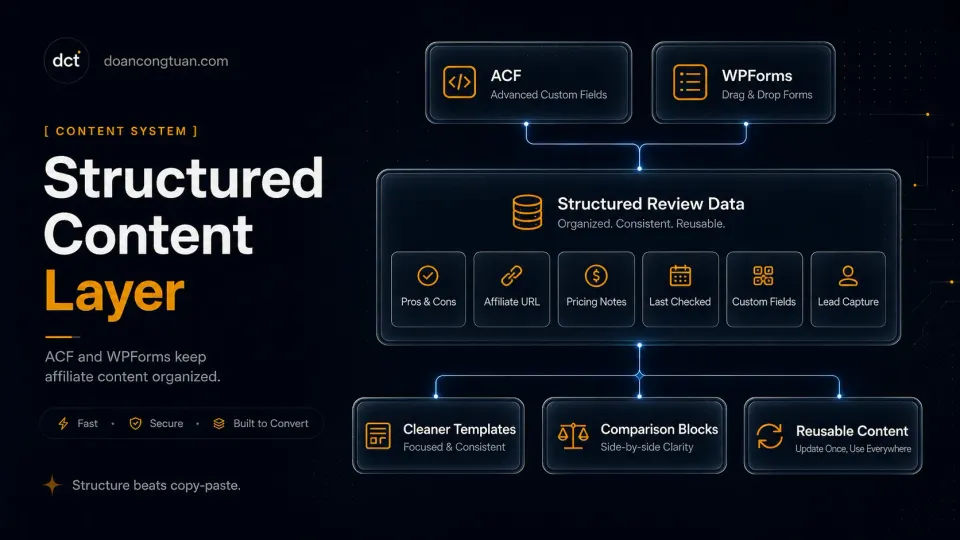
ACF Pro (Advanced Custom Fields) is on almost every WordPress project I build that has structured content requirements. It lets you define custom field groups for posts, pages, users, and options pages — without custom plugin development.
For affiliate sites, the practical applications are: custom review fields (rating, pros, cons, verdict), product metadata (product name, price, affiliate link, last updated), options pages for site-wide affiliate settings, and Gutenberg blocks backed by ACF field groups.
The Pro version ($49/yr, unlimited sites) adds Repeater fields for repeating content sections, Flexible Content for modular layouts, and ACF Blocks. For most affiliate site needs, these features are worth the subscription. The free core plugin covers basic field types if the budget is tight.
One thing to note: ACF became part of WP Engine through the Delicious Brains acquisition in 2022. The plugin continues to be actively developed, but developers who follow plugin ownership changes are monitoring it.
Best Form and Lead Tools
WPForms for most affiliate sites that need contact forms, lead capture, or simple payment collection.
The free Lite version handles contact forms with spam protection and email notifications. For affiliate sites, this is often enough — a simple contact page and maybe a newsletter signup. The Pro version adds conditional logic, file uploads, payment processing (Stripe, PayPal), and CRM integrations.
One configuration note worth mentioning: if you notice WPForms assets loading on pages without forms, check the asset-loading settings or use an asset cleanup plugin. Do not assume every form plugin setup is automatically performance-friendly on a performance-sensitive affiliate site.
Best Affiliate Link Management Tool
Pretty Links — for clean URLs and click tracking
Affiliate link management is one of those tools that most affiliate site owners add after their first 50 posts, when they realize they have raw Amazon and affiliate URLs scattered across hundreds of posts with no way to update them cleanly.
Pretty Links solves this with a single concept: replace every raw affiliate URL with a clean redirect on your own domain. Instead of https://amazon.com/dp/B08XYZ123/?tag=mysite-20 scattered in your content, every link goes through /go/product-name. When the affiliate URL changes — and it will — you update one redirect, and every post that uses it updates automatically.
The practical features for an affiliate site: custom slug redirect paths, click tracking per link, auto-keyword linking (Pretty Links can find keywords in your content and auto-link them to the correct redirect), and basic analytics on which links get clicked.
The free version covers basic redirects and click counts. Pro adds auto-keyword linking, geo-targeting, and advanced redirect types. For most affiliate sites, the free version handles the core use case.
Good fit: Any WordPress affiliate site with more than a handful of affiliate links. The value compounds as the site grows — clean redirect slugs, centralized URL management, and click data without a separate analytics service.
Not a good fit: Sites using Astro or other static frameworks. Pretty Links is a WordPress plugin and only works within WordPress.
Best Hosting Pairings for Affiliate Sites
Hosting choice depends on the affiliate site’s technical complexity and the owner’s comfort level with server management.
Hostinger (shared hosting) is the right starting point for most beginner affiliate sites. LiteSpeed servers with LiteSpeed Cache included give above-average performance for the price tier. hPanel is cleaner than cPanel for non-technical users. Budget-friendly at promotional pricing with renewal rates that, while higher, are still competitive compared to SiteGround or Bluehost.
Vultr (self-managed VPS) is where my affiliate sites live when they need Nginx-level control, Redis, custom PHP-FPM pools, and full stack ownership. The Singapore data center covers Southeast Asia latency well. For a product-heavy affiliate site that has outgrown shared hosting, a $12-20/mo Vultr instance with a properly configured Nginx + PHP-FPM + MariaDB + Redis stack handles the load without the managed hosting price premium.
The WordPress VPS hosting guide covers the decision between these paths in detail.

Self-managed cloud VPS. Full stack control for affiliate sites that have outgrown shared hosting. Hourly billing, Southeast Asia data centers.
Get Vultr →Affiliate link — I may earn a commission at no cost to you.
My Practical Stack for a Small Affiliate Site
If I were starting a new affiliate content site today from scratch, this is what I would use:
Hosting: Hostinger shared for a new site. Move to Vultr VPS when the site has enough content and traffic to justify server management work.
Theme: GeneratePress or Blocksy — start lightweight. Move to ReHub only if the content model explicitly needs comparison tables, deal blocks, or Content Egg integration.
SEO: Rank Math free. Upgrade to Pro when the site justifies rank tracking or Content AI features.
Caching: LiteSpeed Cache on Hostinger (it’s free and tuned for LiteSpeed servers). WP Rocket when moving to Vultr or a non-LiteSpeed host.
Product data: No Content Egg until the site has real traffic and a proven need for live pricing. Manual affiliate links first.
Custom fields: ACF free tier until Repeater fields or Options Pages become necessary. Then Pro.
Forms: WPForms Lite for contact. Upgrade to Pro only when the site needs payment forms or conditional logic.
The point is not to assemble the most impressive stack on day one. The point is to match the stack to the stage the site is actually at.
What I Would Avoid
A page builder as the primary layout tool for a content-heavy affiliate site. Elementor and WPBakery produce heavier markup and add more plugin surface area than most affiliate sites need. Use them where the design genuinely requires it — landing pages, campaign pages, visual-heavy sections. Do not build every post template in a page builder.
Too many SEO and performance plugins overlapping. Rank Math plus a separate schema plugin. WP Rocket plus a separate lazy load plugin. Each overlap adds plugin conflict risk and complicates debugging. Pick one tool per function and configure it properly rather than layering multiple plugins solving the same problem.
ReHub on a site that does not need affiliate-specific features. ReHub is a powerful theme for the right use case and a heavy, complex theme for the wrong one. If the affiliate site is primarily content and review articles without comparison tables or live product data, a lighter theme is a better choice.
- Your site is a content or authority blog with affiliate links
- You write product reviews without complex comparison tables
- Performance and fast setup matter more than affiliate-specific features
- You are building a first affiliate site and want to start simple
- Your site does product price comparison across multiple networks
- You need comparison tables, deal blocks, and rating formats built in
- You want automated product data from Amazon, eBay, or similar
- You are building a coupon or dedicated product comparison site
Frequently Asked Questions
What is the best WordPress theme for affiliate sites?
Is ReHub still worth using in 2026?
Do affiliate sites need WP Rocket?
Is Rank Math better than Yoast for affiliate content?
Do I need Content Egg for an affiliate site?
What is a simple WordPress affiliate stack for beginners?
Related Pillar Guides
- Best WordPress themes for affiliate sites — choosing the content model before choosing the plugin stack.
- WordPress performance stack — how hosting, cache, theme, and database choices work together.
- WordPress VPS hosting — when affiliate sites should move beyond shared hosting.
- WordPress vs modern stack — whether WordPress is still the right base for your content business.
- Astro for WordPress developers — when a static workflow can replace part of a WordPress stack.