Rank Math Review: A Good SEO Plugin That Will Not Replace Good Content
Honest Rank Math review from a developer who uses it on affiliate and content sites. What it does well, where it gets bloated, and whether you actually need Pro.
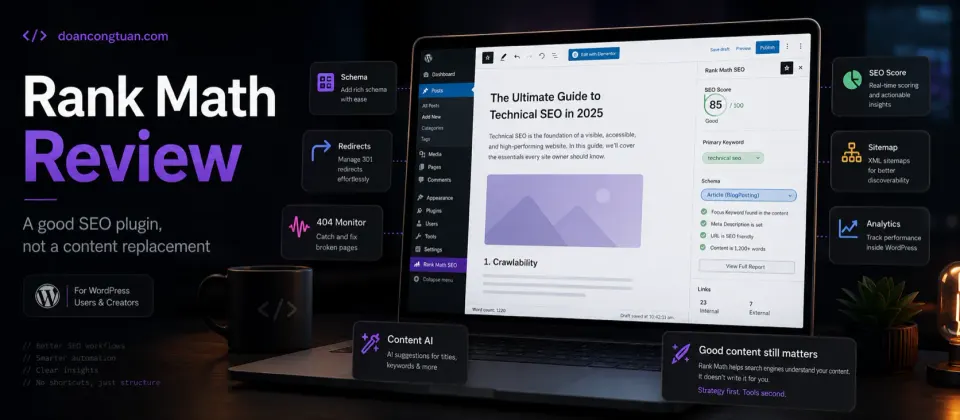
Rank Math is the SEO plugin I use on my own WordPress sites. The free version is genuinely generous. The interface can feel like a lot at first, but the features that matter day-to-day work well. The most important thing to understand going in: Rank Math helps you implement SEO correctly. It does not create SEO results on its own.
- Free tier includes redirects, 404 monitor, schema markup, and analytics integration
- Schema markup builder covers most content types including Review, Article, Product, FAQ
- Redirect manager built in — no separate plugin needed
- Import from Yoast or AIOSEO with one click
- Active development and regular updates
- Integration with Google Search Console and Analytics
- Feature density can feel overwhelming for new users
- Some settings require care — wrong schema or duplicate titles can cause issues
- Content AI and newer AI features have separate plan/usage limits that need checking before you rely on them
- Free tier keyword tracking is limited to a small number of keywords
- Score-chasing behavior — users sometimes over-optimize for Rank Math's score rather than the reader
Rank Math is one piece of a larger affiliate-site stack. I compare the broader plugin and workflow setup in my best WordPress tools for affiliate sites guide.
Quick verdict
Rank Math is a WordPress SEO plugin that helps manage metadata, schema markup, sitemaps, redirects, 404 monitoring, and on-page SEO checks inside the WordPress editor. It is useful as an SEO workflow tool, especially for content and affiliate sites, but it does not make weak content rank by itself.
The free version is strong enough for many WordPress sites. Pro makes more sense when you need rank tracking, advanced schema, WooCommerce SEO, or multi-site/client workflows.
The most important caveat: the Rank Math score is a checklist, not Google’s judgment. Use it to catch basic mistakes, not to decide whether your content is actually good.
SEO plugins occupy a strange position in WordPress. They are genuinely useful for implementing SEO correctly — metadata, schema markup, redirects, technical signals. But they are routinely oversold as something that will improve your rankings by themselves.
Rank Math is a good SEO plugin. It will not rank your site for you.
What Rank Math actually is
Rank Math is a WordPress plugin that helps you manage the technical and on-page SEO layer of your site. The core functions:
- Metadata management: Control the title tag and meta description for every post, page, and taxonomy. Set Open Graph and Twitter Card data.
- Schema markup: Add structured data (Article, Review, Product, FAQ, HowTo, and others) so search engines understand your content type.
- Redirect manager: Create 301, 302, and other redirects from inside WordPress without a separate plugin.
- 404 monitor: Log 404 errors so you can identify broken internal or external links and redirect them.
- XML sitemaps: Auto-generated, customizable.
- Analytics integration: Connect to Google Search Console and Analytics to see keyword data inside WordPress.
Most of this is available in the free version. That is the honest reason Rank Math became popular quickly — the free tier covers more practical SEO workflow than many beginners expect from a free plugin.
The Rank Math score is not Google’s score
This is the part I wish more beginners understood.
Rank Math gives you a visible SEO score because checklists are useful. They remind you to write a title, add a meta description, use headings, include internal links, and avoid obvious on-page mistakes.
But Google does not see a Rank Math score and reward the page because it says 90/100. The score is only Rank Math’s checklist for basic on-page signals. It does not measure real expertise, originality, backlinks, topical authority, search intent match, or whether the page actually helps a reader.
My rule: use the Rank Math score to catch missing basics, then stop chasing it. A clear, useful article with a lower plugin score is better than a robotic article written to turn every indicator green.
Free vs Pro — the honest breakdown
Free version covers:
- On-page SEO analysis for posts and pages
- Schema markup for most content types
- Redirect manager (301, 302, 307, 410, 451)
- 404 error monitor
- XML sitemaps
- Google Search Console and Analytics integration
- WooCommerce basic SEO (product metadata, breadcrumbs)
Pro adds:
- Advanced keyword rank tracking (more keywords, historical data)
- Content AI access/trial depending on plan, with separate feature-based monthly usage limits
- More schema types and schema variables
- Advanced WooCommerce SEO features
- Image SEO automation
- Local SEO tools
- Better analytics reporting
For a single content or affiliate site, the free version covers most of what you actually need day-to-day. The main genuine reason to upgrade to Pro is if you want keyword rank tracking inside WordPress rather than checking Search Console separately.
Pricing
Rank Math’s pricing is easiest to misunderstand because the page shows monthly equivalents, but the paid SEO plugin plans are billed annually. At the time of check, the offer page showed PRO at $5.99/mo for personal websites, Business at $19.99/mo for freelancers/agencies managing client sites, and Agency at $44.99/mo for higher-volume agency use. Those are promotional monthly equivalents before VAT/taxes, not month-to-month subscriptions.
The renewal numbers matter more than the promo headline. The same pricing page showed renewals at $8.99/mo for PRO, $27.99/mo for Business, and $64.99/mo for Agency, billed annually plus taxes. If you manage only your own sites, PRO is the plan to compare. If you manage client websites as a business, check Business or Agency instead of assuming the personal PRO license is enough.
The watch-out is the AI layer. Content AI and AI Link Genius are not the same kind of decision as metadata, redirects, and schema. Rank Math has moved Content AI toward feature-based monthly usage limits, so verify the current limits before treating it as part of your content workflow.
Who should use Rank Math
Rank Math is a good fit if you publish content regularly and want one plugin to handle the main WordPress SEO workflow.
I would use it for:
- affiliate sites that need review, product, FAQ, or article schema
- content sites that publish many posts and need consistent metadata
- WordPress sites that need redirects and 404 monitoring without another plugin
- WooCommerce sites that need product SEO and schema controls
- site owners who want more features than Yoast free without paying immediately
- developers managing multiple WordPress content sites
It fits especially well beside a broader WordPress stack: clean content structure, internal links, performance basics, and tools like WP Rocket when speed matters.
Who should avoid Rank Math
Rank Math is not the right answer for every WordPress site.
I would avoid or delay it if:
- your site already uses Yoast cleanly and you have no real reason to migrate
- you are brand new to SEO and will confuse plugin scores with real SEO strategy
- you want the lightest possible WordPress admin with fewer dashboard features
- another plugin or theme already outputs schema and you do not want to debug duplicates
- you expect the plugin to replace keyword research, content strategy, or editorial judgment
If you are building an affiliate site, think of Rank Math as one piece of the stack, not the whole system. Pair it with a sensible theme/plugin setup, good internal links, and a performance layer instead of installing more tools every time something feels missing.
Where Rank Math gets bloated
The flip side of a feature-dense plugin: the WordPress admin becomes heavier. The Rank Math menu, analytics dashboard, and post edit panels add up. On an already plugin-heavy WordPress install, this contributes to admin slowness.
The schema builder is powerful but worth being careful with. Duplicate schema (Rank Math + another plugin both adding the same type) can create conflicting structured data. Check that your setup generates clean schema before considering it done.
The feature count can also lead to misconfiguration. Advanced settings like canonical URLs, noindex rules, and breadcrumb behavior require some SEO knowledge to configure correctly. The defaults are sensible, but advanced users can get into trouble.
Rank Math vs doing SEO manually
Some WordPress developers manage SEO metadata directly in their theme or via custom fields without a dedicated SEO plugin. This is viable if you know what you are doing and want a lean setup.
The reason most developers reach for a plugin: schema markup, redirects, and sitemap generation are genuinely tedious to maintain manually at scale. Rank Math helps handle these across dozens or hundreds of posts without custom code. The plugin earns its place on any site with real content volume.
- You publish content regularly and want structured SEO workflow
- You need schema markup for articles, reviews, FAQs, or products
- You want a redirect manager built into WordPress
- You run an affiliate or content site where metadata matters
- You want more features than Yoast free without paying
- You expect the plugin to generate rankings without strong content
- Your site is already running Yoast well — migration risk for marginal gain
- You want a minimal plugin footprint above all else
- You are new to SEO and need to understand the basics before adding tooling
My Real Decision Rule
- Use Rank Math Free first if you need metadata, schema, redirects, 404 monitoring, and sitemaps.
- Upgrade to PRO only if rank tracking, advanced schema, WooCommerce SEO, or AI features will actually save time on your own sites.
- Avoid switching from Yoast only for curiosity if the current setup is stable and clean.
- Treat the SEO score as a checklist, not the goal of the article.
- Use Business or Agency instead of PRO if this is for serious client-site work.
Final verdict
Rank Math is the SEO plugin I use on my own sites and the one I would recommend to most WordPress publishers starting fresh. The free version is competitive with other plugins’ paid tiers. The schema builder, redirect manager, and 404 monitor handle real problems without requiring separate plugins.
The important framing going in: Rank Math is a tool for implementing SEO correctly. The actual work — choosing what to write, building topical authority, earning links, and publishing content that readers find valuable — is not something any plugin does for you.
Use it. Configure it. Do not spend more time on the score than on the content.
For affiliate and content sites, I would pair Rank Math with a practical stack: a theme that fits the site model, performance work through something like WP Rocket, and a clear content system. I cover that broader setup in my best WordPress tools for affiliate sites guide.
WordPress SEO plugin with schema markup, redirect manager, 404 monitor, and analytics integration in the free version. PRO adds rank tracking, advanced schema, WooCommerce SEO, and AI features depending on plan.
Get Rank Math →Affiliate link — I may earn a commission at no cost to you.
Frequently Asked Questions
Is Rank Math free version enough?
Rank Math vs Yoast — which is better?
Does Rank Math actually improve rankings?
What is Rank Math's Content AI?
Does Rank Math slow down WordPress?
How much does Rank Math Pro cost?
Disclosure: Some links on this page are affiliate links. If you make a purchase through them, I may earn a small commission at no extra cost to you. I only recommend products I've genuinely evaluated. Full disclosure →