GeneratePress Review for Developers: The Lightweight WordPress Theme Worth Knowing
A research-based look at GeneratePress for WordPress developers. What makes it stand out from heavier themes, who it suits, and what to verify before buying.
GeneratePress has a strong reputation among WordPress developers for good reason: it is lean, well-maintained, and does not get in your way. This is a research-based review. I have not shipped client projects with it personally, but the case for it is clear enough to evaluate honestly.
- Extremely lightweight: under 10kb gzipped, minimal CSS and JS
- Well-structured, developer-friendly code base
- Elements system allows custom layouts without page builders
- Compatible with all major page builders
- Good accessibility out of the box
- Active development with regular updates since 2014
- Free version is quite limited. Premium needed for most useful features
- Design is minimal. Requires real effort to make it visually distinctive
- Not as visually intuitive as Divi or Elementor-heavy themes for non-developers
- Elements system has a learning curve
GeneratePress is only one theme option. I compare it against other affiliate-site theme choices in my WordPress themes for affiliate sites guide, and place it inside the wider stack in my best WordPress tools for affiliate sites guide.
Quick verdict
GeneratePress is a lightweight WordPress base theme for developers who want a clean starting point instead of a heavy all-in-one theme. It is best understood as a foundation, not a finished affiliate system, visual builder, or client-ready design package.
I would consider GeneratePress when performance, maintainability, and clean structure matter more than built-in visual features. It makes the most sense for developers who are comfortable building the design and content structure themselves.
I would not choose it if I needed a complete affiliate theme like ReHub or a visual builder workflow like Divi. GeneratePress is strong because it stays out of the way.
On earlier affiliate projects using heavier WordPress themes, I saw the usual pattern: caching helped, image optimization helped, but the theme was still doing a lot of work nobody asked it to do. That is the kind of experience that makes a lightweight base theme interesting.
That pattern sent me looking at what developers actually used when they wanted a theme that stayed out of the way. GeneratePress kept coming up. Not in “best themes for bloggers” listicles only, but also in developer forums and practical WordPress discussions where people care about maintainability.
I have not shipped client projects with GeneratePress myself. The themes I have run in production are ReHub, WoodMart, Blocksy, Flatsome, and PremiumPress. What I can give you here is an honest evaluation based on what I know about those themes and what GeneratePress is actually positioning itself against.
In fairness: PremiumPress did the same job GeneratePress avoids: it tried to do everything, and I spent more time working around it than building with it. That taught me to appreciate minimalism.
GeneratePress is a lightweight WordPress base theme built for developers who want a clean, fast starting point without fighting the theme to get there. The free version handles basic structure. The Premium plugin unlocks the features that make it genuinely useful for professional work.
What GeneratePress is
GeneratePress is a WordPress base theme: a structural foundation. It handles document layout, header and footer, post templates, and core styling without bundling a visual editor.
This is a meaningful distinction from most popular WordPress themes, which come with predefined layouts, their own shortcodes, and custom post types that are hard to override. GeneratePress comes with almost none of that. You get a clean, fast base and add what you need.
The core theme is free. GeneratePress Premium ($59/yr) unlocks the features that make it useful for professional work. Most developers who use it seriously run the Premium version.
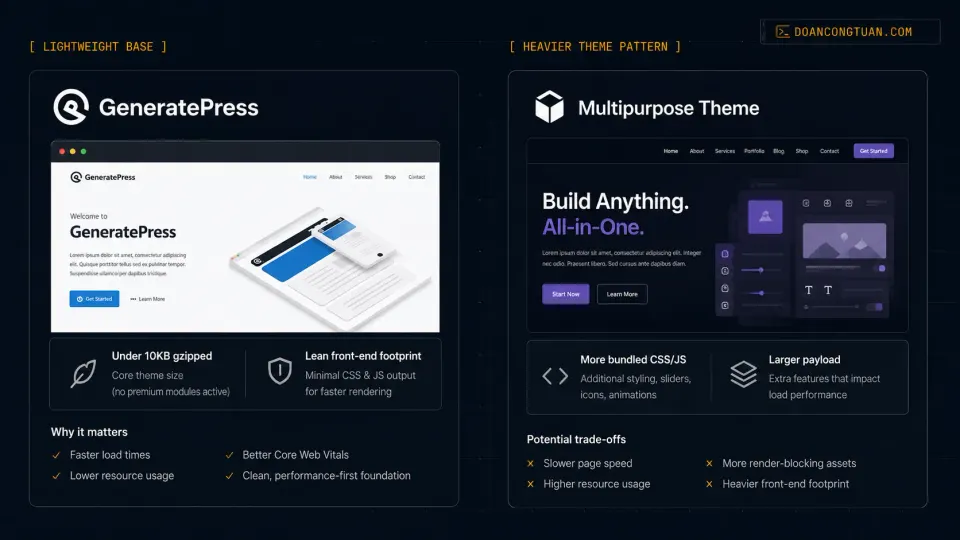
According to the official WordPress.org listing, a fresh GeneratePress install adds less than 10kb gzipped to page size. That does not automatically make every GeneratePress site fast, but it gives developers a cleaner baseline than many multipurpose themes.
Performance positioning
GeneratePress’s reputation for performance comes from what it does not do. It does not register multiple stylesheets for features you did not enable. It does not load jQuery effects for animations you did not ask for. It is lean by design.
Third-party tests often report very strong PageSpeed and Lighthouse results for clean GeneratePress installs. That is useful signal, but it should not be read as a promise for your real site. Hosting, images, plugins, ads, analytics scripts, fonts, and page builder choices can change the result quickly.
For comparison, heavier multipurpose themes such as Divi or Avada often need more optimization work because they start with more visual-builder features and frontend assets. The direction of the trade-off is real; the exact score depends on the setup.
GeneratePress and the performance stack
GeneratePress can give you a cleaner performance baseline, but it does not replace the rest of the WordPress performance stack.
A fast WordPress site still depends on hosting, caching, image optimization, plugin discipline, database health, and frontend payload. A lightweight theme helps because it starts with less baggage. It does not magically fix slow hosting, bloated plugins, heavy page builders, large images, or poor caching.
That is why I would pair a lightweight theme decision with a broader performance plan. I cover that in my WordPress performance stack guide, and I review the caching layer separately in my WP Rocket review.
Pricing
The tiers:
- Free: core theme, basic customization, no Elements system
- Premium annual ($59/yr): GP Premium as an individual product, with premium features and one year of updates/support
- GeneratePress One: bundle for GP Premium + GenerateBlocks Pro + GenerateCloud; the current page may show introductory pricing, renewals at full price, and use on up to 500 sites
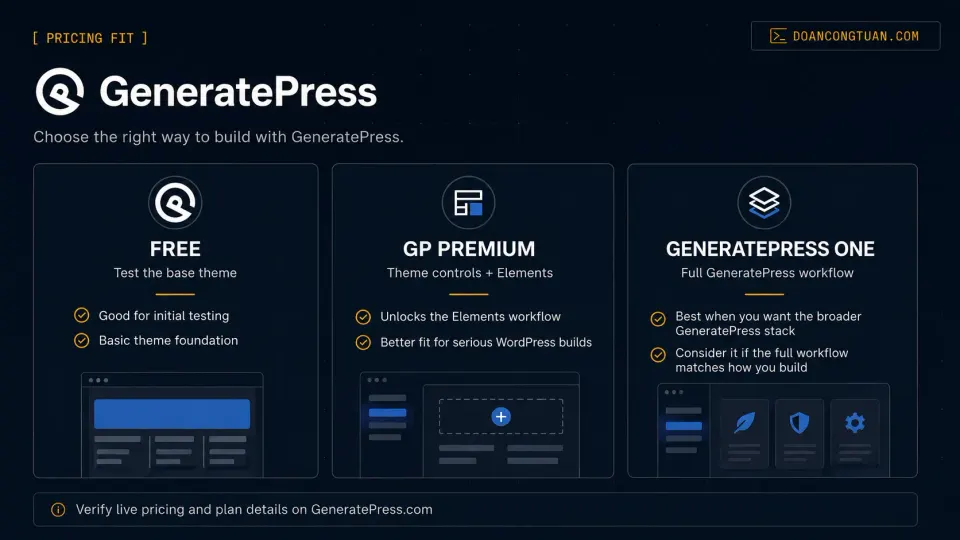
Before committing to an annual plan, test the free theme and make sure the editing workflow fits you. $59/yr for GP Premium is reasonable, but make sure you are comparing total cost over your expected usage period, not just the first year.
For developers building multiple client sites, the GeneratePress One bundle may be the better value than buying individual products separately — but only if you actually use GenerateBlocks Pro and GenerateCloud. Verify current pricing, promotional terms, renewal pricing, and client-site license rules at GeneratePress.com.
The Elements system
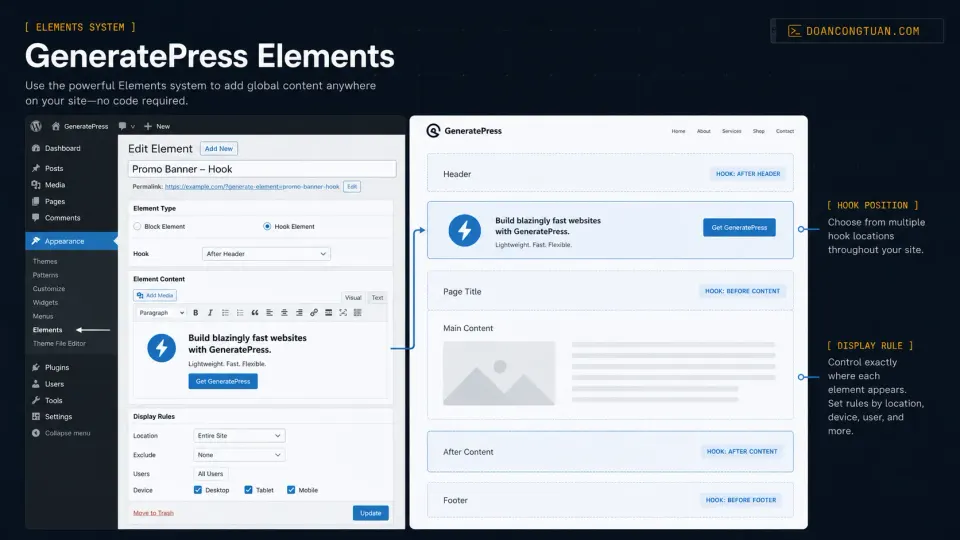
The most useful Premium feature for developers is Elements. It lets you inject custom content or layout modifications into specific positions on specific pages using WordPress hooks, without a page builder.
Common use cases reported by the community include custom headers for specific page types, affiliate blocks injected before post footers in specific categories, and different sidebar layouts for WooCommerce product pages. This is functionality that would otherwise require a child theme or a page builder.
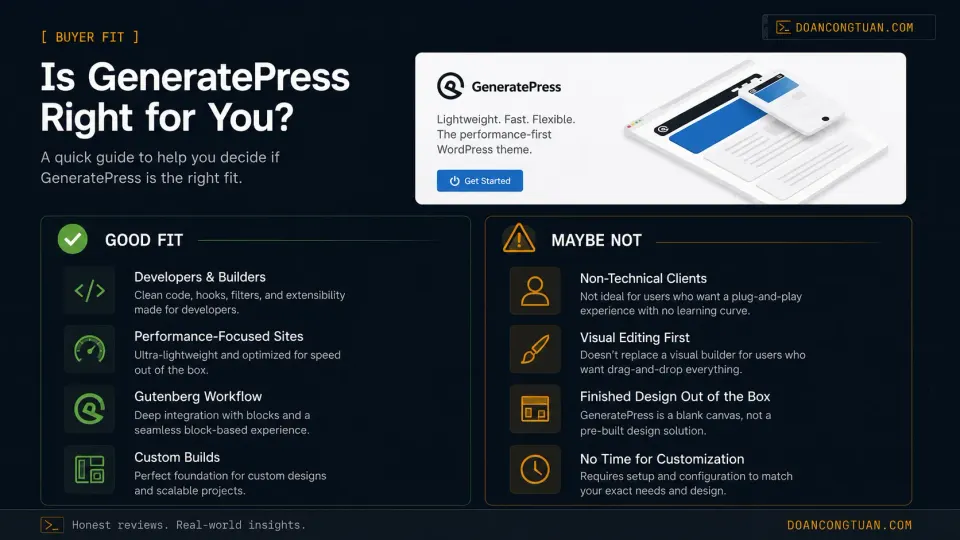
Who should use GeneratePress
Based on public positioning and developer community feedback, GeneratePress fits best when you want a lightweight, stable WordPress foundation and you are comfortable building the site around it.
I would consider GeneratePress for:
- developer-built WordPress sites
- performance-focused blogs and business sites
- affiliate sites where you want a lightweight base instead of a heavy affiliate theme
- projects using Gutenberg or GenerateBlocks
- client sites where the developer controls the layout system
- WordPress builds where long-term maintainability matters more than flashy demos
GeneratePress is strongest when the person building the site knows what they are doing. It gives you a clean base, not a finished system.
Who should avoid GeneratePress
I would avoid GeneratePress if the project needs a complete design system, visual editing workflow, or affiliate feature set out of the box.
It is probably not the right fit for:
- non-technical clients who want to design pages visually
- affiliate sites that need built-in comparison tables, coupon layouts, and product boxes
- users who expect the free version to feel complete
- projects where the theme needs to provide most of the visual design
- teams that prefer Divi, Elementor, or another visual builder workflow
For full affiliate-site features, ReHub is a better comparison. For visual-builder workflows, compare Divi and Elementor instead.
GeneratePress vs ReHub
GeneratePress and ReHub solve different WordPress problems.
GeneratePress is a lightweight base theme. You bring the content model, blocks, custom fields, comparison tables, affiliate CTAs, and layout logic yourself.
ReHub is an affiliate-focused theme. It already includes product boxes, comparison layouts, coupon features, WooCommerce-oriented structures, and deep compatibility with affiliate data plugins like Content Egg and External Importer.
My practical rule: choose GeneratePress when you want speed, clean structure, and developer control. Choose ReHub when affiliate functionality is the core of the site and you want those features built into the theme.
Neither is automatically better. The right choice depends on whether the site needs a lightweight base or a full affiliate engine.
GeneratePress vs Elegant Themes (Divi)
The main alternative at a similar price point is Elegant Themes, which includes Divi.
The honest positioning: Divi is better for non-technical clients who want to design their own pages. GeneratePress is better for developers who want to build clean, fast sites with full code control. They are not really competing for the same buyer. I cover the visual-builder side more directly in my Divi vs Elementor comparison.
A note on the official video
The GeneratePress official YouTube channel has tutorial content showing the theme and GenerateBlocks workflow. It is worth watching before buying to understand whether the editing workflow matches how you actually build.
Recommended video: Using GeneratePress and GenerateBlocks to Build WordPress Websites, published September 2024, shows the current GP + GenerateBlocks workflow in practice.
My Real Decision Rule
- Choose GeneratePress Premium if you want a clean base theme and will build the design yourself.
- Stay on the free version first if you only need to test the workflow and baseline performance.
- Consider GeneratePress One only if GenerateBlocks Pro and GenerateCloud are part of your actual build process.
- Avoid it if the client expects a full visual builder experience like Divi or Elementor from day one.
- Do not buy it only for a benchmark score; buy it because the workflow fits how you build WordPress sites.
Verdict
GeneratePress has earned its reputation as a developer-friendly base theme. The performance positioning is real, but the important point is not only benchmark scores. The real value is starting with a theme that does not fight your layout, caching, and long-term maintenance decisions.
This review is not from personal production use. If you are evaluating it seriously, run it on a test project first. The free version is enough to assess whether the editing workflow suits how you build.
The $59/yr GP Premium plan covers the theme product. GeneratePress One covers the broader GeneratePress stack, and its promotional/renewal pricing can change. Check GeneratePress.com for current pricing before purchasing.
Lightweight WordPress base theme for developers who want clean code and good performance. Free to try. Premium unlocks the Elements system and full controls.
Get GeneratePress →Affiliate link — I may earn a commission at no cost to you.
Frequently Asked Questions
Is GeneratePress good for beginners?
Does GeneratePress work with Elementor?
What is the difference between GeneratePress free and Premium?
Does GeneratePress still offer a lifetime license?
How does GeneratePress compare to Divi?
Disclosure: Some links on this page are affiliate links. If you make a purchase through them, I may earn a small commission at no extra cost to you. I only recommend products I've genuinely evaluated. Full disclosure →