Vultr Review: Why I Use It for My WordPress and Static Sites
An honest review of Vultr VPS from someone who runs their main projects on it. What works, what does not, and who should actually use it.
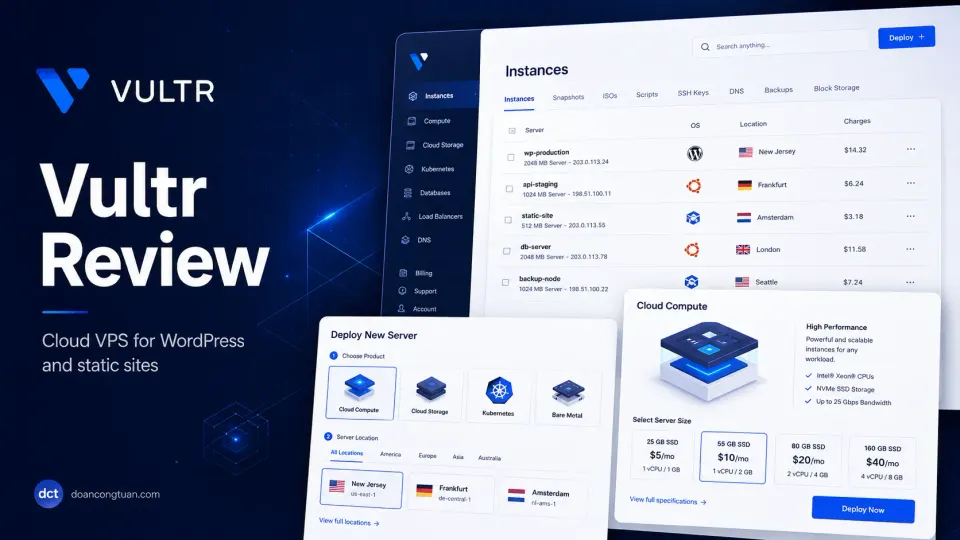
Vultr is the VPS I actually run. doancongtuan.com and my other main projects live on a Vultr instance. The control, the pricing, and the hourly billing all work in its favor. The trade-off is real: you become the support team. That is not a reason to avoid it. It is a reason to go in with your eyes open.
- Hourly billing with no long-term contract required
- Clean control panel, not overwhelming for a first-time VPS user
- Global data centers including Singapore and Tokyo for Southeast Asia
- Good price-to-performance on compute instances
- Reliable snapshot and backup system
- No forced managed tiers or upsells
- Supports Rocky Linux, Ubuntu, Debian: your choice of OS
- Port 25 blocked by default. WordPress email needs an SMTP plugin workaround.
- Requires manual server setup from scratch. Not managed hosting.
- You become your own support team when things break
- No built-in WordPress optimization. That is entirely your job.
- Support is adequate but not fast like premium managed hosts
Vultr is only one part of the decision. I explain when a VPS is worth it in my WordPress VPS hosting guide, and how hosting fits into speed work in my WordPress performance stack guide.
Quick verdict
Vultr is an unmanaged VPS provider for people who want full server control, hourly billing, and direct access to the Linux stack. It can be a strong WordPress hosting choice when you know how to manage Nginx, PHP-FPM, databases, caching, backups, SSL, and server security yourself.
I use Vultr because it fits how I work, not because it is the best hosting choice for everyone. For developers, it gives control and good value. For beginners, it adds responsibility too early.
The honest trade-off is simple: Vultr gives you the server, but you become the support team.
I moved to VPS because a shared hosting provider throttled my account at 11am on a Tuesday. No warning. The site just stopped loading. Support said I had exceeded CPU limits on a plan that advertised “unlimited resources.” After the third time this happened in two months, I stopped arguing and started learning Nginx.
That first VPS setup took me a full day. I broke PHP-FPM twice, misconfigured the Nginx server block once, and briefly redirected everything to a 404. But when it finally worked, the site loaded faster than anything I had ever run on shared hosting and I never got a throttling email again.
I chose Vultr for that first setup because of the Singapore data center and hourly billing. I could test it for a few hours and destroy the instance if it did not work out. It worked out. doancongtuan.com and my other main projects have been on Vultr since.
Full disclosure: I now have full control over breaking everything myself. This is genuinely an upgrade from having no control and things breaking anyway.
If you want the full VPS setup walkthrough, start with the WordPress VPS series. This review focuses on Vultr as a provider — what it is, what it costs, and whether it fits your situation.
What Vultr actually is
Vultr is unmanaged cloud VPS hosting. You deploy a bare Linux server, choose your OS, configure everything yourself, and run it. They provide the virtual machine and the data center. Everything above the hardware is your responsibility.
That is the core distinction. Not a marketing angle. The actual product.
Managed WordPress hosts (Kinsta, Cloudways, WP Engine) include a configured environment, WordPress-specific tooling, and support that extends to your application layer. Vultr does not. Their support handles the infrastructure: server not booting, data center issues, billing. Nginx errors, PHP crashes, database problems — that is yours.
The trade is fair. You get full control, competitive pricing, and no vendor lock-in on your server configuration. You give up having someone to call when things break.
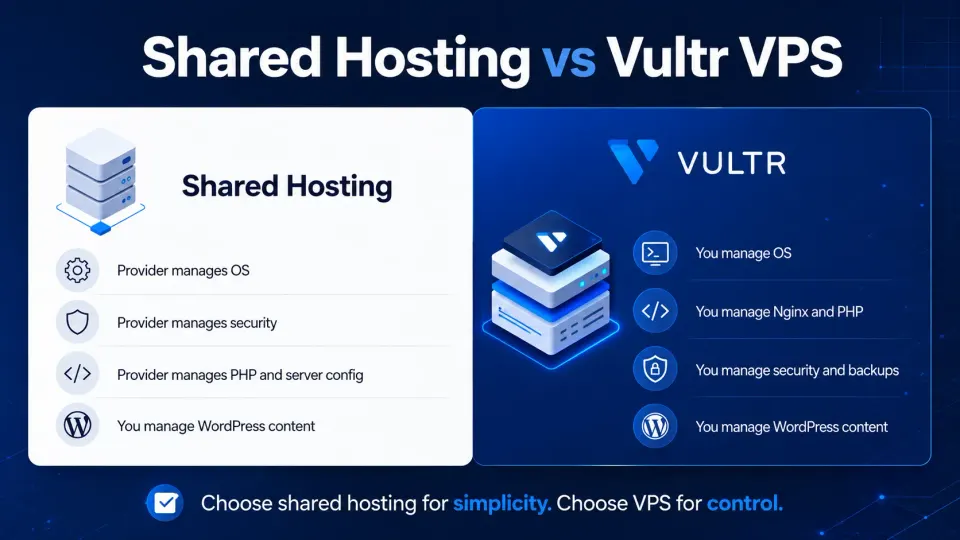
The self-managed VPS responsibility
The biggest mistake with Vultr is treating it like cheaper managed WordPress hosting. It is not.
With Vultr, you are responsible for the operating system, web server, PHP version, database, firewall, backups, SSL renewal, caching, email delivery, updates, monitoring, and recovery plan. That control is exactly why I like it, but it is also why I do not recommend it blindly.
A well-configured Vultr server can be fast and economical. A poorly configured Vultr server can be slower, less secure, and more stressful than normal shared hosting.
That is why I would not move a WordPress site to Vultr just because “VPS is faster.” I would move when there is a clear reason: shared-hosting limits, custom server configuration, multiple sites, better caching control, or a developer who wants to learn and own the stack.
Pricing
Vultr bills hourly. The dashboard shows estimated monthly costs, but you pay for actual usage. Spin up a test instance, run it for two hours, destroy it — you pay for two hours. No annual lock-in, no cancellation fee.
Realistic costs for WordPress:
- $5/mo (Cloud Compute Regular, 1GB RAM): Good for testing the stack. Gets tight with real WordPress traffic and caching layers running.
- $6/mo (High Performance, 1GB RAM): Better baseline CPU for a WordPress site seeing real visits.
- $12/mo (2GB RAM, 1 vCPU): A comfortable single-site WordPress setup with Nginx, PHP-FPM, Redis, and MariaDB running concurrently.
- $24/mo (4GB RAM, 2 vCPU): Multiple WordPress sites on one instance, WooCommerce with active sessions, or higher-traffic workloads.
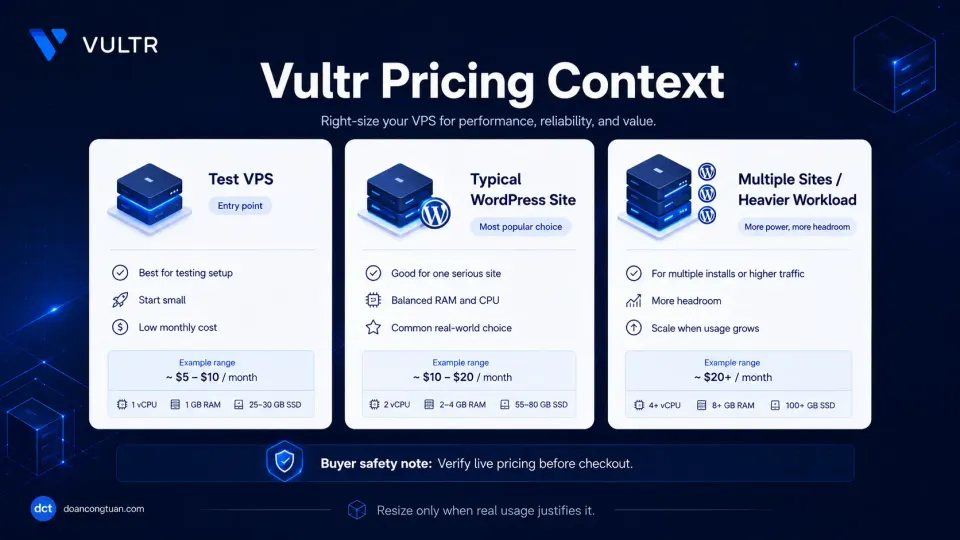
I pay around $20/month for the instance running doancongtuan.com alongside other active projects.
A few things to verify before signing up:
- Backups are an add-on. Vultr’s automated backup system is useful, but it costs extra on top of the instance price. Enable it or have another backup strategy in place before you go live. Backups are the kind of thing you only appreciate after something goes wrong.
- The $5/mo plan is a starting point, not a production target. Use it to learn the stack. Resize when you know what the site actually needs.
- Free credits for new accounts exist. Check the current offer on the signup page — this changes and is not something to assume from a review.
- Pricing is hourly but Vultr.com shows monthly estimates. This review was updated June 2026. Verify current plan pricing before purchasing.
My current stack on Vultr
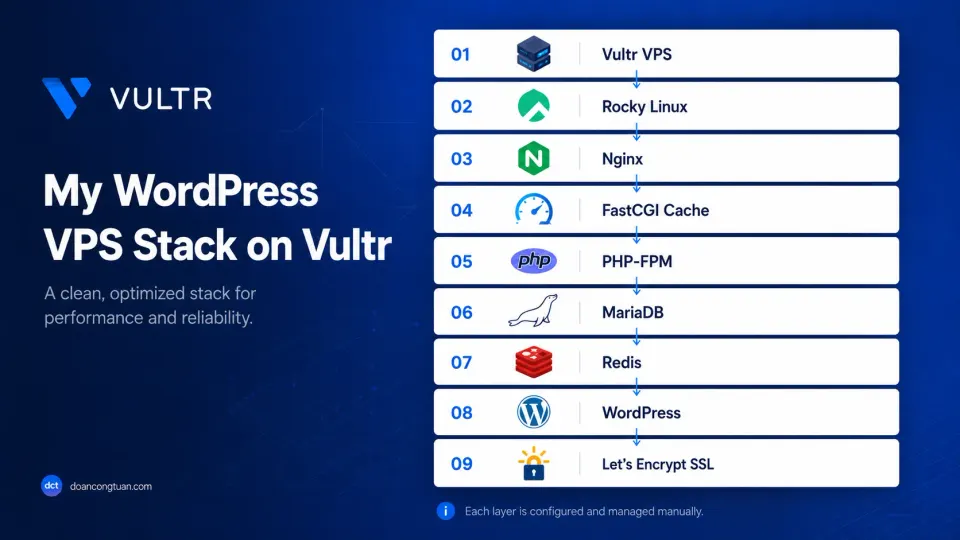
This is what runs on my Vultr instance:
- OS: Rocky Linux
- Web server: Nginx with FastCGI cache
- PHP: PHP-FPM
- Database: MariaDB
- Object cache: Redis
- SSL: Let’s Encrypt via Certbot
- Deploy: Custom shell scripts over SSH
I use Rocky Linux because of habit from earlier projects, not because it is universally the right choice. Ubuntu LTS is easier to troubleshoot as a beginner — more community documentation, more Stack Overflow threads, more guides written for it. Either works for this stack.
One thing I did not fully anticipate: WP Rocket and FastCGI cache running together means WordPress generates static HTML files in wp-content/cache. On a small instance, this can fill disk faster than expected. Run du -sh /var/www/*/wp-content/cache/ occasionally to check.
What works well
Hourly billing is the main reason I chose Vultr. I can spin up a test instance, work on it for a few hours, and destroy it without paying a full month. For development, experimentation, and staging environments this matters a lot. A test that costs $0.02 is not a meaningful decision.
The control panel is clean. Not minimal to the point of missing features, not cluttered with managed-hosting tooling you did not ask for. Deploy an instance, manage firewall rules, take a snapshot, resize disk. Everything is where you expect it.
Southeast Asia data centers. Singapore and Tokyo are important if your audience is in that region. A meaningful portion of my readers are Vietnamese — latency from Singapore to Vietnam is usually better than routing traffic from the US or Europe.
Snapshots work reliably. Before any significant server change, I take a snapshot. If something goes wrong, I can roll back to a known working state in minutes. This has saved me more than once.
No pressure toward managed tiers. Some VPS providers nudge you toward more expensive managed products. Vultr does not. You buy the server and use it.
What does not work
Port 25 is blocked by default. This is the most common surprise for developers new to Vultr. Port 25 is the standard outbound SMTP port. Vultr blocks it to prevent spam from new accounts. WordPress email — contact forms, WooCommerce order confirmations, password resets — will not work until you handle this.
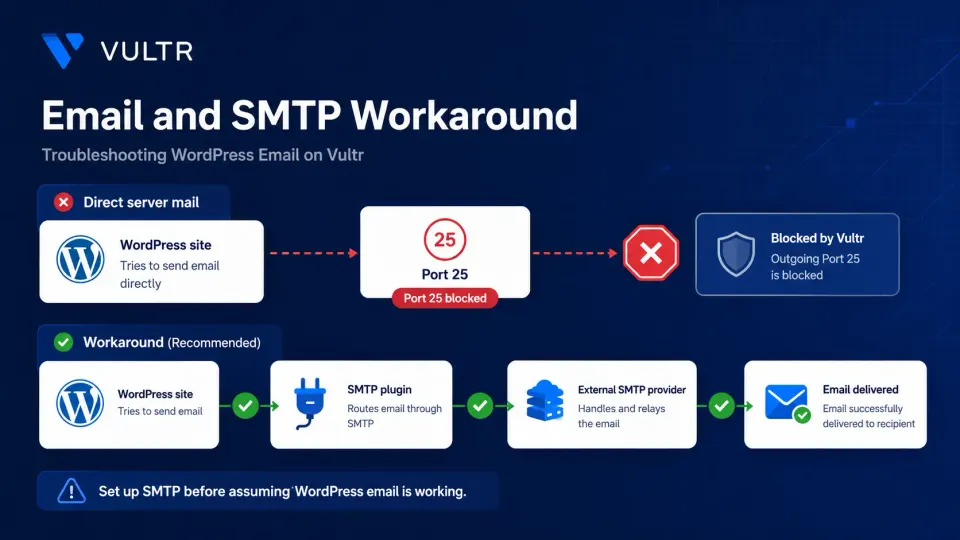
The workaround: install an SMTP plugin in WordPress (WP Mail SMTP is the most reliable option) and connect it to a transactional email service. Mailgun, Resend, and Google SMTP for low-volume all work. The setup adds maybe 20 minutes to a fresh WordPress install. The problem is that it is easy to skip and forget until a customer emails you asking why they never got an order confirmation.
Do this before you assume email is working. Send a test from the plugin’s diagnostic screen before going live.
You are the support team. Vultr support handles infrastructure: server not booting, data center issues, billing. They do not help you configure Nginx, diagnose a PHP error, or debug a WordPress plugin conflict. When something breaks in your stack, that is your problem.
I have fixed enough 502 errors at late hours to know this is the real cost of VPS hosting. The Vultr server itself has been stable. My configuration has occasionally not been.
No built-in WordPress tooling. Managed hosts often include staging environments, one-click WordPress updates, and WordPress-specific caching layers. Vultr provides none of that. You build what you need or you go without.
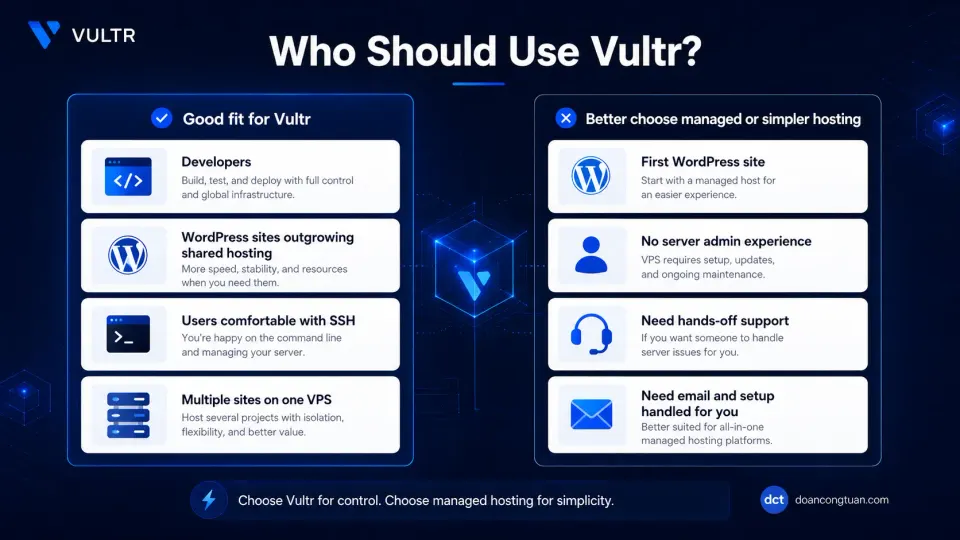
Who should use Vultr
I would use Vultr when the server is part of the strategy, not just a place to upload WordPress.
Vultr makes sense if you want to control the stack, run multiple sites on one instance, tune Nginx/PHP-FPM/MariaDB yourself, or avoid the renewal pricing and limitations of shared hosting. It is especially reasonable for developers who already know SSH and want a repeatable VPS workflow.
- You have set up a Linux server before, or are ready to learn properly
- You need custom Nginx, PHP-FPM, or Redis configuration that shared hosting blocks
- You are running multiple sites and want them consolidated on one controlled instance
- Hourly billing and no annual contracts matter to how you work
- You are comfortable being your own support team when the stack breaks
- This is your first WordPress site
- You want support to fix server-level problems for you
- You do not want to manage Linux, Nginx, and SSL certificate renewal manually
- You need WordPress email to work without extra SMTP configuration
- Server downtime would be a serious problem without a tested recovery plan
Who should avoid Vultr
I would avoid Vultr if you want hosting support to handle WordPress problems, plugin conflicts, email delivery, backups, security hardening, or performance tuning for you.
I would also avoid it for a first WordPress site unless the goal is specifically to learn Linux server management. A beginner can lose days debugging SSH, Nginx, SSL, file permissions, PHP-FPM, and email delivery before publishing a single useful page.
In that case, start with simpler shared hosting like Hostinger or consider a managed cloud path like Cloudways. Vultr becomes attractive when you are ready to trade convenience for control.
Vultr vs shared hosting
Shared hosting is easier. That is the point of it, not a criticism. Shared hosting handles the server environment so you do not have to. You log in, install WordPress, and start publishing. The trade is shared resources, no server-level configuration access, and reliance on the host’s support for anything below WordPress itself.
Vultr gives you a server you own entirely. Better performance per dollar when configured properly, full control over every layer, no resource sharing with other customers. The trade is that you do all of the server work.
My honest take: start on shared hosting if you are new to WordPress. Move to VPS when you have a specific reason — you need custom server config, you are hitting shared hosting limits, or the combined cost of multiple shared hosting accounts starts making a single VPS more economical. Moving for the sake of it adds complexity without proportional benefit at the start.
If you want to try WordPress on a budget while you are deciding, the Hostinger profile is the shared-hosting option I would compare against Vultr first. It is a different type of product, but that is the point: sometimes simplicity matters more than server control.
Vultr vs managed WordPress hosting
Managed WordPress hosting — Kinsta, Cloudways, WP Engine — handles the server configuration and provides WordPress-specific support. You pay more and get a team behind your infrastructure.
I have not used Kinsta or WP Engine personally. I have looked at Cloudways, but I have not run production sites on it. I will not make a direct comparison I cannot back up.
What I can say from the Vultr side: for developers comfortable managing a Linux environment who want full control and lower cost, Vultr is the more economical path. The price gap between a $20/mo self-managed Vultr instance and managed WordPress hosting starting at $35–50/mo is real and compounds over time.
For teams or solo operators who need managed support, automatic updates, and someone to call when the site goes down at midnight — that price premium is worth evaluating honestly. The question is not which is objectively better. The question is which trade-off fits your situation.
The SMTP workaround, step by step
Before you finish any new WordPress install on Vultr, handle email. The steps:
- Install WP Mail SMTP (or a similar SMTP plugin) from the WordPress plugin directory
- Create an account with a transactional email service — Mailgun, Resend, and Google SMTP all work for low volume
- Configure the plugin with your service credentials and SMTP settings
- Use the plugin’s built-in diagnostic tool to send a test email before going live
If you skip this and assume email is working, it is not. Contact form submissions, WooCommerce order confirmations, and password reset emails will silently fail. Check this before launch, not after a customer reports they never received an order confirmation.
Final verdict
Vultr is what I use because it matches how I work. I want control over the stack, I am comfortable with SSH, I do not need managed WordPress support, and the Singapore data center covers the audience I care about most.
The SMTP problem is real but solvable in under an hour. The setup curve is real but finite — after the initial configuration, the server mostly stays out of your way. The hourly billing model suits experimental work and multi-site consolidation better than most alternatives at this price range.
If you are comfortable managing a VPS and want more control than shared hosting offers, Vultr is a provider I can recommend from direct, ongoing use. For the broader decision, read my WordPress VPS hosting guide.
If this is your first WordPress site, shared hosting is still the right starting point. Come back to VPS when you have a specific reason to.
Developer-focused cloud VPS with hourly billing and Southeast Asia data centers. Full server control, no managed layer, competitive pricing. Not for beginners. Good for developers who know what they want.
Get Vultr →Affiliate link — I may earn a commission at no cost to you.
Frequently Asked Questions
How much does Vultr cost for WordPress?
Is Vultr good for beginners?
Does Vultr support WordPress?
What is the difference between Vultr and managed WordPress hosting?
Does Vultr have email hosting?
How does Vultr compare to DigitalOcean?
Disclosure: Some links on this page are affiliate links. If you make a purchase through them, I may earn a small commission at no extra cost to you. I only recommend products I've genuinely evaluated. Full disclosure →