Hostinger Review: Is It Good for WordPress and Static Sites?
An honest look at Hostinger's shared hosting for small WordPress sites and static deployments. What works, what does not, and who it actually suits.
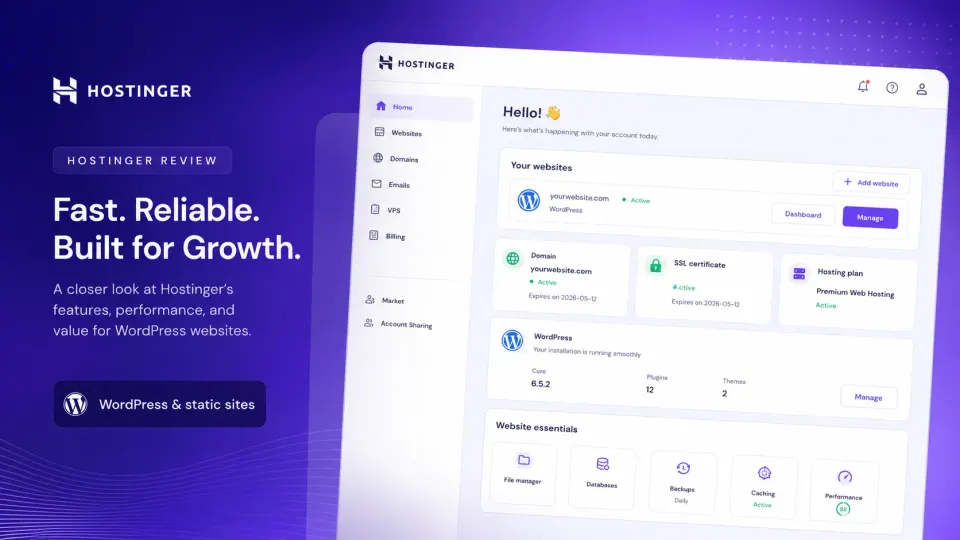
Hostinger is a legitimate budget option. I used it on earlier projects before moving to Vultr VPS for my main work. For a first WordPress site or a low-traffic side project, it does the job. For anything where uptime or performance matters seriously, budget up.
- Very affordable intro pricing
- LiteSpeed server gives better WordPress performance than standard Apache shared hosting
- hPanel is clean and easier to navigate than traditional cPanel
- Free SSL and domain on annual plans
- Global data centers including Asia-Pacific (Singapore)
- Renewal prices are significantly higher than intro rates
- Support quality is inconsistent. Wait times vary
- Shared hosting limits become visible when traffic or plugin count grows
- No root access on shared plans
Hostinger makes more sense for some projects than a VPS. I explain that hosting decision in my WordPress VPS hosting guide, and where hosting fits into speed work in the WordPress performance stack guide.
Quick verdict
Hostinger is a budget hosting provider that makes sense for small WordPress sites, beginner projects, static sites, and low-risk client work where price and simplicity matter more than full server control. Its shared hosting is easier than a VPS and cheaper than managed WordPress hosting, but it also has the normal limits of shared resources.
I would use Hostinger as a starting point, not as the final hosting answer for every serious WordPress site. Once traffic, plugin load, WooCommerce, custom server configuration, or uptime risk becomes important, I would compare it against Vultr for self-managed VPS control or Cloudways for a managed cloud path.
On earlier shared-hosting projects, I saw the usual pattern: the site launched fine, the client was happy, and the setup felt efficient at the beginning. Later, as plugins, email forms, admin work, and real usage piled up, the small frictions became more visible. None of it was always catastrophic. All of it was the normal ceiling of budget shared hosting.
I have used Hostinger on earlier projects before moving my main work to Vultr VPS. This review is written from the perspective of someone who started on shared hosting and moved on, not someone who has never used it.
To be fair: I also set up the client’s site with 23 plugins active. Shared hosting was not the only variable. But it was not helping.
Hostinger is a budget shared hosting provider that has improved meaningfully over the last few years. LiteSpeed servers, a genuinely clean control panel, and competitive intro pricing make it a defensible starting point for low-traffic WordPress sites and static projects.
What Hostinger offers
Hostinger is a web hosting company founded in Lithuania in 2004. Their main products relevant to WordPress developers:
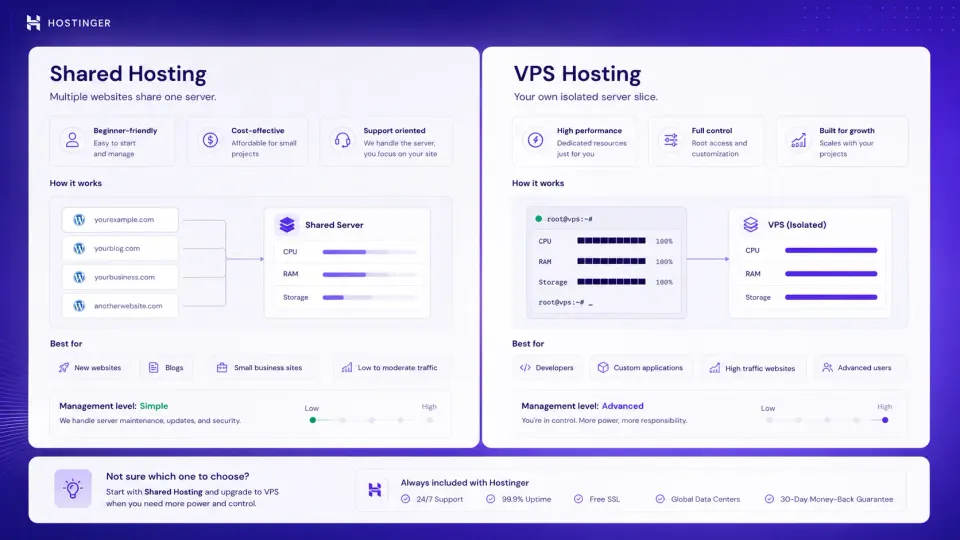
- Shared hosting: the entry-level product, what most people are buying at the low price points
- Cloud hosting: more resources than shared, still multi-tenant
- VPS hosting: virtual private server with full root access
- WordPress-specific plans: shared hosting marketed specifically for WordPress
For most readers considering Hostinger, the shared hosting plans are what the ads are pointing you toward. The VPS product is a separate decision and a different level of technical commitment.
Performance
Hostinger uses LiteSpeed Web Server on their shared plans. This is a real advantage over standard Apache-based shared hosting. LiteSpeed handles PHP and WordPress more efficiently and includes its own caching layer.
Third-party tests often report decent results for Hostinger when the site is simple, the data center is close to the visitor, LiteSpeed Cache is configured properly, and the plugin stack is not bloated. That is useful, but it is not a guarantee for your site.
The safe way to think about it: Hostinger can be fast enough for small WordPress sites and static projects. It is not the same thing as a dedicated VPS or premium managed WordPress hosting. The performance gap may or may not matter depending on traffic, revenue impact, and how much backend/admin speed matters to you.
The hPanel experience
One thing Hostinger does better than most budget hosts: the control panel. hPanel is custom-built and genuinely cleaner than cPanel. WordPress installation is a one-click process. SSL setup is automated.
As a developer you will probably spend minimal time in hPanel anyway. For a non-technical client you are setting up hosting for, hPanel is reasonably easy to hand off. That is a practical advantage worth noting.
Pricing: the full picture
This is where the honest accounting matters.
Hostinger’s intro pricing requires a multi-year commitment and reflects promotional rates. At the time of check, the public pricing page showed:
- Premium web hosting: from $2.99/mo on a 48-month term, renewing around $10.99/mo
- Business web hosting: from $3.99/mo on a 48-month term, renewing around $16.99/mo
- Cloud Startup: from $7.99/mo on a 48-month term, renewing around $25.99/mo
The first billing cycle is cheap. After that, it is a normal budget hosting price point. Not expensive, but not “three dollars per month forever.”
Always calculate the total cost over your expected usage period including renewal, not just the intro offer. If you are comparing Hostinger to a VPS at $6/mo, run the two-year math on both.
Hostinger vs Vultr vs Cloudways
Hostinger, Vultr, and Cloudways are not three versions of the same thing.
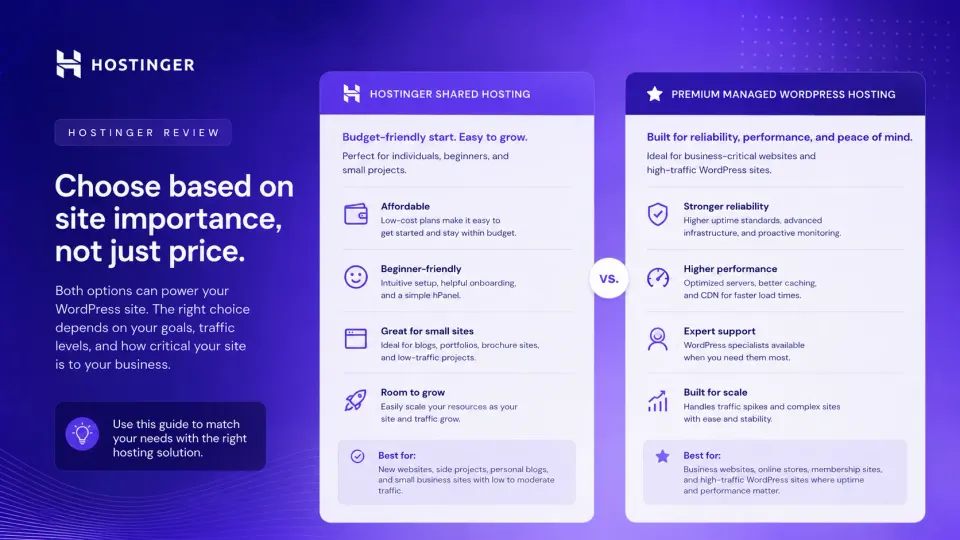
Hostinger is the simpler budget path. You get a control panel, shared or cloud hosting, and less server responsibility. That is useful when the site is small, the budget is tight, or the owner does not want to manage Linux.
Vultr is the self-managed VPS path. You get root access, server control, hourly billing, and the freedom to build your own Nginx/PHP-FPM/MariaDB stack. You also become the person responsible for backups, updates, email delivery, security, and debugging.
Cloudways sits between the two. It gives you cloud infrastructure with a managed layer on top, so you avoid much of the Linux server work while still getting more flexibility than normal shared hosting.
My practical rule: use Hostinger when simplicity and budget matter most, Vultr when control matters most, and Cloudways when you want cloud hosting without becoming the full-time server admin.
Where shared hosting hits its limits
This is what I observed personally and what I hear consistently from developers:
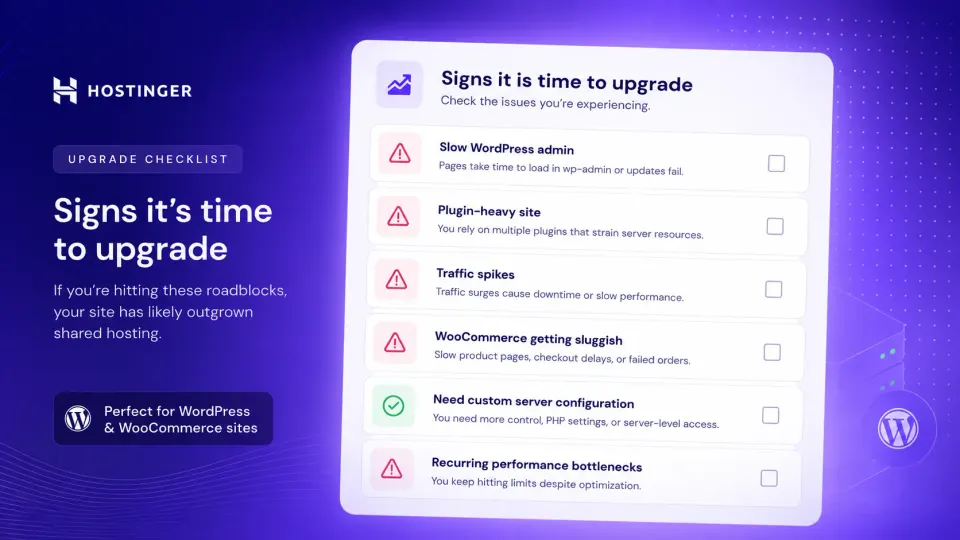
Shared hosting starts showing friction when plugin count grows past 15 to 20, when you are running WooCommerce with real product catalogs, when traffic spikes are common, or when you need custom Nginx or PHP configuration that the shared environment does not allow.
None of that is unique to Hostinger. It is the nature of shared hosting. The point is that Hostinger is a good starting point, not a final answer for a growing site.
When I needed custom Nginx configuration, Redis caching, and control over PHP settings, shared hosting stopped being useful regardless of provider. That is when moving to a VPS made sense. I explain that upgrade path in more detail in my WordPress VPS hosting guide.
Who should use Hostinger
Hostinger is a good fit when the site is small, the budget is limited, and the goal is to publish without learning server administration.
I would consider Hostinger for:
- a first WordPress site
- a low-traffic blog or business site
- a static site where simple file hosting is enough
- a side project where budget matters more than server control
- a small client site where hPanel is easier to hand off than cPanel
- a beginner who wants WordPress running quickly without touching SSH
This is where Hostinger is strongest: it lowers the starting cost and removes most of the server work.
Who should avoid Hostinger
I would avoid Hostinger shared hosting when the site has already become important enough that performance, support quality, backend speed, and traffic spikes directly affect revenue.
I would not choose it for:
- serious WooCommerce stores
- high-traffic affiliate sites
- plugin-heavy WordPress builds
- projects needing custom Nginx, Redis, or PHP-FPM tuning
- sites where downtime creates real business risk
- developers who specifically need root access and full server control
In those cases, compare Vultr if you can manage the server yourself, or Cloudways if you want a managed cloud layer.
On Kinsta and Cloudways as alternatives
Both Kinsta and Cloudways appear in most “Hostinger alternatives” lists. I will be transparent: I have not used either in production. What I can say from research is that they serve a different market segment at a significantly higher price point. If you are comparing Hostinger to Kinsta or Cloudways, you are likely at a different scale than where Hostinger makes sense.
My Real Decision Rule
- Choose Hostinger if this is a first WordPress site, a side project, or a low-risk client site with a tight budget.
- Avoid it if downtime, backend speed, or peak-time performance would directly cost money.
- Calculate the 48-month intro term plus renewal before calling it cheap.
- Use shared hosting for simple sites; consider VPS or managed cloud once plugins, traffic, or custom server needs grow.
- Do not compare only monthly price — compare the cost of support, migration, and performance ceilings too.
Verdict
Hostinger is a legitimate starting point, not a scam and not a trap. The LiteSpeed hosting is a real performance advantage at this price tier. The hPanel is genuinely good. The intro pricing is low enough that the risk of trying it is minimal.
The realistic picture: renewal pricing is a step up from the intro rate, support is inconsistent enough that you should not rely on fast help when something breaks, and the ceiling of shared hosting will become visible as a site grows.
For a developer’s own side projects, low-traffic client sites, or a beginner’s first WordPress site: Hostinger is a reasonable choice. For production client sites where uptime and performance matter: plan to budget more, or compare the VPS and managed cloud routes before committing.
Budget shared hosting with LiteSpeed performance. A reasonable starting point for low-traffic WordPress sites and static hosting. Check current pricing. Intro rates require multi-year commitment.
Get Hostinger →Affiliate link — I may earn a commission at no cost to you.
Frequently Asked Questions
Is Hostinger reliable for WordPress?
Does Hostinger support Astro or static sites?
Is Hostinger good for beginners?
How does Hostinger compare to Kinsta?
Is Hostinger's renewal price much higher?
Disclosure: Some links on this page are affiliate links. If you make a purchase through them, I may earn a small commission at no extra cost to you. I only recommend products I've genuinely evaluated. Full disclosure →