WP Rocket Review: The Caching Plugin That Actually Works Out of the Box
Honest WP Rocket review for WordPress site owners. What it does well, what it cannot fix, and when a premium caching plugin is worth paying for.
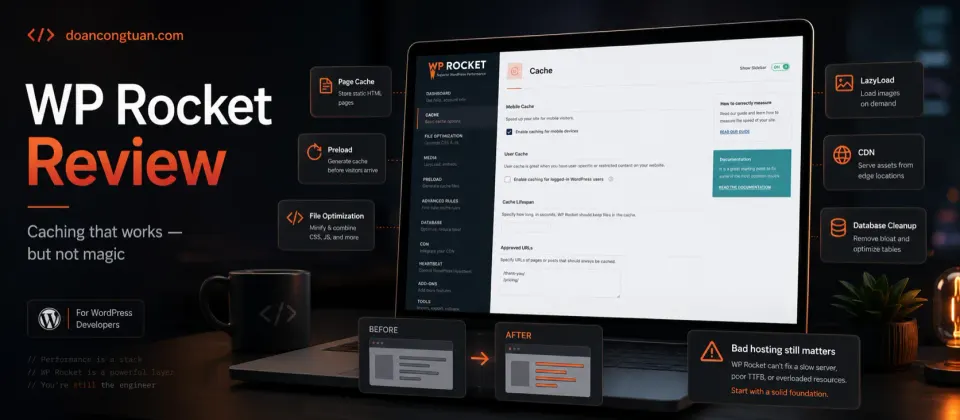
WP Rocket is the caching plugin I reach for on WordPress sites where I want results quickly. The setup takes minutes. The default configuration handles most of what matters. The trade-off is real: it is a premium plugin with no free tier, and it cannot compensate for bad hosting or an overloaded plugin stack.
- Activating it applies most important optimizations automatically — minimal configuration required
- Page cache, browser caching, GZIP, and preloading all work from install
- LazyLoad for images and iframes built in
- JavaScript delay and CSS optimization included
- Smart WooCommerce cache exclusions for cart, checkout, and user pages
- Compatibility with most popular themes and page builders
- 14-day money-back guarantee
- No free version — $59/year minimum
- Cannot compensate for genuinely bad hosting
- Some advanced features require careful configuration to avoid breaking pages
- Delayed JavaScript can cause issues with interactive elements if misconfigured
- Renewal pricing applies every year to keep updates and support
WP Rocket is one of the tools I would consider for a serious WordPress affiliate site. I place it in the broader stack in my best WordPress tools for affiliate sites guide.
WP Rocket can help, but caching is only one layer. For the full picture, see my WordPress performance stack guide covering hosting, theme weight, database, object cache, and real bottlenecks.
Quick verdict
WP Rocket is worth considering if you run a serious WordPress site, your hosting is not terrible, and you want caching plus frontend optimization handled without spending hours testing different free plugins.
I would not buy it as the first fix for a badly overloaded site. If your hosting, theme, plugin stack, or database is the real bottleneck, WP Rocket can help around the edges, but it will not turn a weak setup into a fast one.
My practical rule is simple: fix the obvious stack problems first, then use WP Rocket to make a decent WordPress setup faster and easier to maintain.
Most WordPress performance problems have multiple causes. Bad hosting. Too many plugins. Unoptimized images. Slow database queries. Bloated theme. WP Rocket addresses one layer of this: caching and frontend optimization. It does it well. But it is only one layer.
If you understand that — and your hosting is reasonably decent — WP Rocket is the plugin that makes the biggest visible difference with the least manual configuration.
What WP Rocket actually does
WP Rocket is a WordPress caching plugin with additional frontend optimization features. When you activate it:
- Page caching: WordPress generates pages dynamically by default, running PHP and database queries on every visit. WP Rocket caches the output as static HTML files. Subsequent visitors get the pre-built HTML — significantly faster.
- Browser caching: Instructs browsers to store static assets (images, CSS, JavaScript) locally. Repeat visitors load your site faster because their browser already has the files.
- GZIP compression: Compresses files before sending them to visitors. Smaller files = faster transfer.
- Preloading: WP Rocket crawls your site to pre-populate the cache after a flush, so the first visitor after a cache clear still gets a fast experience.
- LazyLoad: Images and iframes load only when they scroll into the viewport, rather than all at once on page load.
- JavaScript delay: Defers non-critical JavaScript from loading until user interaction. Can significantly improve Time to Interactive scores — but requires testing to make sure interactive elements still work.
- CSS optimization: Removes unused CSS to reduce page weight.
Most of this activates automatically with sensible defaults. On a normal WordPress site, you can usually get the first round of caching and frontend optimization working quickly, then test the riskier settings like delayed JavaScript more carefully.
Pricing
One thing worth noting: WP Rocket retired its unlimited-sites “Infinite” plan and replaced it with tiered multi-site plans. If you manage many sites, verify the current plan structure and pricing at wp-rocket.me before budgeting.
The $59/year single-site price is on the higher end for a WordPress plugin. There is no free tier and no trial. The 14-day refund policy is the practical way to test it: buy it, measure before and after, and request a refund within 14 days if the improvement does not justify the cost.
What WP Rocket does not fix
This is the part most WP Rocket reviews skip.
Bad hosting. If your shared hosting plan is throttling CPU on every request, WP Rocket reduces how often PHP runs — that helps. But a server that is genuinely underpowered or oversold will still be slow. WP Rocket on a $2/month shared hosting account with resource limits is not the same as WP Rocket on a proper VPS or managed cloud instance.
Too many plugins. A WordPress site with 40 active plugins has 40 potential points of overhead, JavaScript enqueueing, and database queries. WP Rocket optimizes the output. It does not remove the underlying overhead from the plugins themselves.
Bloated themes. Page builders like Elementor and Divi add significant JavaScript and CSS to every page. WP Rocket can defer and optimize some of it, but it cannot undo the fundamental weight of a theme that loads everything everywhere.
Slow database queries. If your site is slow because of a poorly indexed database or an inefficient query from a plugin, WP Rocket does not help with that. That is a different problem.
The right frame: WP Rocket handles the caching and frontend delivery layer. The rest of the stack still needs to be reasonable.
Who should use WP Rocket
WP Rocket makes the most sense for WordPress site owners who already care enough about the site to optimize it properly.
I would consider it for:
- content sites where speed affects user experience and SEO
- affiliate sites with product boxes, comparison tables, ads, and third-party scripts
- WooCommerce stores that need sane cart and checkout cache exclusions
- site owners who have tried free caching plugins and want a cleaner workflow
- developers who want repeatable caching settings across multiple WordPress installs
It is especially useful when you want a practical plugin that works across Nginx, Apache, LiteSpeed, shared hosting, VPS, and many managed WordPress setups.
Who should avoid WP Rocket
WP Rocket is not the first thing I would buy in every situation.
I would skip it for now if:
- your site is brand new and has almost no traffic
- your hosting is clearly the bottleneck
- your theme or page builder is loading too much JavaScript everywhere
- you already use LiteSpeed hosting and LiteSpeed Cache is configured well
- your budget is tight and you are willing to spend time configuring free plugins
- you are running Astro or another static site where WordPress caching plugins are irrelevant
In those cases, the better first move may be a plugin audit, a better hosting decision, or a broader look at the WordPress performance stack.
WP Rocket on shared hosting vs VPS
On shared hosting: WP Rocket is typically the highest-impact optimization you can make without changing hosts. Since you cannot modify Nginx configuration or add server-level caching, WP Rocket’s plugin-level page cache makes the biggest visible difference.
On a self-managed VPS with FastCGI cache: WP Rocket’s page caching overlaps with what FastCGI already does. The value shifts to the frontend optimization features — LazyLoad, JS delay, CSS optimization, and browser caching. These still matter and WP Rocket handles them better out-of-box than manual Nginx configuration for most people.
On managed WordPress hosting (Cloudways, Kinsta): these platforms often have their own caching layer. WP Rocket may still add value for frontend optimization, but check whether your host recommends it — some managed hosts have compatibility notes.
If your site is slow because the hosting layer is weak, compare the plugin route with the hosting route. My Vultr review covers the self-managed VPS path. My Cloudways review covers the managed cloud path. WP Rocket is useful, but hosting still sets the ceiling.
- Your hosting is decent but your site feels slow to load
- You want most optimizations working without manual configuration
- You run WooCommerce and need smart cart/checkout cache exclusions
- You have tried free caching plugins and want something more reliable
- Core Web Vitals scores are affecting your SEO
- Your hosting is severely underpowered — fix hosting first
- You are on LiteSpeed hosting — LiteSpeed Cache is free and excellent
- You run server-level FastCGI cache and only need frontend optimization
- Budget is a constraint — free options like W3 Total Cache work for basic needs
- You are on a static site (Astro, Next.js) — no WordPress, no need
The honest comparison with free caching plugins
Free caching plugins — W3 Total Cache, WP Super Cache, LiteSpeed Cache — are not bad. They work. The difference with WP Rocket:
- WP Rocket’s defaults are better. Free plugins often need significant configuration to match what WP Rocket does out of the box.
- WP Rocket’s compatibility is more consistent. Free plugins occasionally conflict with themes or other plugins in ways that require debugging.
- WP Rocket’s WooCommerce integration is more reliable for automatically excluding the right pages.
- LiteSpeed Cache is genuinely excellent on LiteSpeed hosting. If your host runs LiteSpeed and you are budget-conscious, it is the right free alternative.
The premium price buys you time and fewer headaches. Whether that trade is worth it depends on how you value both.
If you are also building an affiliate or content-heavy WordPress site, caching should sit beside SEO and content structure, not replace them. I pair this kind of performance thinking with tools like Rank Math and a cleaner WordPress stack, not with endless plugin stacking.
My Real Decision Rule
- Choose WP Rocket if your hosting is already decent and you want caching/frontend optimization handled with minimal setup.
- Avoid it if your host is the real bottleneck; fix hosting before buying another plugin.
- Use LiteSpeed Cache first if your host runs LiteSpeed and budget matters.
- Test JavaScript delay carefully because it can improve scores but also break interactive elements.
- Measure before and after during the refund window instead of assuming the plugin will solve everything.
Final verdict
WP Rocket is the WordPress caching plugin I reach for when I want results without spending an afternoon troubleshooting configuration. The defaults are sensible. The WooCommerce integration works correctly. The combination of page cache, browser cache, LazyLoad, and JS optimization covers most of what matters in one plugin.
The price is real. If you are on LiteSpeed hosting, the free LiteSpeed Cache plugin is a legitimate alternative. If budget is the constraint, W3 Total Cache can be configured to do most of the same things with more effort.
For sites where performance matters and you want it handled reliably: WP Rocket is worth it.
Premium WordPress caching plugin. Page cache, LazyLoad, JS delay, and WooCommerce integration out of the box. $59/year for one site. 14-day money-back guarantee.
Get WP Rocket →Affiliate link — I may earn a commission at no cost to you.
Frequently Asked Questions
Does WP Rocket work on shared hosting?
WP Rocket vs LiteSpeed Cache — which is better?
Does WP Rocket work with FastCGI server cache?
What does WP Rocket not fix?
How much does WP Rocket cost?
Does WP Rocket work with WooCommerce?
Disclosure: Some links on this page are affiliate links. If you make a purchase through them, I may earn a small commission at no extra cost to you. I only recommend products I've genuinely evaluated. Full disclosure →