When you create a VPS on Vultr, you choose an operating system from a dropdown. The list includes Ubuntu, Debian, Rocky Linux, AlmaLinux, Fedora, and others. If you’ve never used Linux before, these names mean nothing.
Here’s what actually matters and what doesn’t.
What Distros Actually Are
All of these are Linux — the same kernel, the same fundamental design. The differences are in packaging: which package manager they use, which default software they include, how often they release updates, and who maintains them.
Think of it like car brands that all use the same engine but have different dashboards, different service manuals, and different communities of mechanics. You can drive all of them. Some have more repair shops nearby.
For WordPress on a VPS, you’re installing the same software stack on all of them: Nginx, PHP-FPM, MariaDB, Redis. The stack doesn’t care which distro it runs on. The differences appear in how you install things and where config files live.
The Three You’ll Encounter
Ubuntu LTS
Maintained by: Canonical
Package manager: apt
Release cycle: LTS (Long Term Support) versions every 2 years, supported for 5 years
Current version: Ubuntu 24.04 LTS
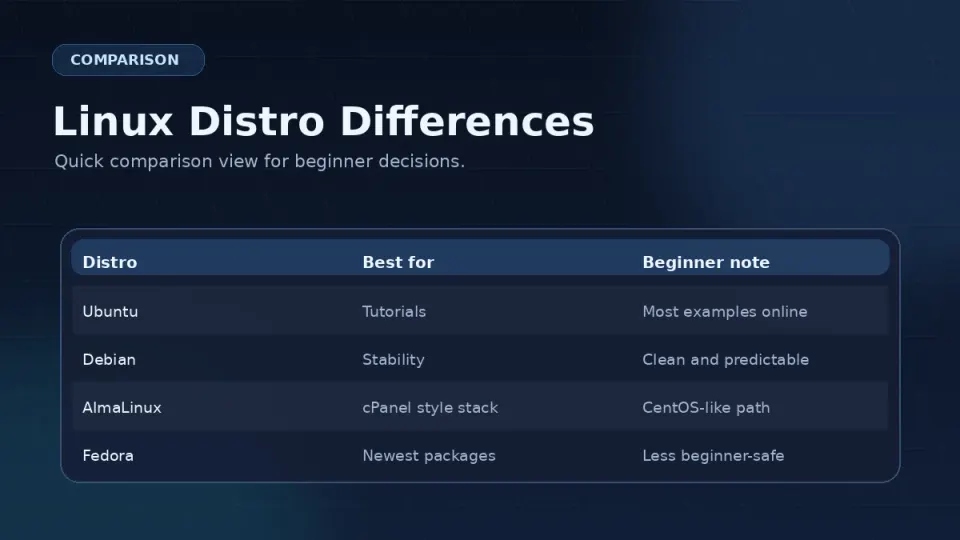
Ubuntu is the most commonly used Linux server distro for web hosting. That fact has one practical consequence: when you search for a tutorial, help forum answer, or Stack Overflow solution, it’s probably written for Ubuntu.
For a beginner who will lean on online resources, this matters. You’ll spend less time mentally translating commands between distros.
Best for: First-time VPS users who expect to rely heavily on tutorials and community documentation.
Rocky Linux
Maintained by: Rocky Enterprise Software Foundation
Package manager: dnf
Release cycle: Follows Red Hat Enterprise Linux releases, long support cycles
Current version: Rocky Linux 9
Rocky Linux was created as a direct replacement for CentOS after CentOS changed its support model in 2021. It’s binary compatible with Red Hat Enterprise Linux — the OS that runs a significant portion of the world’s enterprise servers.
This has a practical upside: stability and long support windows. Rocky Linux 9 is supported until 2032. You won’t be forced to migrate to a new OS version on a short timeline.
Why I use it: I switched from CentOS when Vultr stopped recommending it. Rocky Linux felt familiar — same dnf package manager, similar file structure. I’ve used it since without issues. The honest reason isn’t technical superiority. It’s familiarity and inertia.
Best for: Users who want a stable, long-supported system, are comfortable finding documentation for RHEL-based systems, or are following this series.
Debian
Maintained by: Debian Project (community)
Package manager: apt (same as Ubuntu — Ubuntu is based on Debian)
Release cycle: Major releases every 2–3 years, very conservative update policy
Current version: Debian 12 “Bookworm”
Debian is the foundation Ubuntu was built on. It’s extremely stable — changes are tested extensively before inclusion. This conservatism means slightly older software versions but very predictable behavior.
Best for: Experienced users who prioritize stability over cutting-edge software versions.
What’s Actually Different
The differences that matter in practice:
Package manager — the main one
# Rocky Linux / AlmaLinux
sudo dnf install nginx
sudo dnf update

# Ubuntu / Debian
sudo apt install nginx
sudo apt update
Same structure, different command. If you know one, you know the other.
Nginx user
# Rocky Linux — Nginx runs as:
nginx

# Ubuntu — Nginx runs as:
www-data
This affects file ownership. When setting WordPress directory ownership, the user changes:
# Rocky Linux
sudo chown -R nginx:nginx /var/www/yoursite/

# Ubuntu
sudo chown -R www-data:www-data /var/www/yoursite/
Config file paths — Nginx
# Rocky Linux
/etc/nginx/conf.d/yoursite.conf

# Ubuntu
/etc/nginx/sites-available/yoursite.conf
# (then symlinked to sites-enabled/)
Rocky Linux uses a simpler structure. Files in /etc/nginx/conf.d/ are loaded automatically — no symlink step required.
PHP installation
Rocky Linux doesn’t include recent PHP versions in its default repositories. You need to add the Remi repository to get PHP 8.2 or 8.3. This series covers that step in Part 4.
Ubuntu includes recent PHP versions via standard repositories, which is slightly simpler for installation.
SELinux — The Rocky Linux Gotcha
Rocky Linux includes SELinux (Security-Enhanced Linux) enabled by default. SELinux adds a security enforcement layer on top of standard Linux permissions.
For most server work, SELinux runs quietly in the background. Occasionally — particularly around Nginx, PHP-FPM socket permissions, and certain file operations — it blocks actions that standard file permissions would allow, producing confusing “permission denied” errors even when ls -la shows correct ownership and permissions.
When you hit one of these, the symptom is: permissions look right, chown was done correctly, but Nginx still can’t access the file.
The diagnosis command:
sudo ausearch -m avc -ts recentThis shows recent SELinux denials. Part 3 covers the specific SELinux contexts you need to set for a WordPress VPS.
The Honest Recommendation
If you’re new to Linux and will search for help online: Use Ubuntu 24.04 LTS. You’ll find more tutorials, more forum answers, and more documentation specifically written for your setup.
If you’re following this series: Use Rocky Linux 9. Every command, file path, and configuration has been written and tested for Rocky Linux 9. Using the same OS removes one variable when you’re troubleshooting.
If you already have a preference: Use it. The WordPress site you end up with will run identically on either.
The distro debate has more energy in online communities than it deserves. You’re not making a permanent decision — you’re choosing a starting point. Pick one and start Part 3.