If you already understand the basic idea of a VPS and want to decide whether WordPress should actually run on one, continue with my WordPress VPS hosting guide.
When I started running more WordPress sites, something felt off. Pages that used to load quickly started taking longer. At random intervals — not during obvious traffic spikes — the server just felt sluggish. I checked my plugins, ran caching plugins, and optimized images. Everything looked fine. The problem wasn’t my WordPress setup. The problem was that I was sharing a server with hundreds of other sites, and when they got busy, so did I.
That’s when I started looking into VPS hosting. And promptly got overwhelmed by the amount of stuff I thought I’d need to learn.
This article is the one I wish I’d had then.
What a VPS Actually Is
A VPS — Virtual Private Server — is a portion of a physical server that has been partitioned off to behave like its own independent machine.
Here’s a way to think about it that actually makes sense:
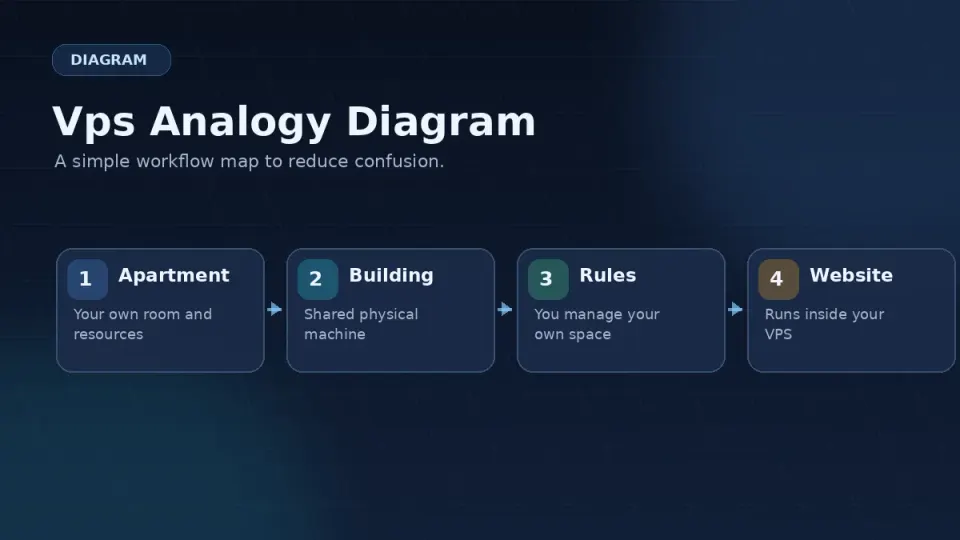
Shared hosting is like renting a desk in a co-working space. The WiFi, the printer, the meeting rooms — everything is shared. When someone else has a big conference call, your video meeting gets choppy. You have no control over the environment.
A VPS is like renting your own office in that same building. You have your own door, your own router, your own resources. What happens next door doesn’t affect you. You’re still in a shared building — but inside your space, you’re on your own.
A dedicated server is like owning the entire building. Every resource is yours. Also: every repair is yours, every bill is yours, and the cost is significant.
For most WordPress site owners moving off shared hosting, a VPS is the right next step.
What “Virtual” Means
The “virtual” part refers to how this is done technically. A single physical server — with, say, 128GB of RAM and 32 CPU cores — runs software called a hypervisor. The hypervisor divides that physical hardware into multiple isolated environments, each acting like a separate machine.
Your VPS gets a guaranteed slice of those resources. If you’re on a 4GB RAM plan, that 4GB is yours. Other customers on the same physical machine can’t use it, even if their sites are idle.
This is the core difference between a VPS and shared hosting. On shared hosting, resources are pooled and distributed dynamically. On a VPS, your allocation is fixed.
What You Control on a VPS
This is where it gets interesting — and where the responsibility starts.
On shared hosting, your host controls the server. You get a control panel (usually cPanel) to manage your files, databases, and email. The operating system, web server software, PHP version, security configuration — all of that is the host’s problem.
On a VPS, you control all of it.
That means:
- You choose the operating system (I use Rocky Linux 9)
- You install and configure the web server (Nginx in this series)
- You manage PHP versions and settings
- You set up your own firewall
- You handle backups
- When something breaks at 11pm, you fix it
This is not a complaint. It’s a trade-off. That control is exactly why a well-configured VPS can run circles around shared hosting. But “can” is doing a lot of work in that sentence — the performance only materializes if you set things up correctly.
Who Actually Needs a VPS
Not everyone. Here’s an honest breakdown:
You probably don’t need a VPS yet if:
- You have one small site with low traffic
- You’re happy with your shared hosting performance
- You don’t want to manage a server yourself
- Budget is tight and managed options feel expensive
You’re probably ready for a VPS if:
- Your shared hosting feels consistently slow or unreliable
- You’re running multiple WordPress sites
- You want to run custom server configurations (Redis, Nginx, PHP-FPM tuning)
- You’re comfortable learning new things and troubleshooting in a terminal
- You want full control over your hosting environment
You might want managed cloud hosting instead if:
- You want VPS-level performance without the management overhead
- You’re willing to pay more for someone else to handle the server
- Options like Cloudways or Kinsta fit your budget
There’s no shame in any of these paths. I moved to a VPS because I wanted the control and was willing to learn. That’s still the right reason to do it.
What This Series Covers
Moving from shared hosting to a self-managed VPS involves more than just signing up and pressing buttons. You need to understand how to connect to a server, how Linux works at a basic level, how to install and configure the software stack, and how to keep things running reliably.
This series walks through all of it — in the order you’ll actually need it.
The stack we’ll build: Rocky Linux 9 + Nginx + PHP-FPM + MariaDB + Redis + Let’s Encrypt. This is the exact setup I run for my own projects, including this site.
Part 0 — this part — covers the mindset and context before we touch a single command. It’s the section I skipped the first time and paid for later.
The next article covers the difference between shared hosting, VPS, and managed hosting in more detail — and gives you a framework for deciding which one you actually need right now.