GeneratePress Review for Developers: The Lightweight WordPress Theme That Actually Delivers
A developer-focused review of GeneratePress. Why it's the WordPress theme I keep recommending for performance-conscious sites.
GeneratePress is the WordPress theme developers actually want to use. It's lightweight, clean, and gets out of the way. The Premium tier is worth it for professional projects.
- Extremely lightweight — minimal CSS and JS, excellent baseline scores
- Well-structured, developer-friendly code
- Elements system allows custom layouts without page builders
- Compatible with all major page builders
- Good accessibility out of the box
- Active development with regular updates
- Free version is quite limited — Premium needed for most useful features
- Design is minimal — requires real effort to make visually distinctive
- Not as visually intuitive as Divi or Elementor-heavy themes
- Elements system has a learning curve
Most WordPress themes try to impress you with demos and features. GeneratePress does the opposite: it ships almost nothing and lets you build what you actually need. This makes it boring to look at in a theme directory and excellent to build with in practice.
What GeneratePress actually is
GeneratePress is a WordPress theme, not a page builder. It’s a base theme — a structural foundation that handles document layout, header/footer, post templates, and core styling — without bundling a complete visual editor.
This is a meaningful distinction. Most popular WordPress themes are heavily opinionated: they come with predefined layouts, their own shortcodes, custom post types, and styling that’s hard to override. GeneratePress comes with almost none of that. You start with a clean, fast base and add what you need.
The core theme is free. GeneratePress Premium ($59/yr or $249 lifetime) unlocks the features that make it actually useful for professional work.
Performance: where GeneratePress shines
Performance is where GeneratePress earns its reputation among developers.
A fresh WordPress install with GeneratePress and no plugins on decent shared hosting typically achieves:
- Google PageSpeed mobile: 85-92 (before content optimization)
- Google PageSpeed desktop: 95-99
- Total page size: under 100KB for a basic page
- JavaScript: near zero on the front end
Compare this to Divi or Avada fresh installs, which often start in the 50-70 range on mobile and require caching optimization to climb.
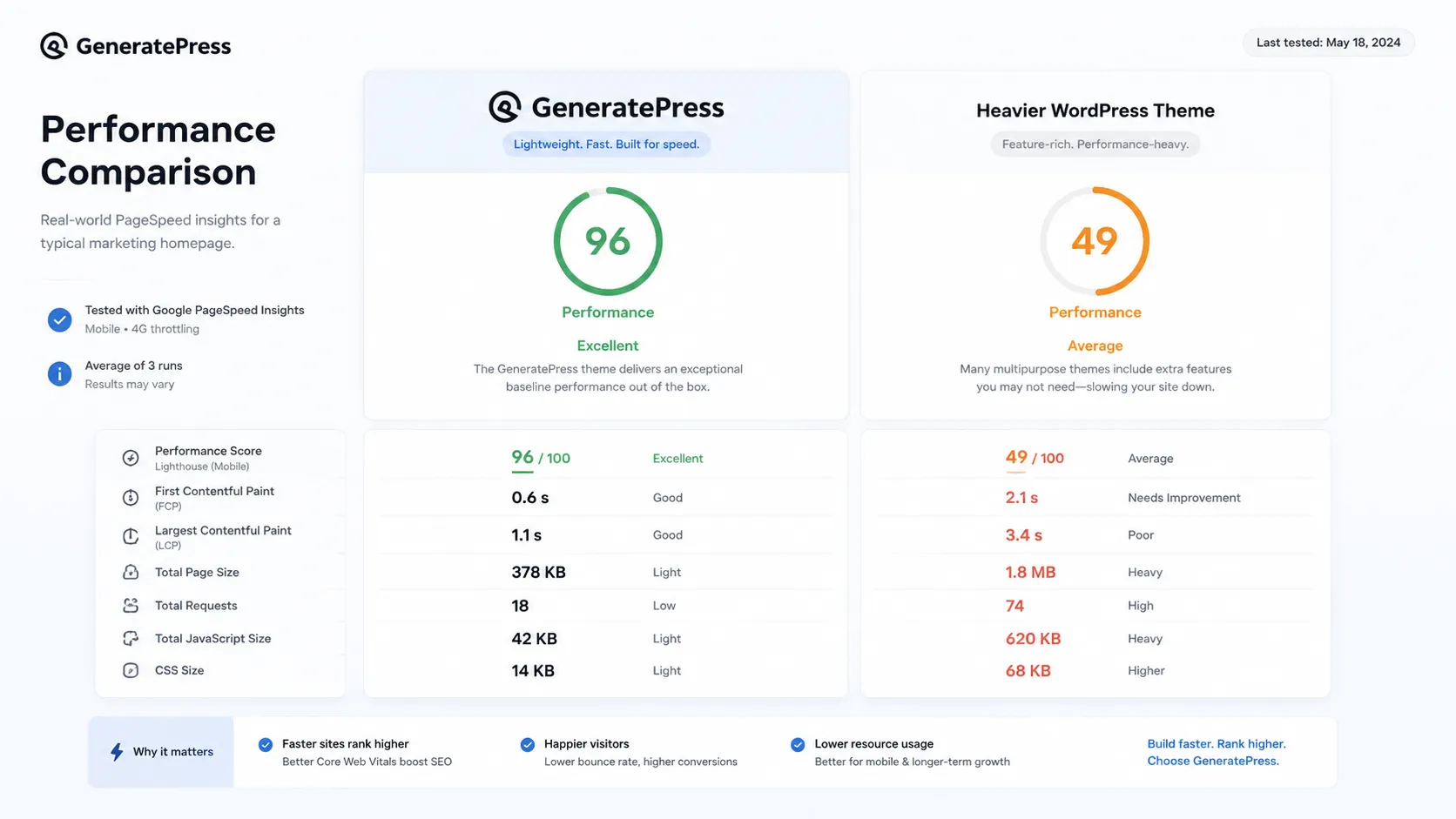
The reason is straightforward: GeneratePress doesn’t load what it doesn’t need. It doesn’t register ten stylesheets for features you’re not using. It doesn’t load jQuery effects for animations you didn’t ask for. It’s lean by design.
Pricing
The pricing tiers:
- Free: core theme, basic customization, no Elements system
- Premium annual ($59/yr): full Elements system, all controls, WooCommerce support
- Premium lifetime ($249): everything, unlimited sites, permanent updates
For developers building multiple client sites per year, the lifetime license is excellent math. Three client sites at $59/yr each saved on licensing = lifetime license paid for. After that it’s free.
Pros and cons
- Extremely lightweight — minimal CSS and JS, excellent baseline scores
- Well-structured, developer-friendly code
- Elements system allows custom layouts without page builders
- Compatible with all major page builders
- Good accessibility out of the box
- Active development with regular updates
- Free version is quite limited — Premium needed for most useful features
- Design is minimal — requires real effort to make visually distinctive
- Not as visually intuitive as Divi or Elementor-heavy themes
- Elements system has a learning curve
The Elements system
The most useful GeneratePress Premium feature for developers is Elements. Elements lets you inject custom content or template modifications into specific positions on specific pages using hooks — without a page builder.
Use cases:
- A custom header for landing pages only
- An affiliate CTA block injected before the post footer on all posts in a specific category
- A different sidebar layout for WooCommerce product pages
- A custom 404 page template
This is the kind of functionality that would require a custom child theme or a page builder in most other setups. In GeneratePress, it’s a clean UI with hook selection and display conditions.
Who should use GeneratePress
GeneratePress is the right theme for:
- Developers who want a clean, well-coded starting point
- Sites where performance is a priority
- WordPress installs that will use Gutenberg or a separate page builder
- Developers building multiple client sites who want a consistent base
GeneratePress is the wrong theme for:
- Non-technical clients who want a complete visual design out of the box
- Projects where the client needs to make complex layout changes without developer help
- Sites where you want the theme to do all the visual heavy lifting with minimal customization
GeneratePress vs Elegant Themes (Divi)
The main alternative at a similar price point is Elegant Themes, which includes Divi.
The honest comparison: Divi is better for non-technical clients who want to design their own pages. GeneratePress is better for developers who want to build clean, fast sites with full code control.
Verdict
GeneratePress is what a WordPress theme should be: focused, fast, and honest about what it is. It doesn’t try to be a page builder or a design system. It’s a clean base for developers who know what they’re building.
If you’re a WordPress developer who hasn’t tried it: buy the lifetime license, use it on your next five projects, and see if you agree. At $249, the downside risk is low.
The lightweight WordPress theme developers actually enjoy using. Clean code, excellent performance baseline, and an Elements system that replaces most page builder needs.
Get GeneratePress →Affiliate link — I may earn a commission at no cost to you.
Frequently Asked Questions
Is GeneratePress good for beginners?
Does GeneratePress work with Elementor?
What's the difference between GeneratePress free and Premium?
Is the GeneratePress lifetime license worth it?
How does GeneratePress compare to Divi?
Disclosure: Some links on this page are affiliate links. If you make a purchase through them, I may earn a small commission at no extra cost to you. I only recommend products I've genuinely evaluated. Full disclosure →