Astro vs Next.js: Which Framework Should You Use in 2026?
Practical comparison of Astro and Next.js for content sites and React apps. From a developer who builds with Astro in production and knows Next.js well enough to tell you when to use it instead.
Astro wins for content-heavy static sites where performance is the priority. Next.js wins for React applications, dynamic features, and complex interactivity. They target genuinely different use cases.
| Factor | Astro | Nextjs | Winner |
|---|---|---|---|
| Default performance | Excellent: zero JS on static pages | Good, but JS bundle ships by default | Astro |
| React app support | Partial: islands only | Full: built for React apps | Nextjs |
| Content and MDX support | First-class: Content Collections built-in | Works but requires more setup | Astro |
| Server-side features | SSR available but not the primary focus | Core strength: SSR, ISR, API routes | Nextjs |
| Learning curve | Moderate: new concepts but simpler mental model | Steeper: App Router and Server Components add complexity | Astro |
| Hosting flexibility | Any static host, free tiers available | Best on Vercel; other hosts need adapters | Astro |
| Bundle size | Near-zero JS for static content | Larger JS bundle: React ships to client | Astro |
| Ecosystem | Growing but smaller | Large: React ecosystem plus Next.js community | Nextjs |
- Content sites, blogs, docs, and affiliate sites
- Sites where performance is the top priority
- Projects that do not need a full React application
- Developer-owned static sites with MDX content
- Complex React applications
- Sites with dynamic data and real-time features
- Teams already deep in the React ecosystem
- E-commerce with dynamic inventory and user accounts
If you are choosing between Astro, Next.js, Webflow, and WordPress as a whole, start with my WordPress vs modern stack guide. If your background is WordPress specifically, the Astro for WordPress developers guide explains the transition more directly.
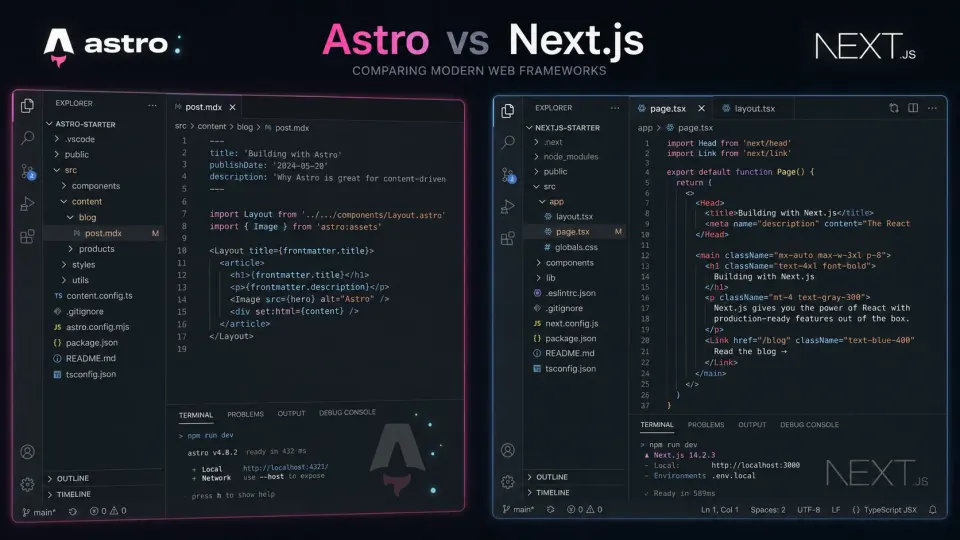
The first time someone asked me to recommend a framework for their content site, I said Next.js because it was the name I had heard most. They came back three months later with a site that was technically functional but overly complex: an App Router setup with Server Components for a blog that published twice a week. I had recommended the right brand and the wrong tool.
The Astro vs Next.js choice looks complicated from the outside because both are modern JavaScript frameworks that can build similar-looking websites. The distinction that matters is not performance benchmarks or ecosystem size. It is what you are actually trying to build.
I have since learned to ask what the site does before recommending a framework. Most of the time the answer is “publishes articles,” and the conversation gets simpler from there.
The core difference
Astro’s philosophy: Ship as little JavaScript as possible. Build content sites where performance is the default, not something you optimize toward. Use components from any framework as isolated islands of interactivity only where actually needed.
Next.js’s philosophy: Full-stack React. Server-side rendering, static generation, API routes, edge functions, streaming: all in one framework built to scale from simple sites to complex applications.
These philosophies produce different defaults for the same page:
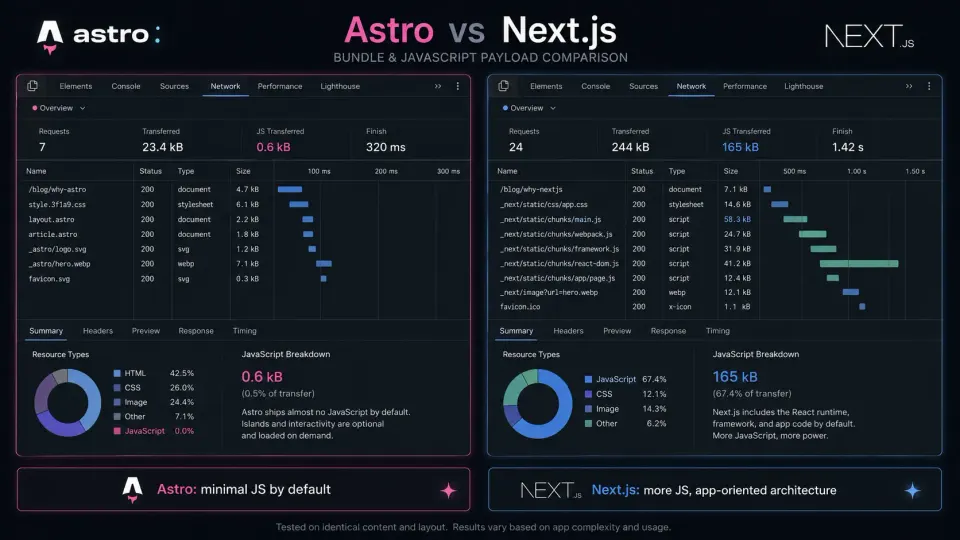
- A blog post in Astro: roughly zero KB of JavaScript shipped to the browser
- A blog post in Next.js: roughly 100 to 150 KB: React runtime plus the page component
For a content page with no interactivity, that JavaScript is overhead. Astro does not load what it does not use.
Full comparison
| Factor | Astro | Next.js | Winner |
|---|---|---|---|
| Default performance | Excellent: zero JS on static pages | Good, but JS bundle ships by default | Astro |
| React app support | Partial: islands only | Full: built for React apps | Next.js |
| Content and MDX support | First-class: Content Collections built-in | Works but requires more setup | Astro |
| Server-side features | SSR available but not the primary focus | Core strength: SSR, ISR, API routes | Next.js |
| Learning curve | Moderate: new concepts but simpler mental model | Steeper: App Router and Server Components add complexity | Astro |
| Hosting flexibility | Any static host, free tiers available | Best on Vercel; other hosts need adapters | Astro |
| Bundle size | Near-zero JS for static content | Larger JS bundle: React ships to client | Astro |
| Ecosystem | Growing but smaller | Large: React ecosystem plus Next.js community | Next.js |
Performance: Astro wins on content pages
For content sites, Astro’s performance advantage is real and consistent from what I have observed directly.
Astro’s Island Architecture means client-side JavaScript loads only for components that explicitly require it. A static article page with no interactive components ships zero JavaScript. The HTML is pre-built at compile time and the browser receives a clean document with no framework overhead.


Next.js, even with static generation enabled, ships React to the browser by default. Server Components introduced in the App Router reduce this, but the baseline JavaScript payload remains larger than Astro’s for equivalent content pages. This is based on public benchmark comparisons and Next.js documentation. My direct Next.js experience is from prototypes, not production load testing.
The practical implication: for a blog or affiliate content site where most pages are static articles, this performance gap shows up in Core Web Vitals scores.
Content workflow: Astro’s home turf
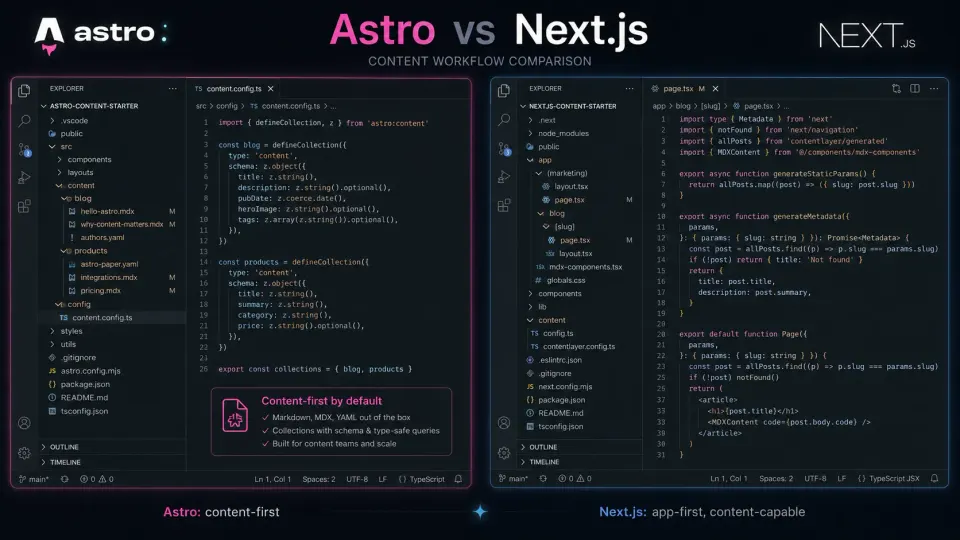
Astro was designed for content. Content Collections is a first-class feature with TypeScript-validated schemas, type-safe frontmatter, built-in MDX support, and automatic slug generation from filenames. I use this on this site and it works cleanly at production scale.
src/content/
├── blog/
│   └── my-post.mdx
├── products/
│   └── vultr.yaml
Next.js supports MDX and content management, but it requires more setup: choosing an approach, often installing additional packages, and wiring up content fetching. It works. Content is not the primary design focus of Next.js, and the setup reflects that.
React applications: Next.js’s home turf
For actual React applications (user dashboards, authenticated flows, real-time features, complex state management): Next.js is the right framework. Based on documentation and the framework’s design intent.
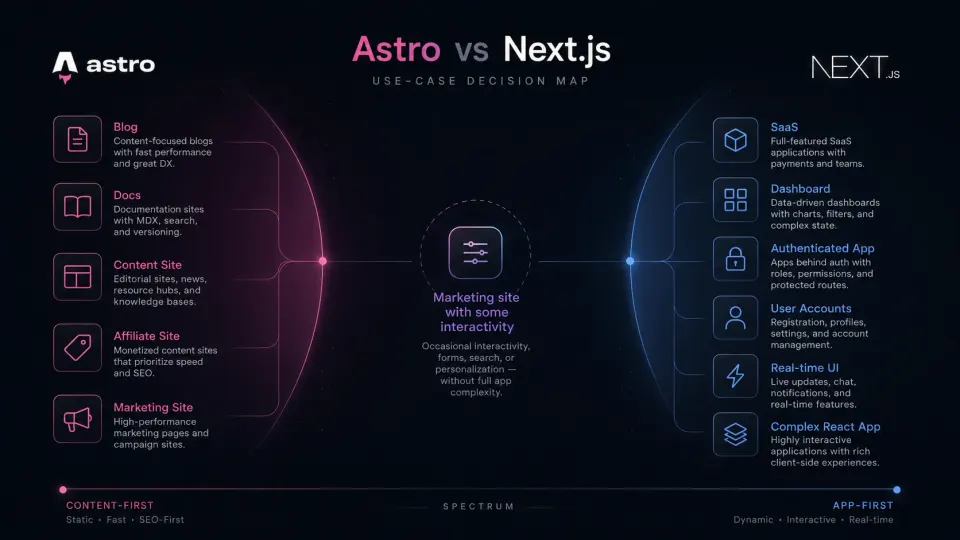
Astro’s islands support React components, but working against the grain if your entire site is essentially a React application. Island Architecture fits “mostly static with some interactive widgets.” It is awkward for “mostly interactive with some static pages.”
If you are building a SaaS product, a user-facing dashboard, or anything with real-time data and accounts, Next.js is the appropriate choice.
Learning curve
Next.js has become significantly more complex. The App Router introduced Server Components, Client Components, nested layouts, streaming, Suspense boundaries, and a new data-fetching model. It has a lot of capability, but the mental overhead is real. Developers experienced with the older Pages Router find the App Router non-trivial.
Astro’s mental model is simpler: write HTML templates with component syntax, use MDX for content, mark interactive components as client:load or client:idle. Fewer concepts, clearer boundaries.
For a developer new to modern JavaScript frameworks, Astro is a gentler starting point. For a developer already in the React ecosystem, Next.js builds on familiar ground.
Hosting
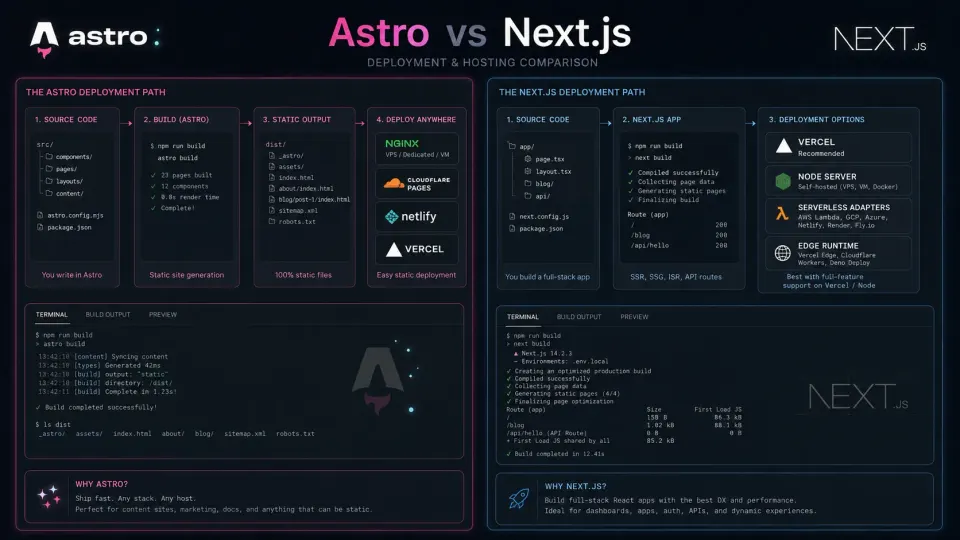
Astro: Works on any file server. Static output runs on Cloudflare Pages, Vercel, Netlify, or a VPS with Nginx. This site runs on a Vultr VPS with Nginx at around $20/month for the server.
Next.js: Works best on Vercel, built by the Next.js team. Other platforms (Netlify, Cloudflare, self-hosted) require adapters and do not always support all features. Full Next.js feature support is most reliable on Vercel, and Vercel has a cost at scale.
For a content site, Astro’s hosting flexibility is a real practical advantage.
Who should use which
- Building a blog, docs site, or content-heavy site
- Performance and Core Web Vitals are the priority
- You want minimal JavaScript shipped to users
- Managing content via MDX and YAML files
- You want flexible, cheap hosting options
- Building a full React application
- Your site needs dynamic data, user auth, or real-time features
- You or your team are deeply in the React ecosystem
- You need API routes and server-side logic
- You are deploying to Vercel and want the full platform
The honest bottom line
Most developers asking “Astro or Next.js?” are building content sites: blogs, portfolios, documentation, affiliate sites. For those use cases, Astro is the better choice in 2026. It is simpler, faster by default, and designed for exactly that problem.
Most developers who should be using Next.js already know they need a React application and are not asking this question in the same way.
If you are building a marketing site with a few interactive elements (a search widget, a contact form, a newsletter signup), Astro handles that well with islands. You do not need Next.js for “mostly static with some interactive components.”
Frequently Asked Questions
Is Astro faster than Next.js?
Can Astro replace Next.js?
Is Next.js overkill for a blog?
Does Astro support React?
Which has better SEO: Astro or Next.js?
Does Next.js work on hosting other than Vercel?
Disclosure: Some links on this page are affiliate links. If you make a purchase through them, I may earn a small commission at no extra cost to you. I only recommend products I've genuinely evaluated. Full disclosure →