WordPress vs Astro: Full Platform Comparison
A detailed head-to-head comparison of WordPress and Astro covering performance, CMS features, developer experience, and which to choose.
WordPress wins for client-editable sites, WooCommerce, and plugin-heavy projects. Astro wins for developer-controlled content sites, static blogs, and affiliate sites where performance matters.
| Factor | Wordpress | Astro | Winner |
|---|---|---|---|
| Default performance | Needs optimization — caching, CDN required | Fast by default — static HTML, zero JS | Astro |
| Client content editing | Built-in admin dashboard | No dashboard — developer edits files | Wordpress |
| E-commerce | WooCommerce — industry standard | None built-in | Wordpress |
| Plugin ecosystem | Thousands of plugins | Small ecosystem — build features in code | Wordpress |
| Hosting cost | PHP hosting from ~$3/mo | Static hosting — free tiers available | Astro |
| Content model | Database-driven CMS | File-based Content Collections (MDX/YAML) | Tie |
| Security | Active patching required | Static HTML — minimal attack surface | Astro |
| Build complexity | Low for editors, medium for devs | Low for content, medium for setup | Tie |
| Type-safety | None built-in | Full TypeScript with Content Collections | Astro |
- Client websites where non-technical users need to edit content
- WooCommerce e-commerce stores
- Sites with plugin-dependent functionality
- Businesses with multiple content editors
- Developer-owned blogs and content sites
- Static affiliate sites like this one
- Documentation and portfolio sites
- Performance-critical sites where Core Web Vitals matter
This comparison is the detailed WordPress vs Astro breakdown. For the wider platform decision, start with my WordPress vs modern stack guide. If you already come from WordPress and want the transition path, read Astro for WordPress developers.
WordPress and Astro are often compared as if one is obviously better. They’re not. WordPress is a CMS designed for non-technical content management. Astro is a static framework designed for developer-owned content sites. Comparing them directly is like comparing a delivery truck to a sports car — the better choice depends entirely on what you’re doing.
Platform overview
WordPress is a PHP CMS that stores content in a MySQL database and renders pages server-side. It powers over 40% of all websites. Non-technical users can edit content through the WordPress admin dashboard. Plugins extend functionality for almost any use case.
Astro is a JavaScript static site framework that compiles templates and content into static HTML at build time. It supports Content Collections for structured, type-safe content in MDX and YAML files. Deployment requires no PHP or database — plain HTML files served by any static host or Nginx.
Full feature comparison
| Factor | WordPress | Astro | Winner |
|---|---|---|---|
| Default performance | Needs optimization — caching, CDN required | Fast by default — static HTML, zero JS | Astro |
| Client content editing | Built-in admin dashboard | No dashboard — developer edits files | WordPress |
| E-commerce | WooCommerce — industry standard | None built-in | WordPress |
| Plugin ecosystem | Thousands of plugins | Small ecosystem — build features in code | WordPress |
| Hosting cost | PHP hosting from ~$3/mo | Static hosting — free tiers available | Astro |
| Content model | Database-driven CMS | File-based Content Collections (MDX/YAML) | Tie |
| Security | Active patching required | Static HTML — minimal attack surface | Astro |
| Build complexity | Low for editors, medium for devs | Low for content, medium for setup | Tie |
| Type-safety | None built-in | Full TypeScript with Content Collections | Astro |
Performance: the clearest difference
Performance is where Astro wins most definitively.
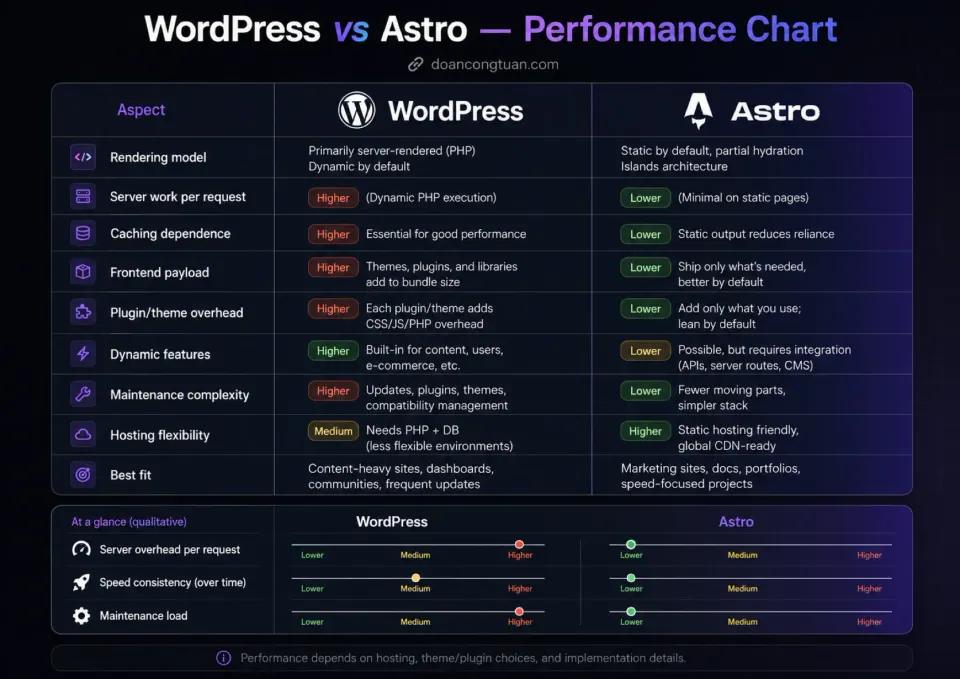
A default WordPress install on shared hosting without caching will score in the 50-70 range on Google PageSpeed mobile. With LiteSpeed cache or WP Rocket, this improves to 80-90 range. With managed hosting (Kinsta, WP Engine) and aggressive optimization, 90+ is achievable but requires real investment.
An Astro static site served via Nginx ships clean HTML with zero JavaScript on content pages. PageSpeed mobile scores of 95+ are the norm, not a goal.
This performance difference is not just about scores. It’s about load time, Core Web Vitals, and the maintenance overhead of keeping WordPress performance tuned.
The content editing reality
Performance is where Astro wins. The CMS dashboard is where WordPress wins. And this is ultimately more important for most projects.
WordPress’s admin dashboard is familiar, polished, and used by millions of non-technical users every day. A client can log in, open a page, edit text, upload an image, and hit Update without help from a developer.
Astro has no dashboard. Content lives in MDX files in a Git repository. Editing requires a code editor, familiarity with frontmatter, and a deployment step before changes go live. This is fine — and actually excellent — for developer-owned sites. It’s completely impractical for most client sites.
The question “who edits the content?” settles the WordPress vs Astro debate faster than any benchmark.
Developer experience
For developers, Astro is the more pleasant experience in 2026.
Content Collections with TypeScript schemas give you validated, type-safe content. Break a frontmatter field and you get a build error, not a broken page at runtime. The component model is clean. The MDX support is first-class. The build output is predictable.
WordPress development requires comfort with PHP, MySQL, the WordPress hook system, and often a specific theme framework or page builder. It’s a larger surface area. The DX has improved with modern tooling, but it still feels like working around a legacy CMS architecture.
That said — WordPress developer skills are more marketable for freelancers. There’s more WordPress client work than Astro client work by a wide margin.
Which should you choose?
- Non-technical users or clients need to edit content
- WooCommerce or complex e-commerce is required
- You need specific plugins that solve specific problems
- Long-term client handoff is part of the plan
- You're building client sites where editing independence matters
- You control all content via Git and MDX files
- Performance and Core Web Vitals are top priorities
- You're building a blog, docs, or affiliate content site
- Minimal infrastructure and maintenance overhead matter
- You want a modern TypeScript developer experience
Hosting considerations
For WordPress, managed hosting makes a real difference for performance:
For Astro, any static host works. This site runs on a VPS with Nginx serving the dist/ folder directly. Vercel and Netlify free tiers are also excellent for Astro.
Frequently Asked Questions
Can Astro handle SEO as well as WordPress?
Is Astro hard to learn coming from WordPress?
What do I lose by switching from WordPress to Astro?
Can I use Astro with a headless WordPress backend?
Disclosure: Some links on this page are affiliate links. If you make a purchase through them, I may earn a small commission at no extra cost to you. I only recommend products I've genuinely evaluated. Full disclosure →