WordPress vs Webflow: Which Is Better for Your Project?
A practical comparison between WordPress and Webflow for developers, designers, and agencies deciding on a platform.
WordPress is better for client-editable CMS sites, WooCommerce, and plugin-dependent features. Webflow is better for design-led projects where visual control matters more than plugin flexibility.
| Factor | Wordpress | Webflow | Winner |
|---|---|---|---|
| Design freedom | High with page builder; limited without | Very high — pixel-level control in visual editor | Webflow |
| Built-in CMS | Full CMS — blog, pages, CPTs | Webflow CMS — collections and fields | Tie |
| E-commerce | WooCommerce is the standard | Webflow Ecommerce — limited compared to WooCommerce | Wordpress |
| Plugin ecosystem | Thousands of plugins for every use case | Limited integrations via Zapier and embed codes | Wordpress |
| Hosting | You choose and manage your host | Hosting included — no separate host needed | Tie |
| Pricing at scale | Hosting cost + premium plugins | Can get expensive — per-site and CMS plans | Wordpress |
| Client editing experience | WordPress dashboard — familiar, functional | Webflow Editor — clean but limited | Wordpress |
| Developer control | Full access — PHP, database, server | Limited — can't run server-side code | Wordpress |
| Vendor lock-in | Low — portable to any PHP host | High — export HTML only, no full migration path | Wordpress |
- WooCommerce e-commerce stores
- Sites needing extensive plugin ecosystems
- Non-technical clients who want full CMS control
- Projects on tight budgets
- Design-led marketing sites and landing pages
- Agencies who want design control without code
- Membership or editorial sites with a design budget
- Teams comfortable with Webflow's CMS model
Part of the WordPress vs Webflow decision is whether you want a theme/plugin ecosystem or a visual builder platform. For the WordPress side, I compare theme options in my WordPress themes for affiliate sites guide.
Webflow is only one alternative to WordPress. I compare the broader decision across WordPress, Astro, Webflow, and Next.js in my WordPress vs modern stack guide.
WordPress vs Webflow is a genuinely interesting comparison because they target similar audiences — agencies and developers building client websites — but from very different philosophies. WordPress is a CMS first, a design tool second. Webflow is a design tool first, with a CMS attached.
What WordPress and Webflow actually are
WordPress is open-source software that runs PHP and MySQL on a server you choose and manage. It has a block editor (Gutenberg), a plugin ecosystem with tens of thousands of options, and a dashboard that non-technical users can learn in an afternoon. The design experience depends heavily on what theme and page builder you use.
Webflow is a hosted web design platform. You build sites in Webflow’s visual editor — a browser-based designer that gives you CSS-level control without writing CSS manually. Hosting is included. Webflow handles the infrastructure. You export HTML, but you can’t run server-side code or install arbitrary plugins.
Head-to-head comparison
| Factor | WordPress | Webflow | Winner |
|---|---|---|---|
| Design freedom | High with page builder; limited without | Very high — pixel-level control in visual editor | Webflow |
| Built-in CMS | Full CMS — blog, pages, CPTs | Webflow CMS — collections and fields | Tie |
| E-commerce | WooCommerce is the standard | Webflow Ecommerce — limited compared to WooCommerce | WordPress |
| Plugin ecosystem | Thousands of plugins for every use case | Limited integrations via Zapier and embed codes | WordPress |
| Hosting | You choose and manage your host | Hosting included — no separate host needed | Tie |
| Pricing at scale | Hosting cost + premium plugins | Can get expensive — per-site and CMS plans | WordPress |
| Client editing experience | WordPress dashboard — familiar, functional | Webflow Editor — clean but limited | WordPress |
| Developer control | Full access — PHP, database, server | Limited — can't run server-side code | WordPress |
| Vendor lock-in | Low — portable to any PHP host | High — export HTML only, no full migration path | WordPress |
The design experience
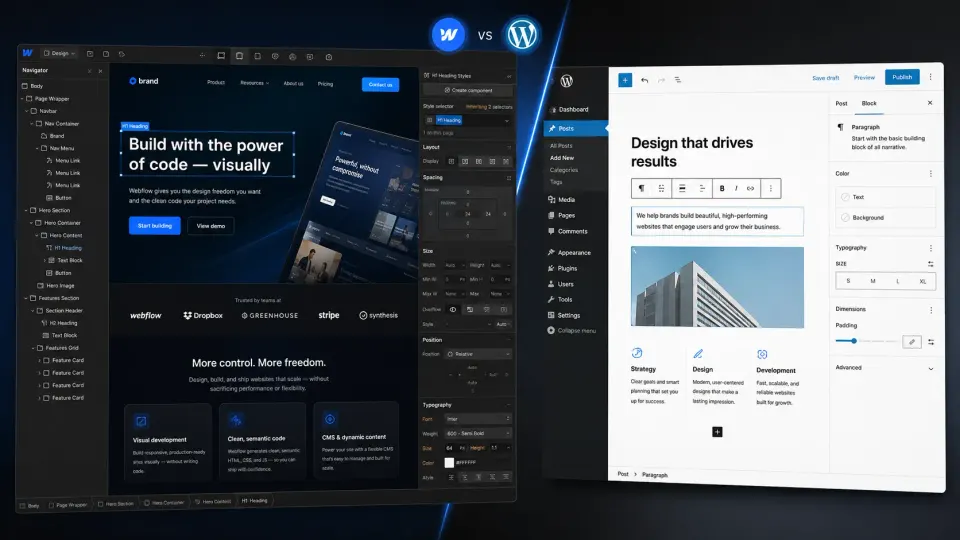
This is where Webflow wins clearly. Webflow’s visual editor is genuinely impressive — you can build pixel-perfect layouts with proper CSS Grid and Flexbox without writing a line of code. Animations, interactions, responsive breakpoints — all in a visual interface.
WordPress’s design experience depends on what you’re using. With Elementor or Divi, you get drag-and-drop that covers most use cases. With Gutenberg alone, you get a block editor that’s good for content but limited for custom layout design. Neither approaches Webflow’s design fidelity.
For a designer who wants to implement their own vision without a developer translating it into code, Webflow is the better tool.
The CMS comparison
Both platforms have a CMS. The experience is different.
WordPress CMS is mature and flexible. Custom post types, taxonomies, custom fields with ACF, REST API, multi-author roles, revision history — it’s been developed for 20+ years and can handle complex content architectures. The admin dashboard is familiar to millions of users globally.
Webflow CMS uses Collections — structured content types with custom fields. It’s cleaner and easier to set up for simple use cases like a blog or portfolio. For complex multi-relationship content (products with categories with authors with tags with related content), WordPress’s flexibility wins.
For client editing: the WordPress dashboard is more familiar territory for most non-technical users. Webflow’s Editor (the client-facing editing interface) is clean but more limited than the WordPress admin.
E-commerce
If e-commerce is a core requirement, this decision is straightforward: WordPress with WooCommerce.
WooCommerce is the most feature-complete e-commerce solution for WordPress and has the largest ecosystem of extensions. It handles everything from simple digital downloads to complex variable products, subscriptions, and B2B pricing.
Webflow Ecommerce exists and works for basic product catalogs, but it’s not in the same league as WooCommerce for complex e-commerce. If your project needs a serious store, WordPress wins this category clearly.
Vendor lock-in: the honest conversation
This is the most important practical difference that often gets glossed over.
WordPress lock-in is low. Your content is in a MySQL database you control. You can export it. You can move it to any PHP host. The CMS belongs to you.
Webflow lock-in is real. Webflow can export static HTML, but that export doesn’t include a working CMS. If you need to move off Webflow — because pricing increased, features changed, or the client wants something different — you’re essentially rebuilding the site. The HTML export is a starting point, not a migration path.
Before recommending Webflow to a client, make sure they understand this. The hosting cost and the export limitation should be part of the conversation.
Pricing comparison
WordPress hosting: as low as $3-4/mo for shared hosting, $35-100/mo for managed hosting. Plus $0-300/yr for premium themes and plugins.
Webflow: free for prototyping, but hosting starts at $14/mo per site (Basic). A site with a CMS and more than 2,000 CMS items needs the $39/mo CMS plan. For an agency building many client sites, the per-site licensing adds up quickly.
For budget-conscious projects, WordPress hosting is cheaper. For projects where design iteration speed saves development time, Webflow’s included hosting might offset the cost.
Which should you choose?
- E-commerce is a core requirement (WooCommerce)
- Complex content architecture with many post types
- You need specific plugins that solve specific problems
- Long-term portability and avoiding vendor lock-in matters
- Client comfort with the WordPress dashboard is important
- Design fidelity is the top priority
- Designer wants to build without a developer translating
- Marketing sites, landing pages, portfolios
- You're comfortable with Webflow's hosting and CMS constraints
- Client has budget for Webflow's per-site pricing
The reality for agencies
Many agencies use both. WordPress for content-heavy or e-commerce sites. Webflow for design-led marketing sites. The skill overlap is limited — Webflow doesn’t really use “WordPress skills” — but the business logic is sound: use the right tool for the job.
If you’re building client sites and need to pick one to specialize in: WordPress has a larger market and more diverse use cases. Webflow has stronger differentiation for design-focused agencies.
Frequently Asked Questions
Is Webflow better than WordPress for agencies?
Can you migrate from Webflow to WordPress?
Is Webflow more expensive than WordPress?
Which is better for SEO — WordPress or Webflow?
Does Webflow have a CMS?
Disclosure: Some links on this page are affiliate links. If you make a purchase through them, I may earn a small commission at no extra cost to you. I only recommend products I've genuinely evaluated. Full disclosure →