I spent months trying to make a WordPress site fast enough.
Not a blog. A price comparison site with tens of thousands of products, constant price updates, and traffic that would spike unpredictably when a deal went viral on Facebook.
I tried everything: FastCGI cache, Redis object caching, WP Rocket, a CDN, image optimization, database query optimization, upgrading the VPS more than once. Each step helped. None of it was enough.
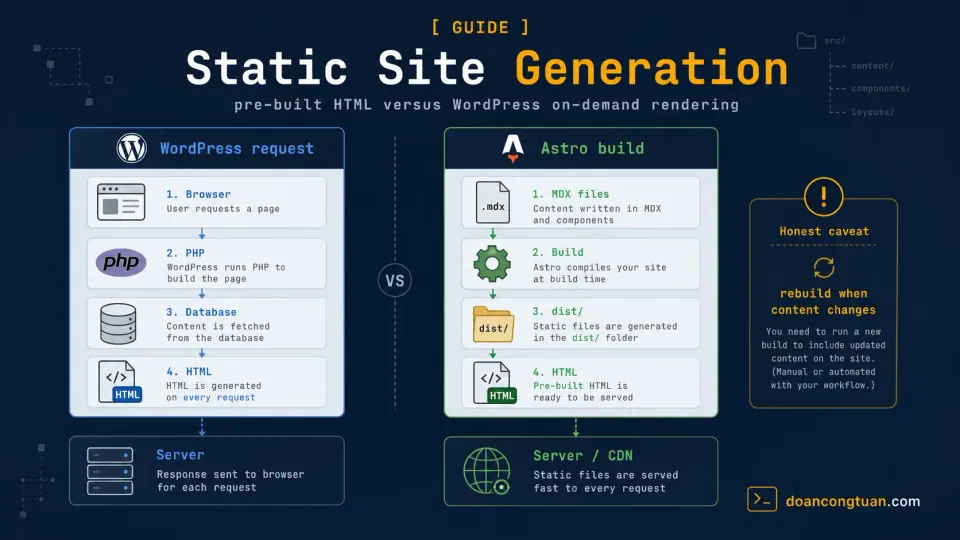
The site was architecturally the wrong tool for the job. Every uncached page request triggered WordPress, which triggered PHP, which queried the database and assembled the page, thousands of times per hour, for pages whose layout and core content had not changed in days.
When I finally moved the repeatable content pages to a static architecture, the server load dropped noticeably. The product data still changed on a schedule, but those updates triggered controlled rebuilds. Visitors received pre-built HTML instead of forcing WordPress to assemble the same page structure again and again.
That experience taught me more about static site generation than any tutorial could.
What happens during an uncached WordPress request
To understand static site generation, you first need to understand what the alternative looks like under the hood.
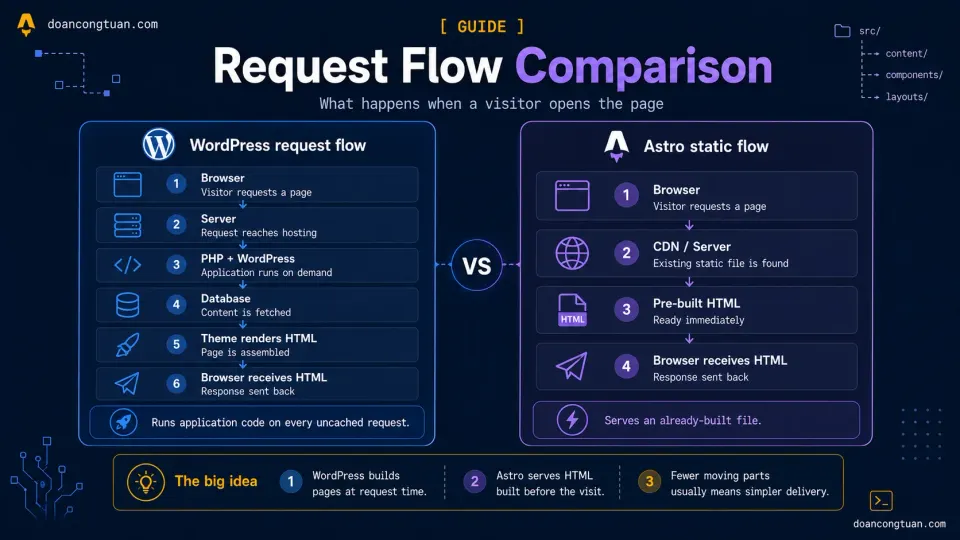
The exact sequence depends on the hosting stack, theme, plugins, and cache layers. When a request is not fulfilled by a full-page or edge cache, a WordPress page commonly follows a flow like this:
1. Visitor's browser sends request to your server
2. Server receives request, wakes up PHP
3. PHP loads WordPress core files
4. WordPress parses the URL, identifies the post
5. PHP connects to MySQL database
6. Database query runs to fetch post content, title, meta, comments
7. WordPress applies theme template to the data
8. PHP outputs completed HTML
9. Server sends HTML to browser
10. Browser renders the page
The important distinction is that steps 2-9 require application work when the request misses every full-page cache layer. A cache hit may bypass most or all of this sequence.
How long an uncached request takes varies widely. Hosting quality, theme and plugin code, database health, external calls, and current traffic all matter. A well-tuned WordPress site can respond quickly; a poorly optimized site or an overloaded origin can take much longer.
Full-page caching stores the generated response so WordPress does not have to repeat the same work for every visitor. It is effective, but it adds another system to configure and understand: cache warming, invalidation, storage, hit rates, and the behavior of pages that cannot be cached.
Static generation changes the default model by creating the page before the request arrives.
What happens when someone visits a static Astro page
1. Visitor's browser sends request to CDN
2. CDN serves the generated HTML from an edge cache or fetches it from the deployment origin
3. CDN sends the HTML to the browser
4. Browser renders the page
For a pre-rendered route, no WordPress application, PHP process, or database query is needed to assemble that page during the request. The HTML already exists.
CDN caching still exists, but a static hosting platform usually manages it as part of the deployment and delivery layer rather than relying on a WordPress page-cache plugin.
This is why static sites can feel fast before you add much optimization. A WordPress site can also be fast, but it usually needs a tuned stack, caching, and more ongoing attention.
The build step: when does the work happen?
For an uncached dynamic WordPress request, the page-generation work happens at request time, when someone visits.
For an Astro route configured for prerendering, the page-generation work happens at build time, before anyone visits.
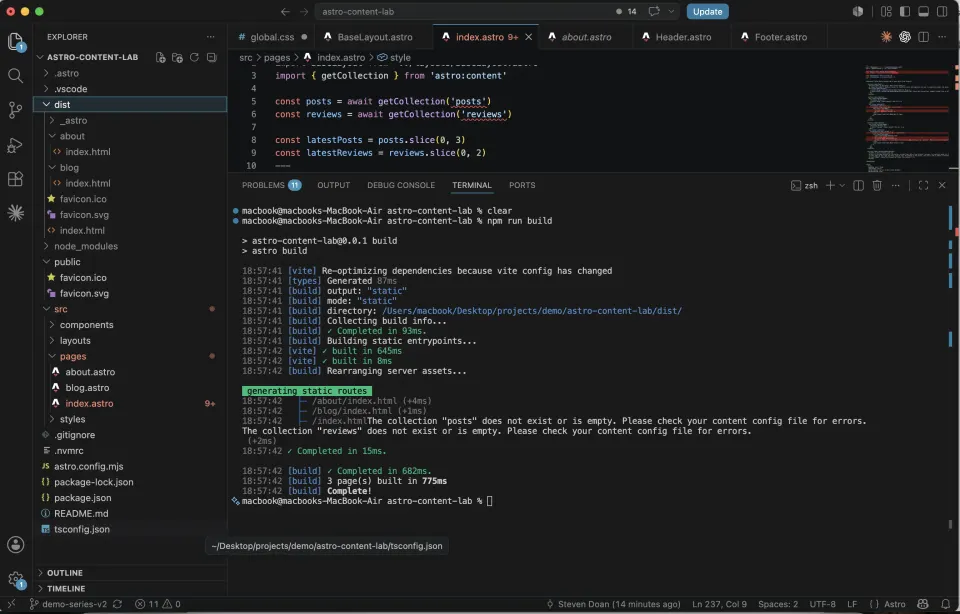
Run npm run build in your Astro project:
npm run buildAstro reads your content and templates and generates the production output. Routes configured for prerendering become HTML files inside the dist/ folder:
dist/
├── index.html
├── blog/
│   ├── hello-world/
│   │   └── index.html
│   └── astro-vs-wordpress/
│       └── index.html
├── reviews/
│   └── hostinger-review/
│       └── index.html
└── assets/
    └── styles.css
For a fully static project, each page route is represented by generated output that can be deployed to a static hosting service such as Vercel, Netlify, Cloudflare Pages, or an object-storage setup configured for website hosting.
Those pre-rendered pages do not need PHP, a database, or a long-running Node.js application at request time. Routes that you later choose to render on demand are a different case and require a compatible server adapter.
Why this matters for performance
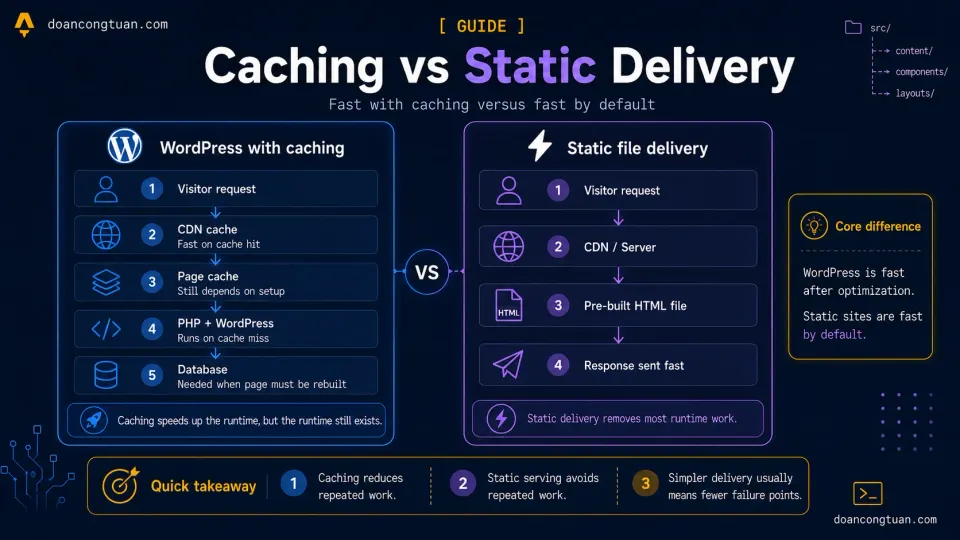
WordPress with effective full-page caching can serve anonymous pages very quickly. The difference is not that WordPress cannot be fast. The difference is where the complexity lives.
WordPress with full-page caching:
- A cache miss can trigger PHP, WordPress, and database work
- Content changes may require cache invalidation or regeneration
- Caching may be implemented through a plugin, the web server, a CDN, or several layers together
- Dynamic and personalized pages may bypass the full-page cache
- The cache stack becomes part of the system you monitor and maintain
Static delivery:
- The HTML already exists before the request arrives
- A pre-rendered page does not require PHP or a database query to be assembled
- No WordPress full-page cache plugin is required
- CDN caching is usually handled by the deployment platform
- A new deployment publishes a new or versioned set of generated files
Static generation therefore gives content pages a strong server-response baseline without requiring an application-level page cache. It does not guarantee a fast page by itself: oversized images, fonts, JavaScript, third-party scripts, and poor frontend design can still make a static site slow.
The real cost of dynamic rendering at scale
When I was running that price comparison site, a single viral Facebook post could send a sudden spike of visitors to the same product page within the hour.
On WordPress, that could mean fresh PHP execution and database queries during the worst possible moment, especially after cache purges, fresh deploys, or pages that had not been warmed yet.
The server struggled. Response times climbed, and some requests timed out.
On a static architecture, most of that traffic can be served from cached copies at CDN edge locations. Even when an edge location needs to fetch the generated file from the deployment origin, it does not need to run WordPress, PHP, and a database query to assemble the page. The origin therefore performs far less work, so a sudden spike is usually easier to absorb.
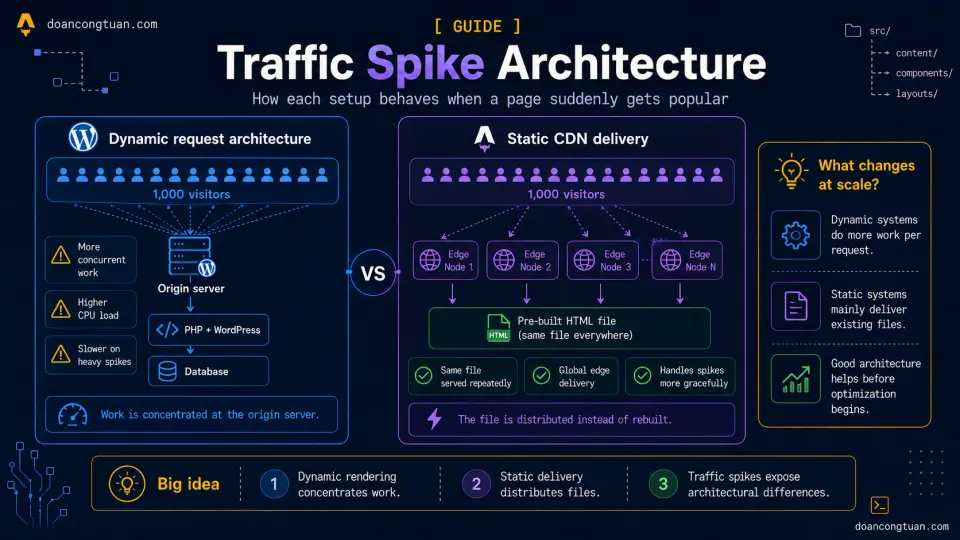
A WordPress site with correctly configured full-page edge caching can behave similarly for anonymous visitors. The difference is that static generation starts with an already-generated page, while WordPress needs the cache and origin behavior to be configured correctly.
This is why static generation is not just a developer preference. For repeatable content pages under traffic spikes, it can be the simpler architecture.
What pure static HTML cannot do by itself
Let’s be honest about the limits.
Keep real-time data current inside the pre-rendered HTML. A generated file cannot update its own stock prices, inventory, or account data after deployment. You need to rebuild the page, fetch current data in the browser, or render that route on demand.
Accept user-generated content without a dynamic service. Comments, forum posts, account profiles, and form submissions need somewhere to validate and store data. A static frontend can connect to services such as Supabase or a dedicated comments platform, but those dynamic systems still exist behind the page.
Run database-backed search by itself. WordPress can query its database at request time. A static site usually builds a search index for a client-side tool such as Pagefind or sends searches to an external service such as Algolia.
Give non-technical editors a dashboard automatically. A client cannot be expected to edit Markdown and run a build. They need a CMS layer such as TinaCMS, a headless CMS, or a dynamic CMS such as WordPress.
Static generation can still be one part of an architecture that includes all these features. The key is recognizing which parts can be pre-rendered and which parts genuinely need live application behavior.
Mixing static and on-demand routes
Astro is not all-or-nothing. In its default static output mode, Astro pre-renders routes during the build. After adding an adapter for a supported server platform, you can opt an individual page or endpoint out of prerendering:
---
export const prerender = false
---
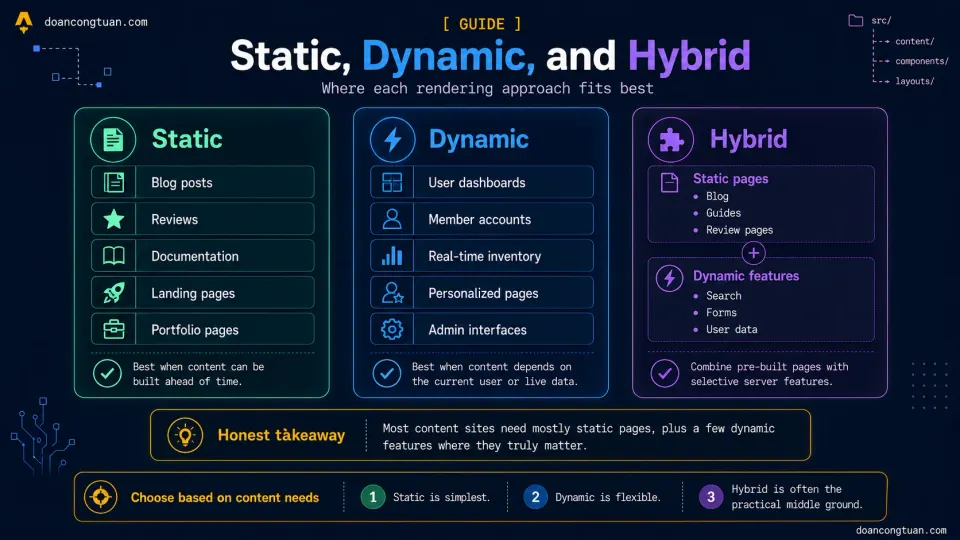
The rest of the site can remain static. A content project might use:
- A pre-rendered blog → generated HTML files
- A pre-rendered review section → generated HTML files
- A contact endpoint → handled on demand
- A protected account or admin area → rendered on demand
People often describe this as a hybrid architecture because static and dynamic behavior exist in the same project. In current Astro configuration, however, you do not select a separate hybrid output mode. You keep the static default and opt selected routes into on-demand rendering with a server adapter.
This series returns to on-demand rendering in the backend section, after the static foundation is clear.
How the build fits into the workflow
Once you understand SSG, the Astro workflow makes sense:
Write content → Run build → Deploy dist/ folder → Site is liveWith Vercel or Netlify connected to GitHub, the last two steps are automatic:
Write content → git push → Vercel builds → Site is liveWith that Git-based workflow, you do not manually upload the generated folder for each edit. You push the change, the platform runs the configured build, and a new deployment becomes live. Build and deployment times vary with the number of pages, integrations, and hosting platform.
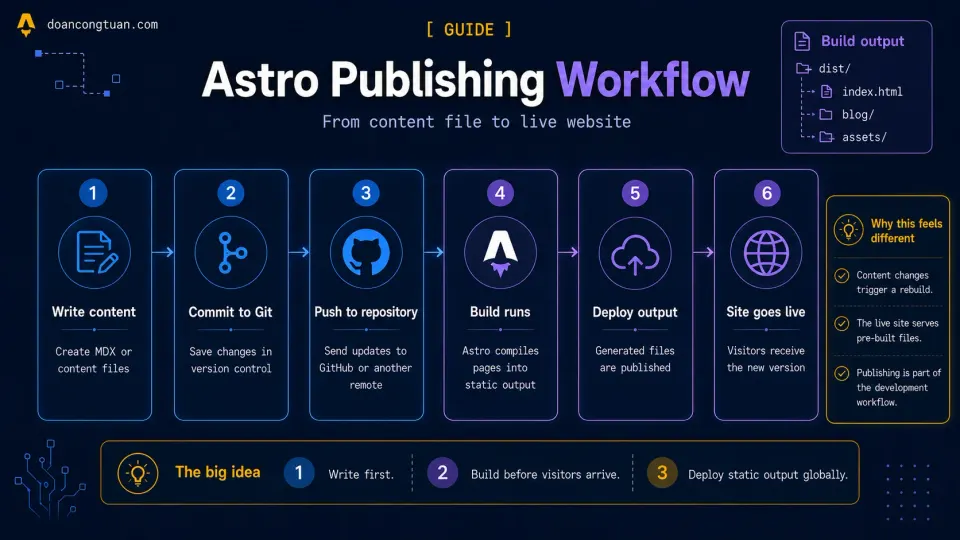
For a solo developer or a small technical team managing a content site, this workflow is cleaner than the WordPress deployment flow I used for years.
Running your first build
Try it now on the demo project. In your terminal:
npm run buildWatch the output. Astro will list every page it generates:
▶ dist/index.html
▶ dist/blog/hello-world/index.html
▶ dist/blog/astro-vs-wordpress/index.html
▶ dist/reviews/hostinger-review/index.html
▶ dist/guides/how-to-deploy-astro/index.html
...
✓ Built in 2.34s
Then look inside the dist/ folder to see what Astro generated.
To test the production output correctly, run:
npm run previewOpen the local URL printed by Astro. This serves the generated output over HTTP, which matters because direct file:// URLs can break absolute asset paths, JavaScript modules, and nested routes.
That is the core of static site generation: source files and templates go into a build, and deployable output comes out.
Next step: deploy the generated site
Now that you know what Astro puts inside dist/, the next step is to publish that output through a Git-based deployment workflow. Continue with How to Deploy Astro to Vercel: From Local to Live in 5 Minutes.