In 2024, I was running a price comparison site on WordPress. Tens of thousands of products. WooCommerce as the backbone. ReHub + Content Egg for affiliate data. The works.
The site worked. Until it really didn’t.
A VPS that used to be enough stopped being enough. I upgraded server resources more than once, adding more RAM, more CPU, a bigger box. It helped for a while. It never fully solved it. I tried every caching plugin combination I knew: FastCGI cache, WP Rocket, Redis object cache, the whole stack. Performance improved. Then another plugin update would undo part of the work. Core Web Vitals were a disaster.
I spent more time maintaining the infrastructure than building the actual site.
That’s when a friend mentioned Jamstack. ChatGPT suggested I look at Hugo, Astro, Next.js. I looked into a few. I kept coming back to Astro.
A quick note on the timeline: this Astro series did not start as polished tutorials.
It started as rough notes while I was moving from my old WordPress workflow into Astro. I wrote down what confused me, what broke, what felt better than WordPress, and what still felt uncomfortable.
Now, in 2026, I am editing those notes into a public series, updating the technical parts for Astro 6, and open-sourcing the demo project so other WordPress developers can follow the same path with fewer surprises.
This article is what I wish someone had written for me before I started: a straight explanation of what Astro is, from someone who came from WordPress and had to figure it out the hard way.
The simplest explanation
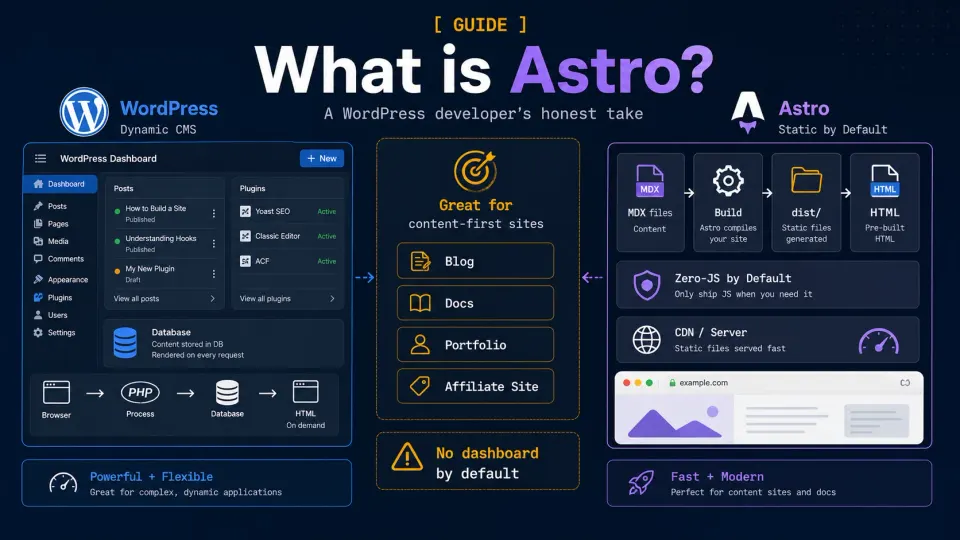
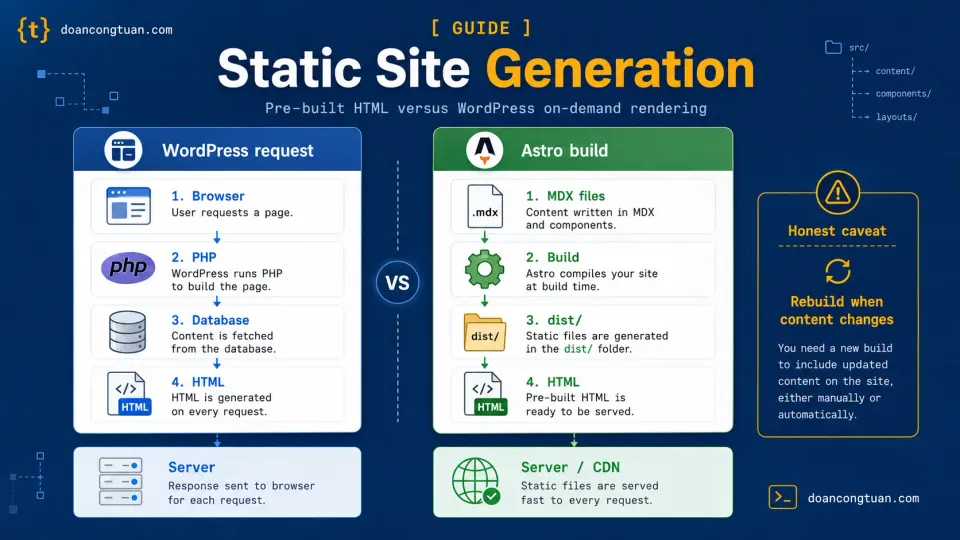
WordPress builds pages on demand.
Someone visits your site → WordPress wakes up → queries the database → runs PHP → assembles the page → sends it to the browser. Every request. Every time.
Astro builds pages in advance.
You run a build command → Astro reads your content files → generates complete HTML pages → you upload those files to a server. When someone visits → server finds the pre-built file → sends it. No database. No PHP. Just a file.
That’s the core difference. Everything else follows from it.
What Astro actually is
Astro is a web framework for content-driven websites. In its default static mode, it pre-renders your pages into HTML files at build time. Those files can then be hosted almost anywhere.
That matters because Astro is not only a “static site generator” in the old narrow sense. Static output is the mode most beginners should start with, but Astro can also be configured for server output when a project needs it. The official Astro output configuration docs explain the difference.
Astro is not:
- A database-driven CMS like WordPress
- A React framework like Next.js
- A page builder like Elementor
- A hosting service
It is a framework and build tool. You run it on your laptop, it produces files, you deploy those files.
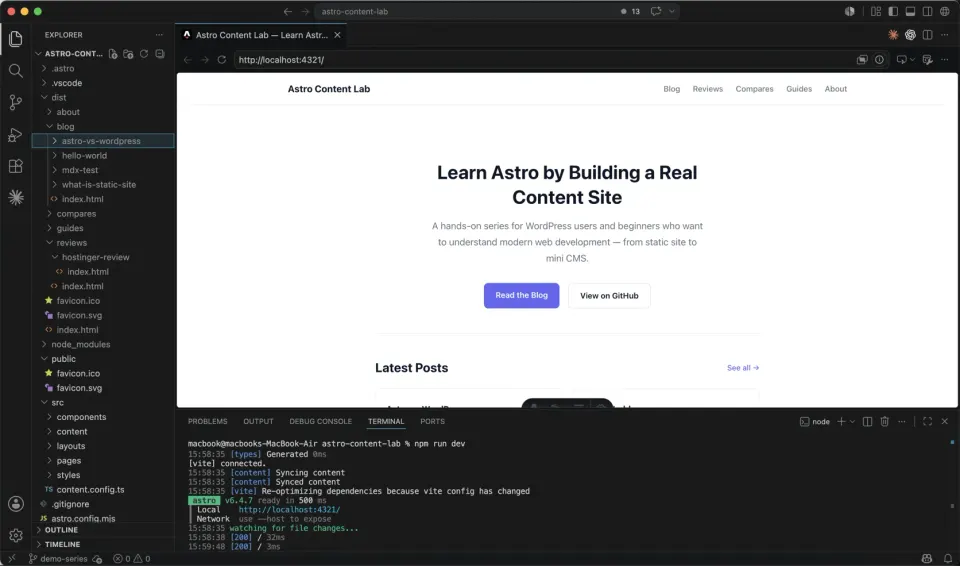
The files it produces are remarkably clean. A simple blog post built with Astro can be mostly HTML. The same content on a typical WordPress site with a theme and a few plugins often carries much more CSS and JavaScript.
That difference in output is the performance difference you see in real-world testing.
For official setup requirements, use the Astro installation guide as the source of truth.
What Astro does that WordPress doesn’t
Ships zero JavaScript by default.
This is the thing that surprised me most. A blog post rendered by Astro sends pure HTML to the browser until you explicitly add client-side interactivity. No JavaScript framework. No React runtime by default. No hydration unless you ask for it. Just HTML.
Many WordPress themes and plugins add frontend JavaScript: sliders, forms, analytics, popups, page builders, comment features, and tracking scripts. Even a well-optimized WordPress site often carries more frontend overhead than a simple Astro page.
Content lives in files, not a database.
Each blog post is a .md or .mdx file. Open it in VS Code. Edit it. Save it. The change is visible in your local browser immediately.
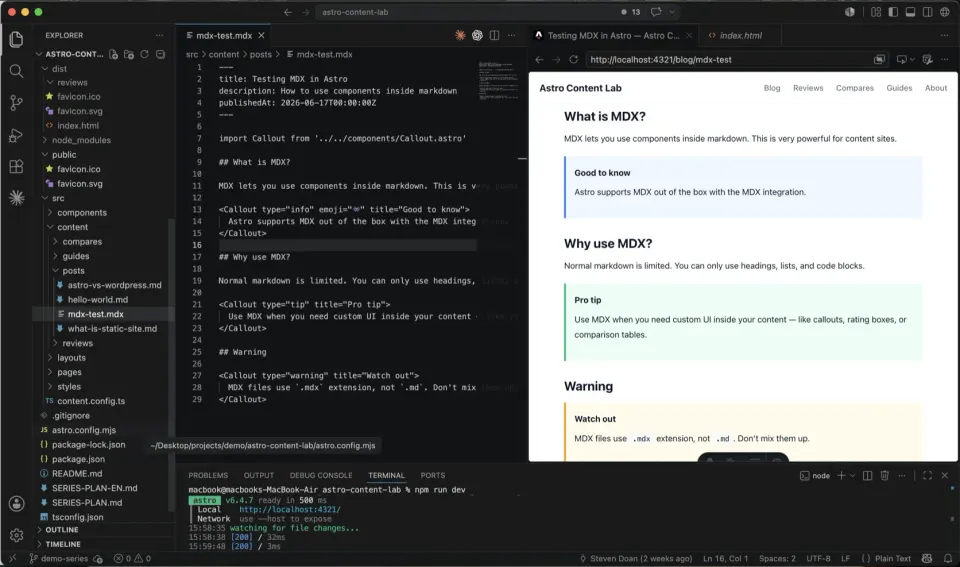
No database to back up. No MySQL to maintain. No wp-content/uploads folder to manage separately. Content and code can live in the same Git repository.
But this is also where Astro becomes less friendly for non-technical writers.
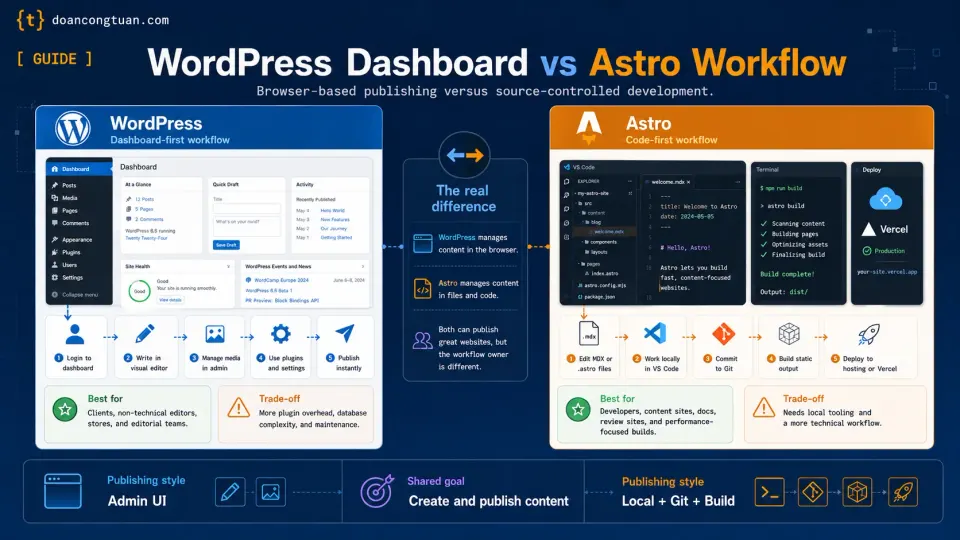
In WordPress, a writer can log in, write a post, click Publish, and never touch Git. In Astro, file-based content usually means opening VS Code, creating a Markdown or MDX file, committing the change, and pushing it through Git.
For a developer, that feels clean. For a pure content writer or SEO editor, it can feel like unnecessary friction. This is why a CMS layer, whether that’s TinaCMS, Sanity, Strapi, or another editor-friendly workflow, becomes important once the site grows beyond one technical owner.
Version control is built in.
Every content change goes through Git. You can see exactly what changed, when, and revert to any previous state. WordPress has revision history, but it’s inside the database, not easily viewable, and not integrated with your code workflow.
Security has a much smaller runtime attack surface.
A pre-built HTML page does not have a WordPress login endpoint, PHP theme files, plugin upload handlers, or a MySQL database sitting behind every request. The attack surface that keeps WordPress site owners busy, things like outdated plugins, core vulnerabilities, and xmlrpc.php attacks, is much smaller for a static Astro site.
That does not mean an Astro site is magically risk-free. Your GitHub account, hosting account, npm dependencies, build pipeline, forms, analytics scripts, and affiliate scripts still matter.
The difference is that the live site itself has far fewer moving parts.
What WordPress does that Astro doesn’t
This is the part most Astro tutorials skip. Let me be direct.
WordPress has an admin dashboard. Astro doesn’t.
If your client needs to log in and edit a blog post without calling you, that’s WordPress. If your content team needs to publish without touching code, that’s WordPress too.
Astro requires either a developer to update content, or a headless CMS layer like TinaCMS that adds complexity. Astro has excellent official documentation on content collections, but content collections are still a developer workflow, not a WordPress-style admin dashboard.
WordPress has WooCommerce. Astro doesn’t.
WooCommerce is still one of the most mature open-source e-commerce platforms available. If you need a real online store, with product variants, inventory, cart, checkout, order management, and payment gateways, WordPress + WooCommerce is hard to beat.
Astro can integrate with Stripe, Snipcart, or custom APIs for simple purchases, but it has nothing close to WooCommerce’s depth by default.
WordPress has a huge plugin ecosystem.
For better or worse. Membership systems, booking calendars, LMS platforms, forum software, complex form builders: most of it exists as a WordPress plugin. The official WordPress Plugin Directory contains tens of thousands of free plugins.
In Astro, you build what you need or integrate external services via API. More flexible for developers. More work than installing a plugin.
WordPress is easier for non-technical users.
The WordPress dashboard is one of the most usable content management interfaces ever built. Non-technical people figure it out quickly. That is a real advantage for agency work and client sites.
Who should use Astro
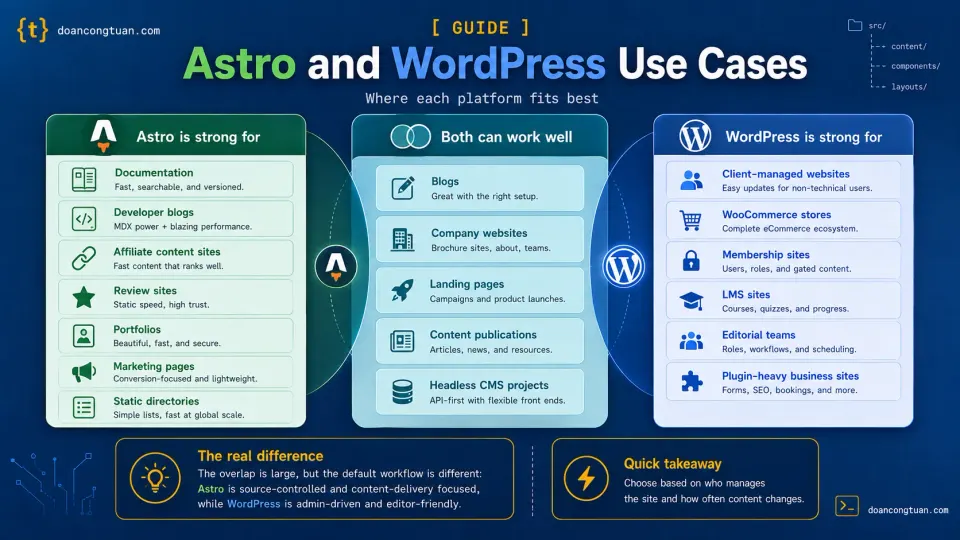
You’re a good fit for Astro if:
You’re a developer building a site you control. No client who needs to log in. You manage content through code and files. You’re comfortable with a terminal and Git.
You’re building a content site. Blog, review site, affiliate site, documentation, portfolio, marketing site. The content is relatively stable. It doesn’t change every minute.
Performance genuinely matters to you. You care about Core Web Vitals scores, page load time, and not having to install a caching plugin before your site is usable.
You want low maintenance. No WordPress plugin updates. No core updates breaking themes. No database maintenance. Deploy once, then mostly worry about content and source code instead of runtime CMS maintenance.
You’re a WordPress developer who wants to understand modern web development. Astro’s concepts, including components, layouts, static generation, and islands of interactivity, provide a solid foundation for understanding what’s actually happening in modern web development, without forcing you into the full complexity of React or Next.js on day one.
Who should NOT use Astro (yet)
Your client needs to manage their own content. Without a CMS layer, Astro is not client-friendly. Don’t put a client on Astro without a solid content management solution in place.
You need WooCommerce. Don’t try to rebuild WooCommerce’s functionality from scratch in Astro for a normal store project. Use WordPress.
You need user accounts, memberships, or community features. WordPress has mature solutions for all of this. Astro requires piecing together external services or moving into a more app-like architecture.
You’ve never used a terminal. The Astro workflow requires comfort with the command line. If the terminal is new territory, spend a week getting comfortable with it first.
Your deadline is next week and you’ve never touched Astro. Learn it on a personal project, not a client deadline.
The honest comparison
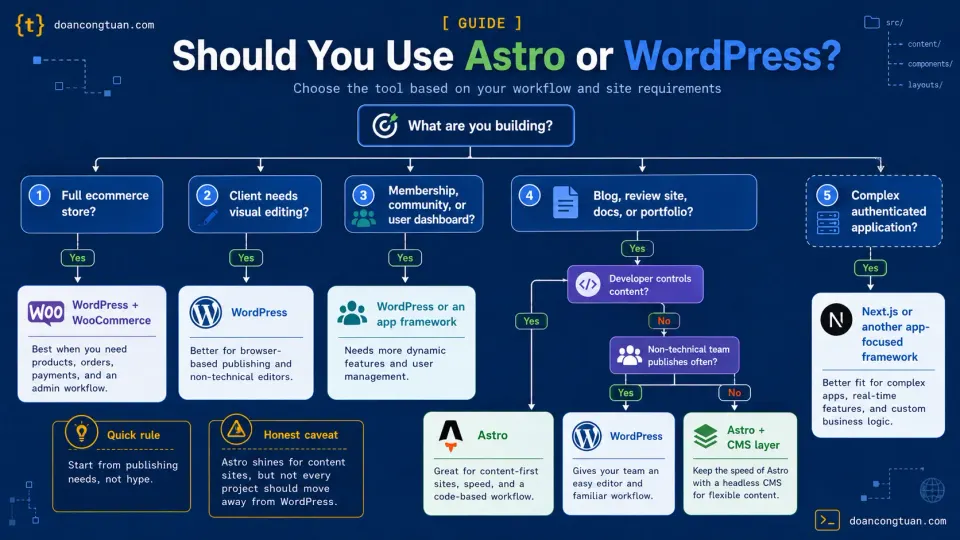
| WordPress | Astro | |
|---|---|---|
| Setup | Browser-based, 5 minutes | Terminal-based, 20 minutes |
| Content editing | Visual admin dashboard | Code editor or headless CMS |
| Performance | Requires optimization | Fast by default |
| Security | Requires ongoing maintenance | Much smaller runtime attack surface |
| E-commerce | WooCommerce, mature ecosystem | Limited, external services |
| Plugin ecosystem | Tens of thousands of plugins | Growing, not comparable |
| Hosting cost | PHP hosting from ~$3/mo | Free static hosting available |
| Client handoff | Easy, familiar dashboard | Difficult without CMS layer |
| Developer experience | Mature, well-documented | Modern, excellent tooling |
| Best for | Client sites, e-commerce, CMS-heavy | Content sites, developer projects |
The wrong choice isn’t the platform. It’s using the wrong platform for the wrong job.
Astro vs Next.js, briefly
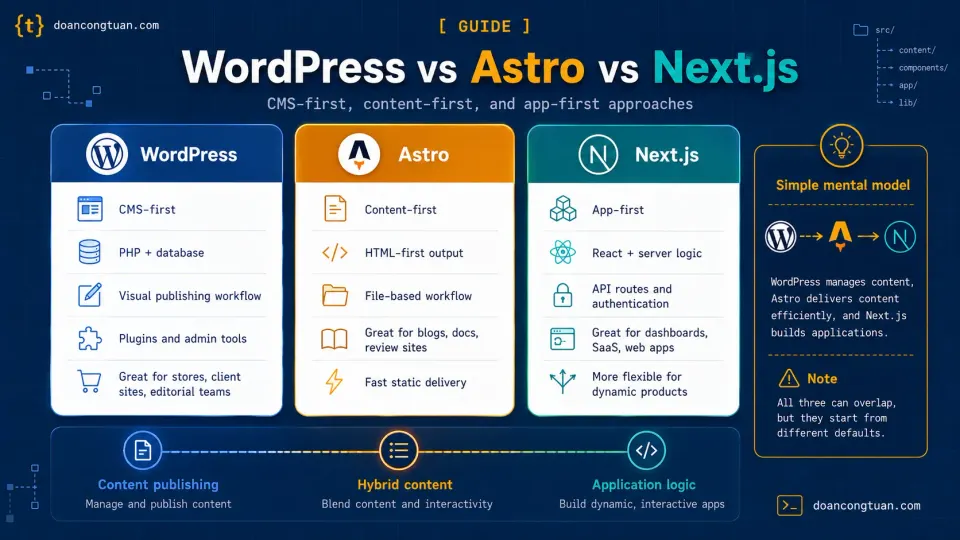
I don’t think beginners coming from WordPress should treat Astro and Next.js as the same category.
Next.js is a React framework for full-stack web applications. It handles server-side rendering, API routes, and authentication well, which makes it a solid choice when you are building dashboards, SaaS products, authenticated apps, and complex interactive interfaces.
Astro is more focused on content-driven websites. It lets you start with HTML-first pages, then add React, Vue, Svelte, or other interactive components only when you actually need them.
For a blog, review site, documentation site, or affiliate content site, I would rather start with Astro. For a complex app, I would reach for Next.js or another app-focused framework.
Why I’m building this series
I spent 10+ years building WordPress sites. I’m still building WordPress sites for clients who need a dashboard and WooCommerce. I will probably build WordPress sites for the rest of my career.
But for my own projects, like this site, affiliate content sites, and other content-driven tools, I’ve moved more of my workflow to Astro. The performance is better. The maintenance is lower. The workflow, once you learn it, is cleaner.
This series documents the transition honestly. What Astro does better. What WordPress still does better. Every mistake I made along the way.
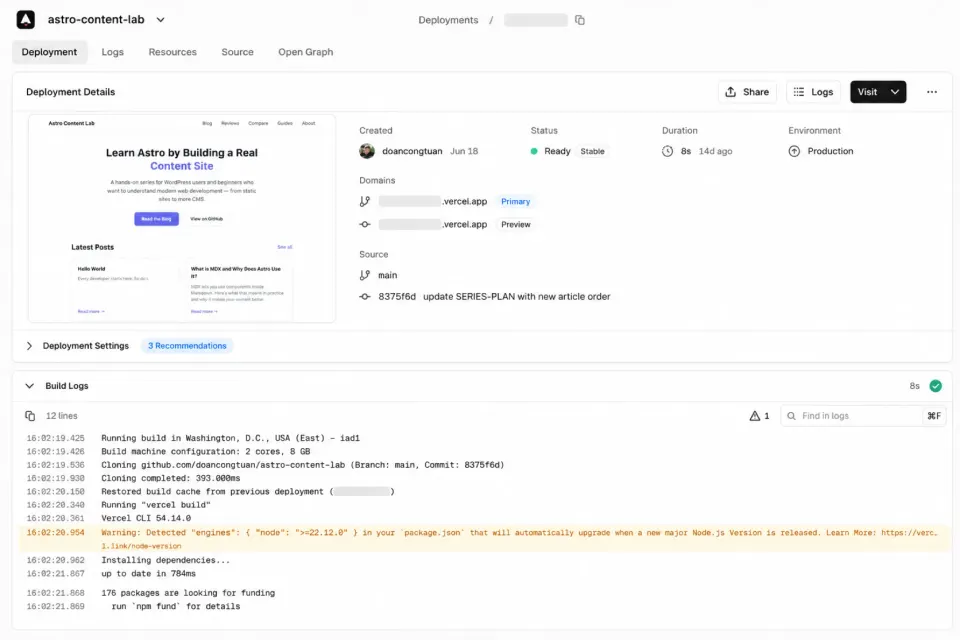
The demo project for this series, astro-content-lab, is built with Astro, deployed on Vercel, and the source code is public on GitHub. Every article uses code from that project as a real-world example.
If you’ve been wondering whether Astro is worth learning, this series is designed to answer that question for you.
If this sounds like the kind of workflow you want to try, start with the step-by-step setup guide:
Set up your first Astro project