When people say “set up a WordPress VPS,” they usually mean one of two software stacks. The difference comes down to one component: the web server.
What LAMP and LEMP Are
LAMP:
- Linux — operating system
- Apache — web server
- MySQL — database
- PHP — scripting language
LEMP:
- Linux — operating system
- ENginx (pronounced “engine-x”) — web server
- MariaDB or MySQL — database
- PHP-FPM — PHP process manager
The databases are interchangeable in practice — MariaDB is a drop-in MySQL replacement and the default on Rocky Linux. The meaningful choice is between Apache and Nginx.
Apache vs Nginx — What Actually Differs
How They Handle Requests
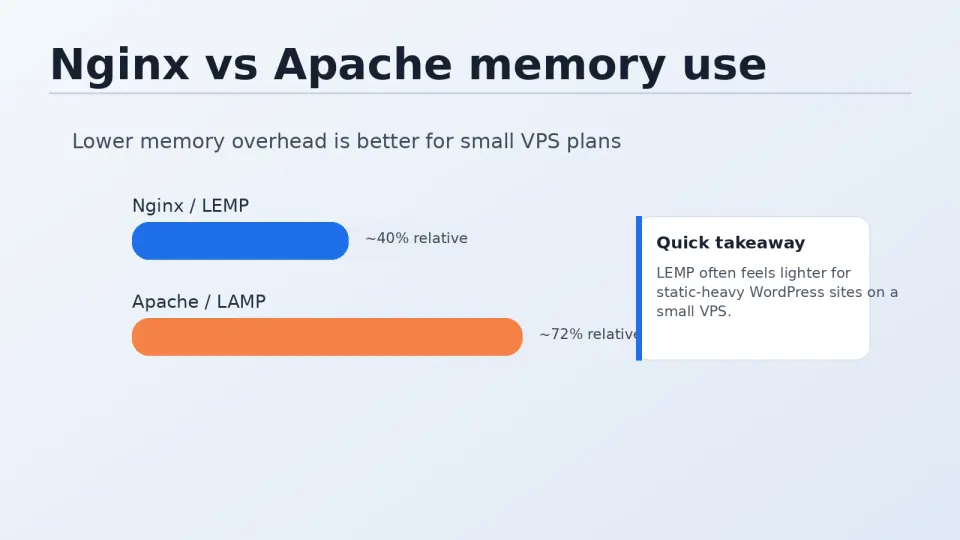
Apache uses a process-based model: each incoming connection spawns a new thread or process. Under high concurrent traffic, this scales poorly because each process consumes RAM while waiting for PHP or the database to respond.
Nginx uses an event-driven model: a small number of worker processes handle many connections simultaneously using non-blocking I/O. Under the same load, Nginx typically uses significantly less memory.
On a $12-20/month VPS with 1-2GB RAM, this difference is real. Apache can exhaust available memory under moderate traffic; Nginx handles the same load while leaving RAM available for PHP-FPM, MariaDB, and Redis.
FastCGI Cache — The Main Reason for Nginx
This is the feature that makes the most practical difference for WordPress.
Nginx includes built-in FastCGI caching: it can store the fully rendered HTML output of a WordPress page and serve it directly on subsequent requests — without running PHP, without querying the database. The page is served from memory in under a millisecond.
Without caching, every WordPress page request follows this path:
- Nginx receives the request
- Passes it to PHP-FPM
- PHP runs, queries MariaDB
- MariaDB returns results
- PHP generates HTML
- Nginx sends HTML to the visitor
With FastCGI cache on a cache hit:
- Nginx receives the request
- Serves cached HTML directly
Steps 2-5 are skipped entirely. The improvement on real traffic is measurable — time to first byte drops dramatically.
Apache can achieve similar results with plugins like WP Rocket’s page cache or server-side caching solutions, but Nginx’s implementation is native, requires no additional software, and operates at the server level rather than the application level.
PHP-FPM vs mod_php
Apache commonly uses mod_php — PHP runs as an Apache module, tightly coupled with the web server process. Each Apache process includes PHP, whether or not the current request needs it.
PHP-FPM is a separate process that handles PHP execution. Nginx communicates with it via a Unix socket. The advantages: PHP processes are independent of the web server, can be tuned separately, and support per-pool configuration (useful when running multiple WordPress sites with different PHP settings).
The Honest Take on Nginx Config
Nginx configuration is not beginner-friendly. The syntax is clean but unforgiving — a missing semicolon or a misconfigured location block fails silently or produces confusing 502 errors. Regex patterns for URL rewriting are particularly opaque.
When I started with Nginx, config errors were the source of most of my debugging time. Stack Overflow helped. Trial and error helped more. It was slow.
The situation is different now. You can paste a broken Nginx config into AI, describe what you want it to do, and get back a working version with an explanation. This has made Nginx’s learning curve meaningfully shallower for beginners.
This series provides the exact Nginx configs you need for each step. If something breaks, paste the error and the config into AI — you’ll get an answer faster than any forum.
Why Follow the Crowd Here
When I started with Nginx, I copied what tutorials recommended because I didn’t know enough to make an independent judgment. That turned out to be the right call — not because of the copying, but because Nginx actually is the better choice for a VPS running WordPress.
The reasoning:
- Less memory usage on limited VPS RAM
- FastCGI cache at the server level
- PHP-FPM decoupling
- Better handling of concurrent connections
You don’t need to understand all of this before installing it. The next article installs Nginx on Rocky Linux 9, and the configuration comes together piece by piece through Part 4 and Part 5.
What This Part Covers
Five articles building the LEMP stack from scratch:
- 4.2 — Install Nginx on Rocky Linux 9
- 4.3 — Install MariaDB and create the WordPress database
- 4.4 — Install PHP-FPM with the right version and extensions
- 4.5 — Configure the Nginx server block with FastCGI cache
- 4.6 — Test the full stack before installing WordPress
By the end of Part 4, you have a working web server environment. Part 5 installs WordPress on top of it.