
Webflow Website Builder
A strong visual build system when design precision matters more than plugin freedom.
Webflow is worth considering for design-led marketing sites, portfolios, startup landing pages, and client-editable brochure sites. It is less ideal for plugin-heavy WordPress workflows or app-like backend logic.
"Webflow is strongest when the site is a visual marketing asset. I would hesitate when the project is really a content database, a plugin ecosystem, or an application hiding behind pretty pages." — Steven Doan, doancongtuan.com
This is a research-based profile from a developer who usually prefers Astro or WordPress depending on the project. I see Webflow as a design and marketing platform, not as a replacement for every CMS or framework.
Webflow changed and simplified plans in May 2026. Site plans, workspace seats, bandwidth, CMS items, form limits, ecommerce, and enterprise needs can change the real monthly cost. Verify current pricing before quoting a client.
- Excellent visual control for designers who understand layout, spacing, responsive behavior, and interactions
- Hosted CMS avoids plugin updates, PHP hosting, cache plugins, and many WordPress maintenance chores
- Great for polished landing pages, startup sites, portfolios, and marketing pages that need fast iteration
- Client editing can be safer than giving non-technical users full WordPress admin freedom
- Interactions, animations, and design systems are much easier than coding everything manually
- Hosting, SSL, CDN, forms, and publishing are integrated into one platform
- Pricing can become confusing when site plans, workspace seats, CMS needs, bandwidth, and ecommerce are mixed
- Not ideal for plugin-heavy workflows, complex custom backend logic, or deep server-side control
- CMS export and platform portability are more limited than flat files or self-hosted WordPress
- Beginners can still make messy layouts if they do not understand CSS concepts
- Affiliate/content sites with hundreds of programmatic pages may be easier in Astro or WordPress
- Design-led marketing websites where visual polish and fast page iteration matter
- Startups that need a professional site before hiring a full frontend team
- Agencies handing clients a safer editing experience than WordPress admin
- Landing pages, portfolios, service sites, and brochure-style CMS projects
- Teams that want hosted convenience instead of managing WordPress hosting and plugins
- Sites that need many custom backend features, memberships, or plugin-like extensibility
- Developers who want full code ownership and Git-first content workflows
- Large affiliate databases or comparison directories with programmatic content generation
- Budget projects where every extra seat, site plan, and limit matters
- Clients who expect WordPress-style plugin freedom
How I Would Think About Webflow
Start from the editor, not the homepage
If the client needs to edit pages safely without touching WordPress plugins, Webflow becomes attractive. If the client needs complex content relationships, check CMS limits carefully.
Pricing is a system, not one number
Site plan, workspace seats, CMS items, bandwidth, forms, ecommerce, and enterprise needs can all affect cost. I would calculate the real setup before recommending it.
Great designers can move fast
Webflow rewards people who understand visual hierarchy and CSS concepts. It does not automatically make a weak design good.
Portability matters for content businesses
For long-term affiliate or programmatic SEO projects, I would compare Webflow against Astro or WordPress before committing the content model to a hosted builder.
Real Use Cases
Startup marketing website
Use Webflow when the team needs polished landing pages, fast design changes, CMS pages, and hosted convenience before a full engineering team is involved.
Agency-built client site
Webflow can give clients controlled editing without exposing them to plugin updates, theme conflicts, or WordPress maintenance.
Portfolio or brand site
For visual identity, interactions, case studies, and responsive design control, Webflow is often faster than coding everything from scratch.
Campaign landing pages
Marketing teams can build and iterate landing pages without waiting on a developer for every layout change.
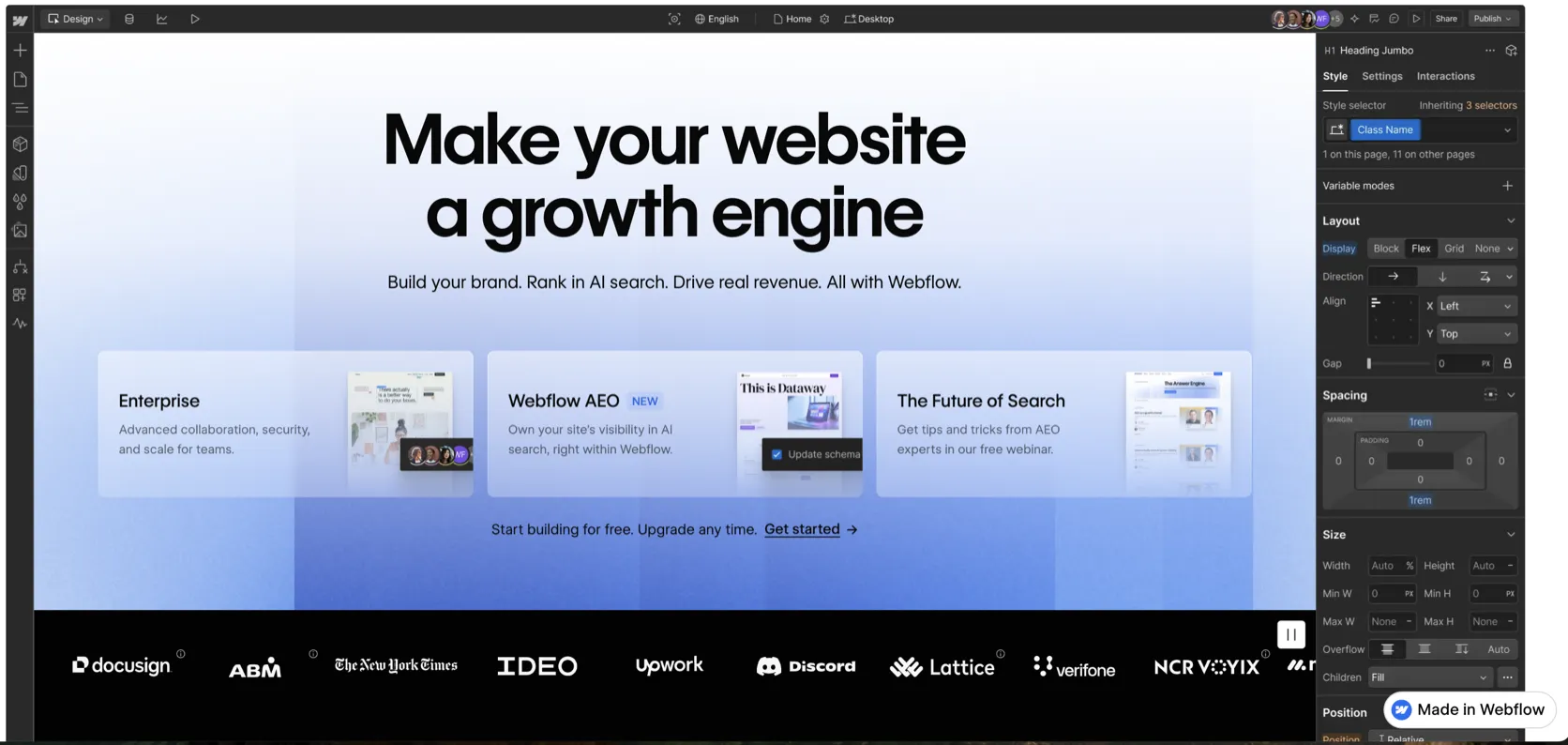
Interface
Key Features
- Visual Designer for HTML/CSS-style layout control
- Hosted CMS collections and dynamic pages
- Responsive breakpoints and interaction design tools
- Forms, SSL, CDN, and managed hosting
- Page building and client editing workflows
- Reusable components and design system patterns
- Workspace collaboration and roles depending on plan
- Ecommerce options for selected use cases
- Custom code embeds and integrations
- Webflow University and template ecosystem
From This Site
Articles, guides, and comparisons featuring Webflow.
Alternatives to Webflow
 WordPress
 The CMS I still respect — as long as the project actually needs a CMS.
 Astro Steven Uses This
 The framework I use when content, speed, and simple deployment matter more than a WordPress admin.
Frequently Asked Questions
Is Webflow better than WordPress?
For design-led marketing sites, Webflow can be cleaner and easier to maintain. For plugin-heavy content sites, WooCommerce, or complex editorial workflows, WordPress may still be better.
Is Webflow good for SEO?
Webflow can be good for SEO if the site structure, content, metadata, internal links, and performance are handled well. The platform alone does not guarantee rankings.
Can clients edit Webflow sites?
Yes, Webflow supports client editing and role-based collaboration depending on plan. It is often safer than giving clients unrestricted WordPress admin access.
Is Webflow expensive?
It can be, depending on site plan, workspace seats, CMS needs, ecommerce, and bandwidth. It is best evaluated as a hosted design and CMS platform, not just a monthly hosting fee.
Would I use Webflow for an affiliate site?
Only for a small, highly designed site. For large affiliate libraries, programmatic pages, or complex comparison data, Astro or WordPress is usually more flexible.
Webflow
Free Starter plan available. Webflow’s simplified 2026 site plans include Basic and a Premium plan around $25/mo yearly or $39/mo monthly for CMS-heavy sites, with workspace and enterprise costs separate.
Disclosure: Some links on this page are affiliate links. If you make a purchase through them, I may earn a small commission at no extra cost to you. I only recommend products I've genuinely evaluated. Full disclosure →