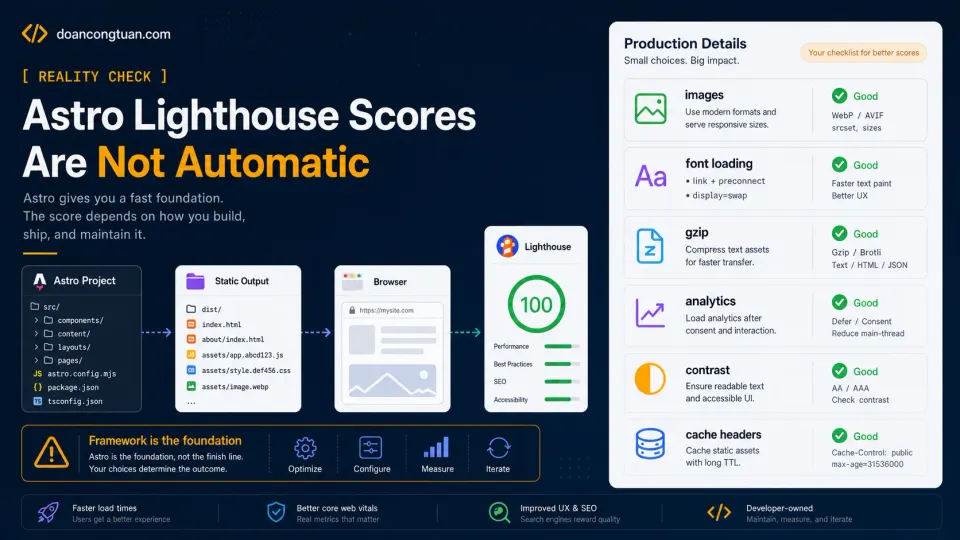
Astro Lighthouse scores can be excellent, but they are not automatic. Astro is fast, and that part is true. A fresh Astro site can feel almost unfair compared with a heavy WordPress setup, especially if you are coming from years of themes, plugins, page builders, caching plugins, database queries, and frontend scripts.
But there is a trap here. It is very easy to think:
I use Astro.
Astro is fast.
Therefore my site should automatically get 100 Lighthouse scores.
That is not how production websites work. Astro gives you a strong starting point: it removes a lot of complexity, makes static output easy, and helps you ship less JavaScript. But it does not protect you from every production mistake.
You can still load oversized screenshots, block rendering with external fonts, fire analytics too early, forget gzip, ship poor text contrast, and publish image-heavy pages without srcset. All on a perfectly static Astro site. That is exactly what I learned while optimizing this site.
Are Astro Lighthouse scores better by default?
I moved this site to Astro because I wanted a simpler content stack. My old WordPress workflow worked, but it came with a lot of moving parts:
PHP
MySQL
theme output
plugins
plugin CSS
plugin JavaScript
cache rules
image plugins
security plugins
SEO plugins
page templates
shortcodes
tracking scripts
A skilled WordPress developer can manage all of that, and I have seen people do it well. But for my own workflow, especially on older coupon and affiliate sites, it was hard to control everything. With Astro, the stack became smaller:
MDX content
Astro layouts
Astro components
CSS
build output
static files
Nginx
That alone changed the performance game. When the site builds, Astro outputs static files. Nginx serves them directly, no database call on every request, no PHP runtime building the page dynamically, no plugin layer deciding what to inject. That is a huge advantage. But it is only the starting point.
Static output does not mean optimized output
This is the most important distinction. A static site means the server can send prebuilt files, but it does not automatically mean those files are perfect. For example, this is static HTML:
<img src="/images/posts/example/large-screenshot.webp" alt="Example screenshot">But it is not an optimized image workflow. There is no srcset, no sizes, no explicit width and height, no smaller image for mobile, no loading strategy, so the browser may still download an image larger than needed. The file is static, but the image delivery can still be poor.
The same applies to fonts. This can be inside a static CSS file:
@import url('https://fonts.googleapis.com/css2?family=Inter:wght@400;600;700&display=swap');It is still render-blocking. A static Astro page can still load Google Analytics too early, and a static page can still have text too light to pass accessibility checks. Static is not the same as optimized. Static only means the page is prebuilt.
Why Lighthouse still matters
I do not worship Lighthouse. A 100 score does not mean a page will rank, does not mean the content is good, does not mean the article satisfies search intent. But Lighthouse is still useful because it catches basic technical problems, and it tells you when the page is fighting itself. For me, the value of Lighthouse is not ego. It is diagnosis. It points to things like:
Images are too large.
Text contrast is weak.
JavaScript is blocking too much.
Third-party scripts load too early.
Compression is missing.
The LCP element needs attention.
Those are real issues. Even if a 100 score is not a ranking strategy, fixing those issues makes the site cleaner, and that is why I still care about the score. Not because it replaces SEO, but because it removes technical friction.
The hidden production details
On my own Astro site, the last points did not come from changing frameworks. I was already on Astro. They came from boring production details.
1. Server compression
Astro generates files, but the server still has to serve them properly. If Nginx is not sending compressed HTML, CSS, JS, JSON, and SVG, the page can be heavier than it needs to be. The fix is not inside Astro. It is inside the server config. If you are new to Nginx configuration, the VPS series covers the full setup.
That is why I checked the live response:
curl -sD - -o /dev/null -H 'Accept-Encoding: gzip' https://doancongtuan.com/ \
  | grep -Ei 'content-type|content-encoding|vary'
The response should show something like:
vary: Accept-Encoding
content-encoding: gzip
If you never check live headers, you may assume compression works when it does not.
2. Font loading
Google Fonts are convenient, but convenience has a cost. If the font CSS blocks rendering, Lighthouse complains, and if the font files add extra network requests before the content is visible, the user pays for that too.
For this site, the fix was removing the CSS @import and loading fonts via a proper HTML <link> element with preconnect hints. The browser warms up the Google Fonts connection before the font request hits, and font-display: swap means text renders immediately with a fallback while the custom fonts load. Sometimes the best optimization is not adding a trick. It is fixing the order of what loads.
3. Analytics loading
Google Analytics is useful, but it is still a third-party script, and if it loads too early, it competes with the page itself. So I delayed analytics until after load and idle time. The principle is simple:
Content first.
Tracking later.
There is a tradeoff: very short visits may be tracked less perfectly. I accept that. For a content site, I would rather have the reader see the page faster than track every bounce with perfect precision.
4. Accessibility contrast
Performance is not the only Lighthouse category. My site had some contrast issues, not huge, but enough to affect the score and, more importantly, readability. Some muted text looked nice but was too light, so I made it stronger. This is one of those fixes that sounds small until you remember that real people read your site on bad screens, in sunlight, on old devices, and with imperfect eyesight. A fast page with hard-to-read text is not a good page.
5. Image delivery
Images were the biggest technical piece. Astro does not automatically optimize every image you put in public/images. If you upload a large screenshot and render it directly, the browser may still receive a large file. So I built a proper image workflow with Sharp:
Original image
→ 640px WebP variant
→ 960px WebP variant
→ 1280px WebP variant
Then I used Astro components to render the correct HTML:
ArticleImage
→ body images
→ loading="lazy"
→ srcset
→ sizes
→ width/height

HeroImage
→ main hero image
→ loading="eager"
→ fetchpriority="high"
→ srcset
→ sizes
→ width/height
I wrote the full technical breakdown here:
Astro Image Optimization with Sharp: How I Automated Responsive Images and Hit 100 Lighthouse Scores
This was the biggest reminder that framework performance and content performance are not the same thing. Astro can make the page shell light, but if you put heavy images into the page, you still need an image system.
Why Astro makes this easier
This article may sound like a list of things Astro does not do automatically, but I do not mean that as criticism. This is actually where Astro shines. The reason I like it is not that it magically fixes every issue. The reason I like it is that when something is wrong, I can usually find it: hero image wrong, I check the layout or HeroImage; body images wrong, I check ArticleImage; fonts blocking, I check global CSS and the head; analytics loads too early, I check one component; compression missing, I check Nginx. That is very different from my older WordPress workflow, where the problem might come from:
the theme
a child theme
a page builder
a plugin
a plugin add-on
a shortcode
a caching plugin
a minification setting
a CDN setting
a hook
a template override
WordPress can be optimized. I am not arguing otherwise. But for me, Astro made the problem smaller. That was the win.
The mistake beginners can make with Astro
The common beginner mistake is thinking Astro replaces performance thinking. It does not. You can still build a slow Astro site: too much JavaScript, heavy third-party embeds, giant images, render-blocking fonts, missing compression, poor CSS, layout shift. Astro gives you a good default, but it does not stop you from making bad production choices. That is why I think the better mindset is this:
Do not use Astro because you want to avoid learning performance.
Use Astro because it makes performance easier to understand.
That is a much healthier expectation.
A simple Astro production checklist
Before chasing a 100 score, I would run through these first:
1. Is the page mostly static?
2. Is unnecessary JavaScript avoided?
3. Are external fonts really needed?
4. Are analytics scripts delayed?
5. Are images responsive?
6. Does the hero image load with the right priority?
7. Do body images lazy-load?
8. Do images have width and height?
9. Is gzip or Brotli enabled?
10. Are text colors accessible?
11. Are cache headers sane?
12. Does the live HTML match what you expect?
That last point matters more than it sounds. Do not only trust your source code. Test the live output. Use Lighthouse, yes, but also use curl, browser DevTools, and view-source. The browser does not care what your intention was. It only cares what you actually shipped.
What I learned from pushing my site closer to 100
The biggest lesson was not about one specific fix. It was about responsibility. A fast framework gets you close, but production quality is still your job. Astro can help you avoid a lot of performance problems by default, especially compared with heavier stacks. But once your site becomes real, with content, images, analytics, styling, internal links, affiliate links, and screenshots, you still need a system.
For me, that system became:
Nginx compression
Optimized font loading (preconnect + display=swap)
Delayed analytics
Stronger contrast
Sharp image variants
ArticleImage
HeroImage
Prebuild automation
Live HTML checks
That combination is what pushed the site from good to much cleaner Lighthouse results.
A quick note about this case study
This article is based on doancongtuan.com, not a universal benchmark for every Astro site. When I mention 98–100 Lighthouse results, I am talking about my own testing during this optimization pass. My homepage reached near-perfect scores, and several important pages landed in the 98–100 range after the cleanup. The point is not that Astro guarantees perfect scores. The point is that Astro made the remaining performance problems easier to find and fix.
The honest bottom line
Astro is fast, but it is not magic. It gives you a cleaner foundation, fewer moving parts, and more control over the final HTML. That is already a huge advantage. But if you want 98–100 Lighthouse scores on a real content site, you still have to care about the boring details: compression, fonts, analytics, accessibility, and images.
The good news is that with Astro, those details are usually easier to fix. That is the real reason I like it: not because it guarantees 100, but because when I miss 100, I can usually understand why.