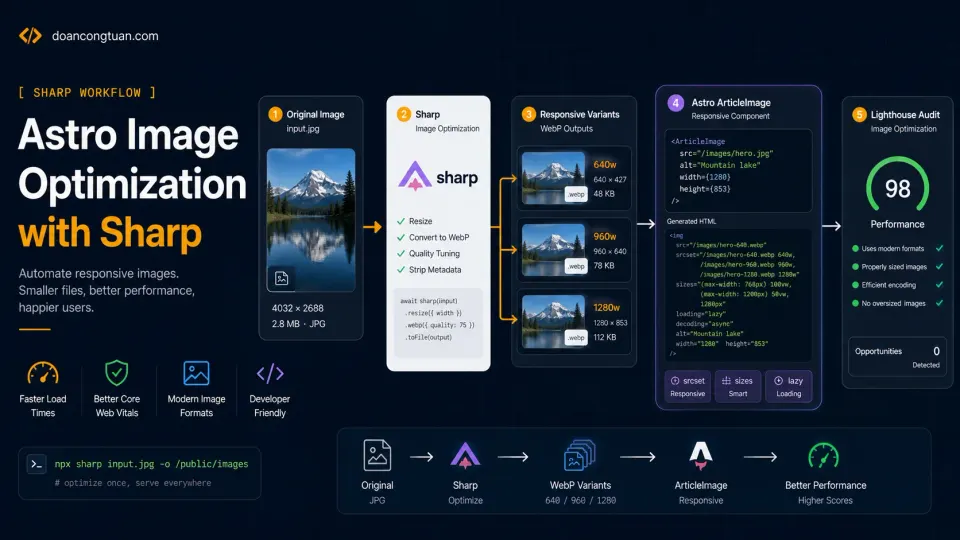
I thought moving from WordPress to Astro would automatically solve my performance problems. Astro image optimization proved me wrong in the most boring way: the framework was fast, but my screenshots were still too large for the browser.
No PHP, no database, no page builder, no plugin stack. Just static HTML files served by Nginx. That should be fast, right? It was fast. But it was not as clean as I expected.
When I tested some image-heavy pages on doancongtuan.com with Lighthouse, the score was not perfect. One blog post that should have been easy for Astro was still showing image delivery warnings. The site was static, but the browser was still being asked to download images that were larger than necessary. That was the humbling part. Astro was not the problem. My image workflow was.
Why does Astro image optimization still matter?
This site was already running on Astro. The production setup was simple:
Astro source files
→ npm run build
→ dist/ folder
→ rsync to VPS
→ Nginx serves static files
That setup is already much lighter than a normal WordPress stack. The full Nginx + VPS configuration behind this is covered in the VPS series, but for this article, the point is what Astro sends to the browser.
Lighthouse does not care what framework you use. It cares what the browser receives. And my browser was receiving image HTML like this in some places:
<img src="/images/posts/example/screenshot.webp" alt="Screenshot">Or, in older MDX posts:
That looks harmless. But it misses several important things:
No srcset
No sizes
No explicit width and height
No build-time resized variants
No consistent lazy/eager loading rule
No automatic protection against oversized screenshots
A 1600px-wide screenshot may look fine on desktop, but a mobile visitor does not need that full-size image. Without srcset, the browser has fewer choices. Without width and height, layout shift becomes easier to trigger. Without a proper hero image rule, the most important image can be handled the same way as every other image.
That is how a static Astro site can still feel technically messy. The full Lighthouse optimization case study covers all the other fixes alongside images: gzip, fonts, analytics, and contrast.
What I wanted from the image system
I did not want a workflow where I had to remember five manual steps every time I published an article, because that would fail eventually. The system needed to be practical:
1. Add the original image to public/images/...
2. Use the correct Astro component in MDX.
3. Run npm run build.
4. Let the build process generate responsive variants automatically.
The final goal was:
hero.webp
→ hero-640.webp
→ hero-960.webp
→ hero-1280.webp

screenshot.webp
→ screenshot-640.webp
→ screenshot-960.webp
→ screenshot-1280.webp
Then the HTML should look like this:
<img
  src="/images/posts/example/screenshot-960.webp"
  srcset="/images/posts/example/screenshot-640.webp 640w, /images/posts/example/screenshot-960.webp 960w, /images/posts/example/screenshot-1280.webp 1280w"
  sizes="(max-width: 760px) calc(100vw - 32px), 720px"
  width="1600"
  height="900"
  alt="Screenshot description"
  loading="lazy"
  decoding="async"
/>
For the hero image, the rule should be different:
<img
  src="/images/posts/example/hero-960.webp"
  srcset="/images/posts/example/hero-640.webp 640w, /images/posts/example/hero-960.webp 960w, /images/posts/example/hero-1280.webp 1280w"
  sizes="(max-width: 760px) calc(100vw - 32px), 960px"
  width="1600"
  height="900"
  alt="Hero image description"
  loading="eager"
  decoding="async"
  fetchpriority="high"
/>
Only the hero image gets loading="eager" and fetchpriority="high" because it is usually the LCP image. Body images should stay lazy.
Step 1: Install Sharp
Install Sharp as a development dependency:
npm install -D sharpSharp runs during build time and does not need to ship to the browser.
Step 2: Add a responsive image generation script
Create this file:
scripts/generate-responsive-images.mjsHere is the full script:
import fs from 'node:fs/promises'
import path from 'node:path'
import sharp from 'sharp'

const TARGET_DIRS = [
  'public/images/posts',
  'public/images/guides',
  'public/images/reviews',
  'public/images/comparisons'
]

const WIDTHS = [640, 960, 1280]
const IMAGE_EXTENSIONS = new Set(['.webp', '.jpg', '.jpeg', '.png'])

function isGeneratedVariant(filename) {
  return /-\d{3,4}\.webp$/i.test(filename)
}

async function fileExists(filePath) {
  try {
    await fs.access(filePath)
    return true
  } catch {
    return false
  }
}

async function shouldGenerate(sourcePath, outputPath) {
  if (!(await fileExists(outputPath))) return true

  const sourceStat = await fs.stat(sourcePath)
  const outputStat = await fs.stat(outputPath)

  return sourceStat.mtimeMs > outputStat.mtimeMs
}

async function processImage(filePath) {
  const ext = path.extname(filePath).toLowerCase()
  const filename = path.basename(filePath)

  if (!IMAGE_EXTENSIONS.has(ext)) return
  if (isGeneratedVariant(filename)) return

  const dir = path.dirname(filePath)
  const base = path.basename(filePath, ext)

  const image = sharp(filePath)
  const meta = await image.metadata()

  if (!meta.width || !meta.height) {
    console.log(`SKIP: cannot read size: ${filePath}`)
    return
  }

  for (const width of WIDTHS) {
    if (meta.width < width) continue

    const output = path.join(dir, `${base}-${width}.webp`)

    if (!(await shouldGenerate(filePath, output))) {
      console.log(`OK: ${output}`)
      continue
    }

    await sharp(filePath)
      .resize({ width, withoutEnlargement: true })
      .webp({ quality: 78 })
      .toFile(output)

    console.log(`CREATED: ${output}`)
  }
}

async function walk(dir) {
  if (!(await fileExists(dir))) return

  const entries = await fs.readdir(dir, { withFileTypes: true })

  for (const entry of entries) {
    const fullPath = path.join(dir, entry.name)

    if (entry.isDirectory()) {
      await walk(fullPath)
    } else {
      await processImage(fullPath)
    }
  }
}

for (const dir of TARGET_DIRS) {
  await walk(dir)
}
The key line is const WIDTHS = [640, 960, 1280]. For most article content those three sizes are enough: 640 for mobile and small screens, 960 for normal article width, 1280 for larger screens or high-density cases.
The script also skips images that are already generated variants:
if (isGeneratedVariant(filename)) returnWithout that guard, the script might try to process image-640.webp again and create messy nested variants.
Step 3: Connect it to npm scripts
In package.json, add:
{
  "scripts": {
    "images:responsive": "node scripts/generate-responsive-images.mjs",
    "prebuild": "npm run images:responsive",
    "build": "astro build && pagefind --site dist"
  }
}
The key is prebuild. NPM automatically runs it before npm run build, so the workflow becomes a single command:
npm run buildBefore Astro builds the site, Sharp generates any missing image variants. This means future articles are harder to mess up: if I add a new image to public/images/posts/my-new-article/, the next build creates the responsive variants automatically.
Step 4: Create an ArticleImage component for body images
The Sharp script creates the files, but the browser still needs HTML that actually uses them. For body images inside MDX articles, I use this component:
src/components/media/ArticleImage.astro---
import { existsSync } from 'node:fs'
import path from 'node:path'
import sharp from 'sharp'
interface Props {
src: string
alt: string
caption?: string
sourceNote?: string
framed?: boolean
width?: number
height?: number
priority?: boolean
sizes?: string
class?: string
imagePrompt?: string
}
const {
src,
alt,
caption,
sourceNote,
framed = false,
width,
height,
priority = false,
sizes = '(max-width: 760px) calc(100vw - 32px), 720px',
class: className = '',
} = Astro.props
const publicPathFromSrc = (imageSrc: string) =>
path.join(process.cwd(), 'public', decodeURIComponent(imageSrc).replace(/^\//, ''))
const ext = path.extname(src)
const base = ext ? src.slice(0, -ext.length) : src
const originalFile = publicPathFromSrc(src)
let intrinsicWidth = width
let intrinsicHeight = height
if ((!intrinsicWidth || !intrinsicHeight) && existsSync(originalFile)) {
const metadata = await sharp(originalFile).metadata()
intrinsicWidth = metadata.width
intrinsicHeight = metadata.height
}
const candidateWidths = [640, 960, 1280]
const candidates = candidateWidths
.map((candidateWidth) => {
const url = `${base}-${candidateWidth}.webp`
const file = publicPathFromSrc(url)
return { width: candidateWidth, url, file }
})
.filter((candidate) => existsSync(candidate.file))
const srcset = candidates.length
? candidates.map((candidate) => `${candidate.url} ${candidate.width}w`).join(', ')
: undefined
const defaultCandidate =
candidates.find((candidate) => candidate.width === 960) ||
candidates.find((candidate) => candidate.width === 1280) ||
candidates[candidates.length - 1]
const imgSrc = defaultCandidate?.url || src
---
<figure class:list={['article-img', framed && 'article-img--framed', className]}>
<img
src={imgSrc}
srcset={srcset}
sizes={srcset ? sizes : undefined}
width={intrinsicWidth}
height={intrinsicHeight}
alt={alt}
loading={priority ? 'eager' : 'lazy'}
decoding="async"
fetchpriority={priority ? 'high' : undefined}
/>
{caption && <figcaption>{caption}</figcaption>}
{sourceNote && <p class="source-note">{sourceNote}</p>}
</figure>
<style>
.article-img {
margin: 2rem 0;
}
.article-img img {
display: block;
width: 100%;
max-width: 100%;
height: auto;
border-radius: 16px;
border: 1px solid var(--border);
}
.article-img figcaption {
margin-top: 0.75rem;
color: var(--muted);
font-size: 0.95rem;
line-height: 1.6;
text-align: center;
}
.source-note {
margin-top: 0.5rem;
color: var(--muted);
font-size: 0.9rem;
}
</style>Now, instead of writing Markdown images like this:
I write:
<ArticleImage
  src="/images/posts/example/screenshot.webp"
  alt="Screenshot description"
  caption="Optional caption explaining what the reader is looking at."
/>
The component does several things:
1. Looks for screenshot-640.webp, screenshot-960.webp, and screenshot-1280.webp.
2. Builds a srcset if those files exist.
3. Uses the 960px variant as the default src when available.
4. Reads the original image dimensions with Sharp at build time.
5. Adds width and height.
6. Lazy-loads body images by default.
7. Falls back to the original image if variants are missing.
That fallback is important: if I forget to generate variants, the page still builds. It just will not be as optimized.
Step 5: Create a HeroImage component for the LCP image
Body images and hero images should not behave the same way. The hero image is usually near the top of the page and may become the LCP element, so it should not be lazy-loaded. For hero images, I use a separate component:
src/components/media/HeroImage.astro---
import { existsSync } from 'node:fs'
import path from 'node:path'
import sharp from 'sharp'
interface Props {
src: string
alt: string
width?: number
height?: number
sizes?: string
class?: string
}
const {
src,
alt,
width,
height,
sizes = '(max-width: 760px) calc(100vw - 32px), 960px',
class: className = '',
} = Astro.props
const publicPathFromSrc = (imageSrc: string) =>
path.join(process.cwd(), 'public', decodeURIComponent(imageSrc).replace(/^\//, ''))
const ext = path.extname(src)
const base = ext ? src.slice(0, -ext.length) : src
const originalFile = publicPathFromSrc(src)
let intrinsicWidth = width
let intrinsicHeight = height
if ((!intrinsicWidth || !intrinsicHeight) && existsSync(originalFile)) {
const metadata = await sharp(originalFile).metadata()
intrinsicWidth = metadata.width
intrinsicHeight = metadata.height
}
const candidateWidths = [640, 960, 1280]
const candidates = candidateWidths
.map((candidateWidth) => {
const url = `${base}-${candidateWidth}.webp`
const file = publicPathFromSrc(url)
return { width: candidateWidth, url, file }
})
.filter((candidate) => existsSync(candidate.file))
const srcset = candidates.length
? candidates.map((candidate) => `${candidate.url} ${candidate.width}w`).join(', ')
: undefined
const defaultCandidate =
candidates.find((candidate) => candidate.width === 960) ||
candidates.find((candidate) => candidate.width === 1280) ||
candidates[candidates.length - 1]
const imgSrc = defaultCandidate?.url || src
---
<img
class:list={['hero-responsive-image', className]}
src={imgSrc}
srcset={srcset}
sizes={srcset ? sizes : undefined}
width={intrinsicWidth}
height={intrinsicHeight}
alt={alt}
loading="eager"
decoding="async"
fetchpriority="high"
/>
<style>
.hero-responsive-image {
display: block;
width: 100%;
max-width: 100%;
height: auto;
border-radius: 16px;
border: 1px solid var(--border);
}
</style>The difference is intentional:
ArticleImage:
- loading="lazy"
- fetchpriority not set by default
- used for body images

HeroImage:
- loading="eager"
- fetchpriority="high"
- used for the main page hero image
Do not set fetchpriority="high" on every image. That defeats the point. The browser needs to know which image matters most, and if everything is high priority, nothing is.
Step 6: Use HeroImage inside the layout
My posts already use frontmatter like this:
heroImage: "/images/posts/example/hero.webp"
heroImageAlt: "Hero image description"
Before the optimization, the layout rendered that image directly. The improved version imports HeroImage:
import HeroImage from '@/components/media/HeroImage.astro'Then the hero area uses:
{heroImage && (
  <HeroImage src={heroImage} alt={heroImageAlt || title} />
)}
That keeps the writing workflow simple. When I write a new article, I only set the normal frontmatter. The layout handles the responsive rendering and priority attributes automatically.
Step 7: Convert old Markdown images
One thing I found during the cleanup was that older MDX files still had Markdown image syntax. I checked with:
grep -RInF 'Convert them to:
<ArticleImage src="/images/posts/example/image.webp" alt="Alt text" />For one file, I used a small script like this:
const fs = require('fs')

const file = 'src/content/blog/when-not-to-use-wordpress.mdx'
let text = fs.readFileSync(file, 'utf8')

const importLine = "import ArticleImage from '@/components/media/ArticleImage.astro'"

if (!text.includes(importLine)) {
  text = text.replace(/---\n([\s\S]*?)\n---\n/, (match) => `${match}\n${importLine}\n`)
}

text = text.replace(/!\[([^\]]+)\]\((\/images\/[^)]+)\)/g, (_, alt, src) => {
  const safeAlt = alt.replace(/"/g, '"')
  return `<ArticleImage src="${src}" alt="${safeAlt}" />`
})

fs.writeFileSync(file, text)
This turned the remaining Markdown images into proper optimized image components.
Step 8: Test the output
After the changes, I ran the build and then checked whether the live HTML actually had srcset:
curl -s https://doancongtuan.com/blog/best-hosting-for-astro-sites/ \
  | grep -o 'srcset="[^"]*"' \
  | head -3
The output looked like this:
srcset="/images/posts/best-hosting-for-astro-sites/hero-640.webp 640w, /images/posts/best-hosting-for-astro-sites/hero-960.webp 960w, /images/posts/best-hosting-for-astro-sites/hero-1280.webp 1280w"
srcset="/images/posts/best-hosting-for-astro-sites/hosting-options-map-640.webp 640w, /images/posts/best-hosting-for-astro-sites/hosting-options-map-960.webp 960w, /images/posts/best-hosting-for-astro-sites/hosting-options-map-1280.webp 1280w"
I also checked that the hero was treated differently from body images:
curl -s https://doancongtuan.com/blog/best-hosting-for-astro-sites/ \
  | grep -o 'fetchpriority="high"\|loading="eager"\|loading="lazy"\|decoding="async"' \
  | sort | uniq -c
The important pattern shows exactly one loading="eager" and one fetchpriority="high" (that is the hero), with multiple loading="lazy" and decoding="async" for body images. Exactly what I wanted. Finally, I checked for any remaining Markdown images:
grep -RInF '![' src/content || echo "OK: no markdown images"The result
After the image pass, the site was much cleaner, and the important improvement was the system, not any single Lighthouse number.
Before:
Large screenshots were used directly.
Some images had no srcset.
Hero images were not responsive.
Old Markdown images bypassed the image component.
I had to remember too much manually.
After:
Sharp generates 640/960/1280 variants.
ArticleImage renders responsive body images.
HeroImage renders responsive LCP images.
The build creates missing variants automatically.
Old Markdown images were converted.
Live pages output srcset, sizes, width, height, lazy loading, and hero priority.
On my tests the image-heavy pages improved clearly. The article pages started producing the kind of HTML I actually wanted from a static performance-focused site, and yes, some of them reached clean Lighthouse results after this pass. But I want to be honest about what that means.
A 100 Lighthouse score is not the same as ranking
A 100 Lighthouse score does not mean Google will rank your page first. It does not mean your content is good, your backlinks are strong, or your search intent match is perfect. What it does mean is simpler:
The technical foundation is not fighting you.For image optimization specifically, that means mobile visitors are not downloading oversized screenshots, hero images load with the right priority, body images do not block the initial render, layout shift risk is lower because width and height are declared, and future articles are harder to break because the workflow is automated. That is worth doing.
What I would do differently next time
If I were starting a new Astro content site today, I would build this image workflow from the beginning, not wait until Lighthouse complains. My default rule would be:
Every article image goes through ArticleImage.
Every frontmatter hero image goes through HeroImage.
Every build runs the Sharp variant generator first.
No Markdown image syntax in production MDX.
That sounds strict, but it makes publishing easier. The point of automation is not to make the site more complicated. It is to stop relying on memory.
Final workflow for new articles
For every new post, my workflow is now:
1. Add original images to public/images/posts/article-slug/
2. Set heroImage in frontmatter.
3. Use ArticleImage for body screenshots.
4. Run npm run build.
5. Sharp creates missing image variants.
6. Astro renders responsive image HTML.
7. Deploy the dist/ folder.
Example MDX:
---
title: "Example Astro Article"
heroImage: "/images/posts/example-article/hero.webp"
heroImageAlt: "Example Astro article hero image"
---

import ArticleImage from '@/components/media/ArticleImage.astro'

<ArticleImage
  src="/images/posts/example-article/screenshot.webp"
  alt="Screenshot showing the optimized Astro image workflow"
  caption="The original screenshot is stored once. Sharp creates the responsive variants during build."
/>
Then:
npm run buildThat is it: no manual resizing, no remembering srcset, no hand-writing width and height, no guessing which image should be eager.
The honest bottom line
Astro gives you a very fast starting point. But if your site uses real screenshots, hero images, product images, review graphics, and tutorial diagrams, you still need a serious image workflow.
Sharp solved the boring part. Astro components solved the HTML consistency problem. prebuild made the whole thing automatic. That combination is what finally made the image-heavy pages on this site feel like they matched the promise of Astro: static, fast, simple, and hard to accidentally break.